A strong Forward Deployed Engineer portfolio shows hiring managers how you tackle real-world problems. It also shows the process you follow to build, test, and roll out a working solution. You don't need seven large projects to get there. One or two finished, well-documented projects can demonstrate more than a stack of half-built repositories.
This guide walks you through seven projects you can start over a weekend. Each one addresses a realistic customer problem and ends with a tangible result. For each, you'll see what to build, what to handle, and what to include in your portfolio to make an impact.
The AnalytixLabs Forward Deployed Engineer Course is a 12-class specialization covering customer discovery, architecture for a named customer, multi-vendor integration, incident response, and executive demos. It ends in a capstone deployment you defend live to a subject-matter-expert panel, the same kind of evidence this guide helps you build. Cohort dates are being scheduled, so register your interest for first access. Explore the course →
What Does a Forward Deployed Engineer Do?
A Forward Deployed Engineer (FDE) works between software development and customer needs. Instead of building features for a broad user base, they solve specific problems inside a customer's business. That might mean connecting two systems, automating a manual task, or adapting software to a company's existing workflow.
Palantir helped popularize the role. Its Forward Deployed Software Engineer job postings still describe engineers who work directly with customers to understand their biggest problems, then design and implement the solutions. OpenAI now hires under the same title. Its FDE job description asks engineers to own discovery, technical scoping, system design, build and production rollout, and measures success by production adoption and workflow impact.
Demand is growing because companies are buying AI faster than they can deploy it. Insight Partners frames the FDE as a market response to that value gap and to widespread proof-of-concept failure. In India, an AnalytixLabs census of FDE job postings counted 289 live roles from named companies in August 2026, led by IT services firms and startups.
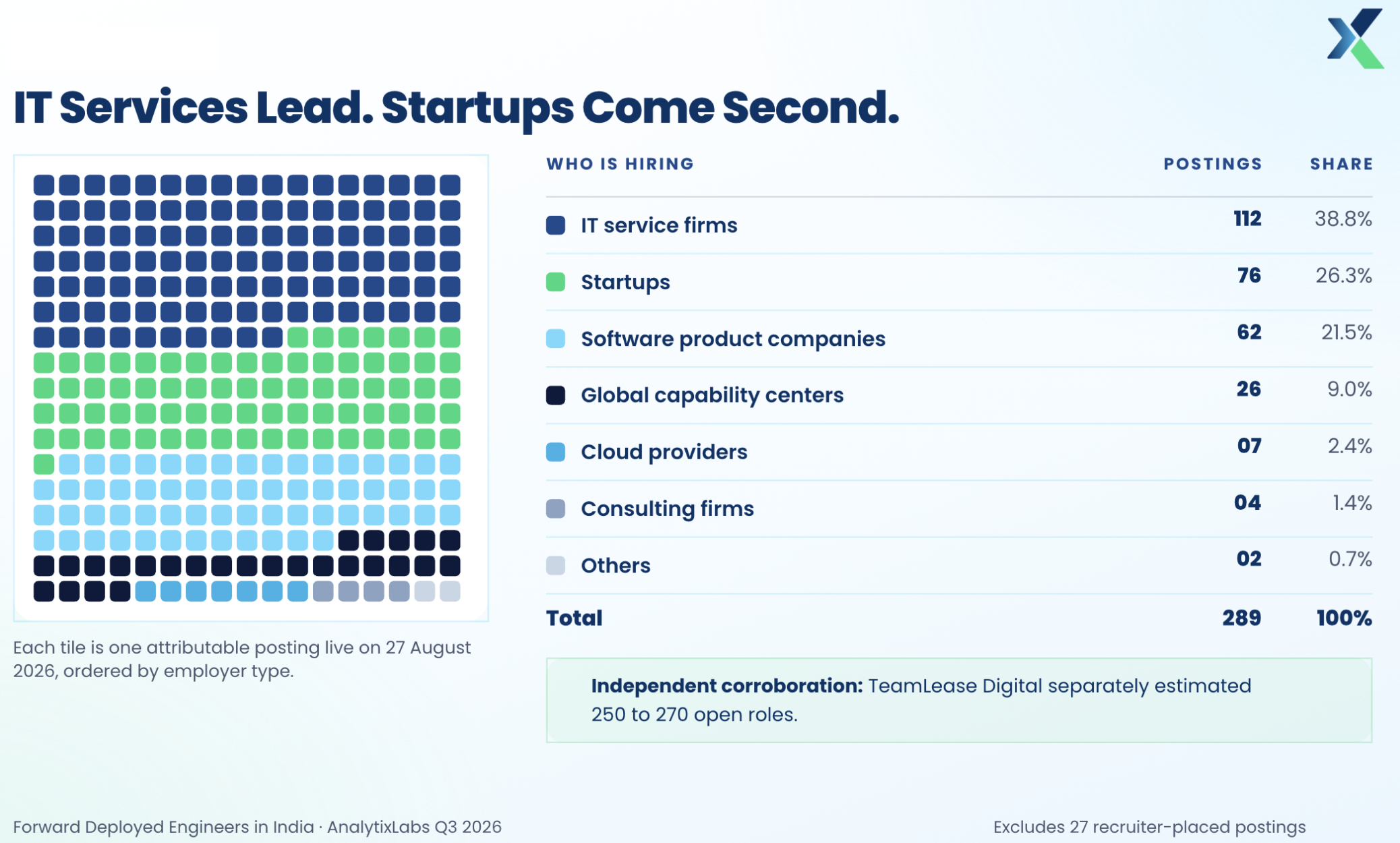
Coding is only part of the job. FDEs must ask useful questions, work inside systems they didn't design, and deal with changing requirements. They also need to explain what a solution can do, where it falls short, and what should happen next. For a full picture of skills, pay, and career paths, see our guide on becoming a Forward Deployed Engineer.
Your portfolio should reflect that mix. A working project is useful, but the reasoning behind it matters just as much.
What a Forward Deployed Engineer Portfolio Should Demonstrate
Your portfolio should show how you turn business needs into working software. Each project needs a clear problem and a measurable outcome that a non-developer can understand.
Focus on these skills:
Problem-solving: Turning an unclear customer request into a well-defined technical problem.
Integration: Connecting APIs, databases, and the tools a business already uses.
Automation: Replacing repetitive manual work with a reliable process.
Data handling: Validating and processing incoming data, then presenting it clearly.
AI implementation: Adding AI features only where they clearly improve the solution.
Reliability: Handling unexpected input, failed requests, and other failures without breaking.
The reliability work is where you can stand out. In the AnalytixLabs census, about two in three FDE postings asked for integration work. Fewer than half mentioned testing or monitoring, and only about three in ten mentioned limits on what a system may do. Projects that show evaluation, monitoring, and permission controls give you evidence few other candidates have.
7 Forward Deployed Engineer Projects to Start Building
Each project below starts from a realistic business scenario. Build a small prototype, not a complete product. Time estimates assume basic programming experience and tools you already have installed; your actual time will vary with scope.
1. Customer Support API Integration
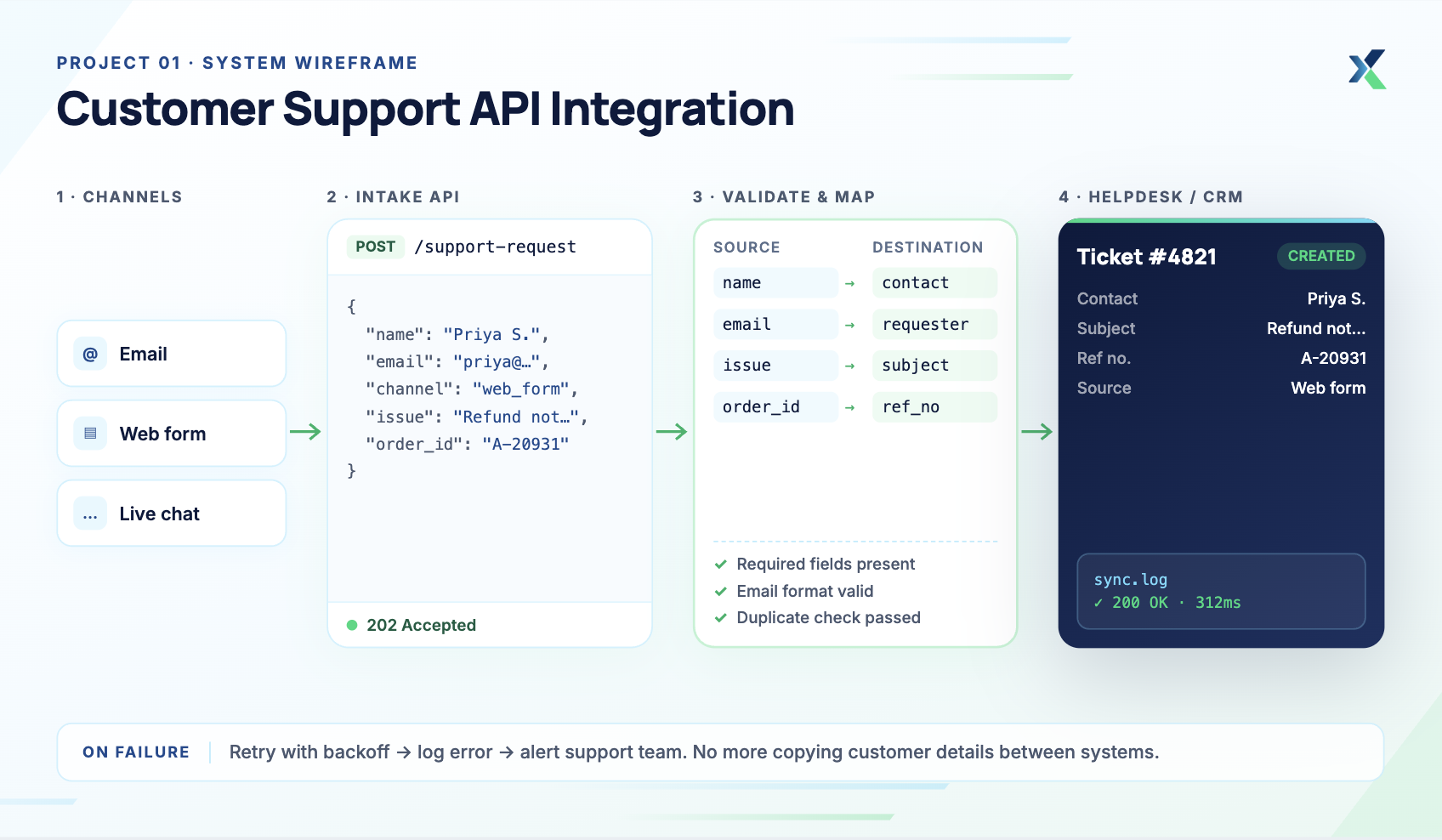
Customer scenario: A small company receives support requests from several channels. Its team wastes time copying customer details between systems.
Difficulty: Beginner to intermediate. Estimated time: 6–10 hours.
What to build: Create a small application that connects two services. For example, receive a support request through an API, then send selected details to a helpdesk or customer database.
Suggested technologies: Python or Node.js, REST APIs, and SQLite. Use a helpdesk API or a mock service for testing.
What to handle: Validate incoming requests before processing them. Handle missing fields, failed requests, and duplicate submissions. Store API credentials securely and keep sensitive details out of your logs.
Portfolio deliverables:
A working integration with sample requests
Source code and automated tests
A diagram showing how the systems connect
A short setup guide and customer handover note
Demonstrates: API integration, error handling, testing, and clear documentation.
2. Document Question-Answering Assistant
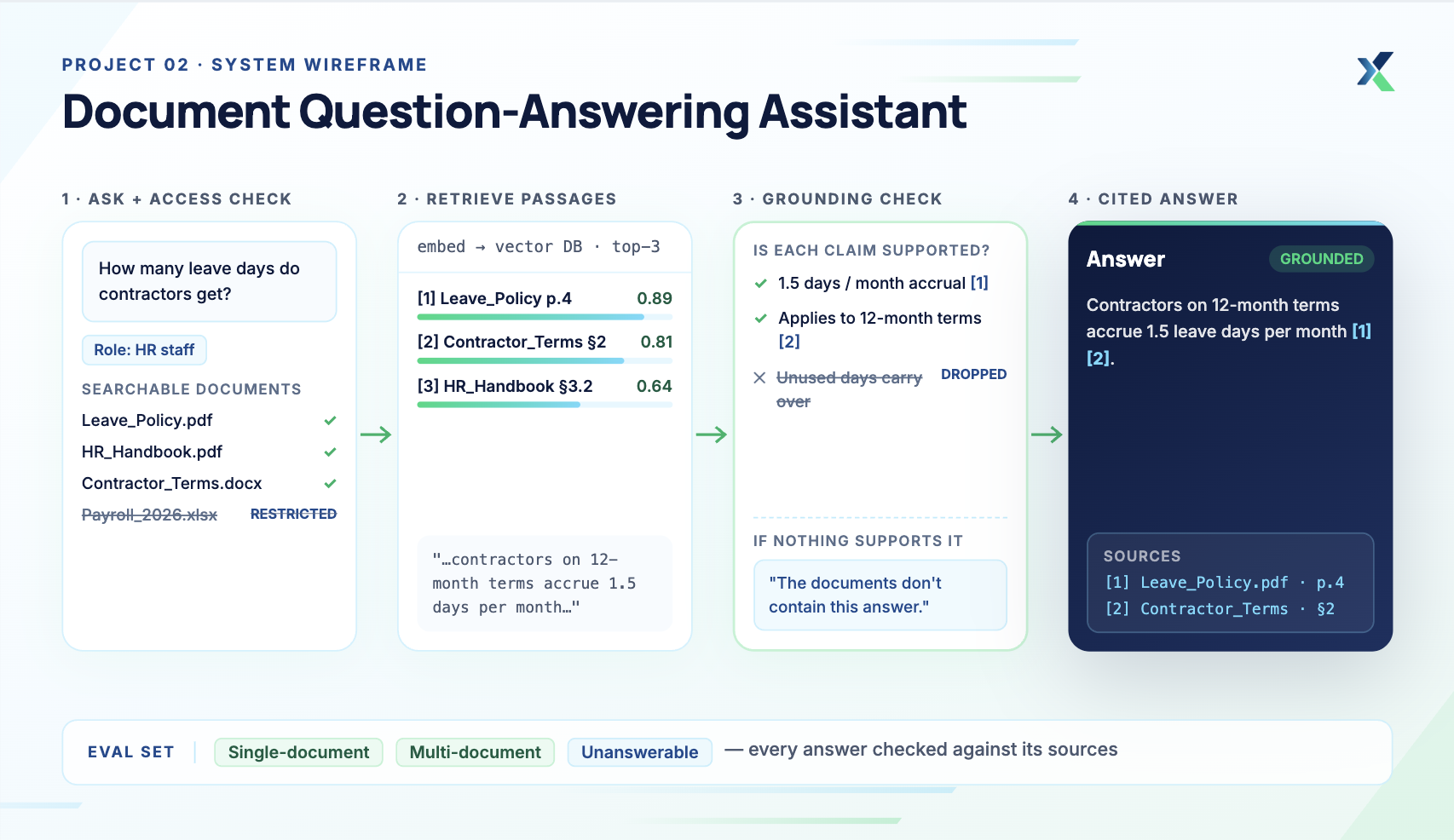
Customer scenario: A company stores policies and guides across many documents. Employees spend too much time finding specific information.
Difficulty: Intermediate. Estimated time: 8–12 hours.
What to build: Build an assistant that answers questions from selected documents. It should retrieve relevant passages before generating an answer and include source references so users can check the information.
Suggested technologies: Python, a document-processing library, an embedding model, and a vector database. You can use a hosted AI API or a local model.
What to handle: Check whether the retrieved passages actually support each answer. The assistant should say when the documents don't contain an answer, and it should never expose restricted documents to unauthorized users. Test it with three question types:
Questions answered by a single document
Questions that need information from several documents
Questions the documents can't answer
Portfolio deliverables:
A working demo using public or synthetic documents
Sample questions and evaluation results
A short explanation of how retrieval and answer generation work
A list of limitations and known failure cases
Demonstrates: Document processing, AI integration, retrieval, evaluation, and user-focused design.
3. Business Workflow Automation
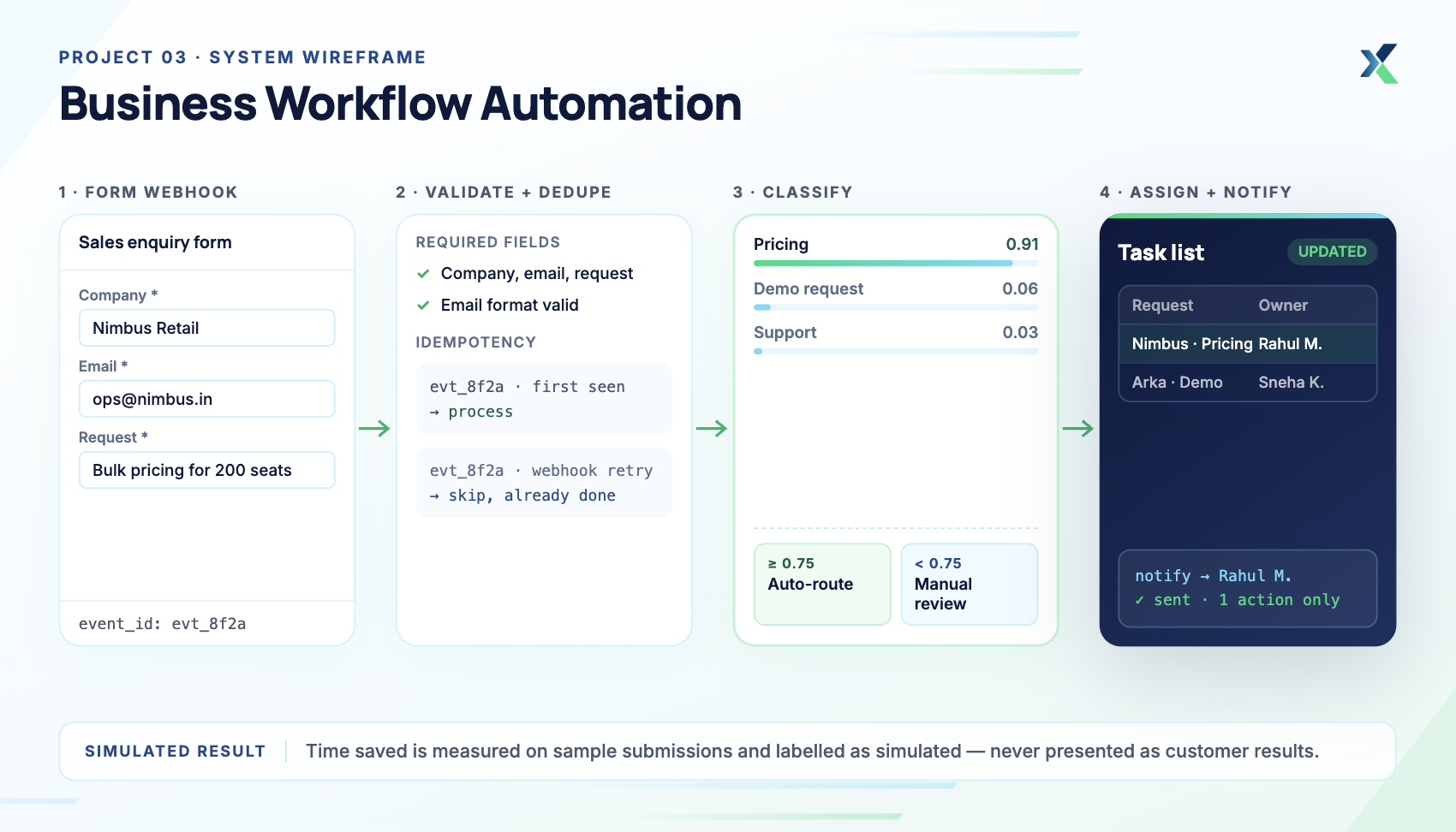
Customer scenario: A sales team receives many requests through an online form. Staff sort them by hand and assign them to team members.
Difficulty: Beginner to intermediate. Estimated time: 5–8 hours.
What to build: Create a workflow that accepts form submissions. The application classifies each request, assigns a category, and then sends a notification or updates a task list.
Suggested technologies: Python or JavaScript, webhooks, and a spreadsheet API. An automation platform also works.
What to handle: Check required fields before processing a request. Prevent duplicate actions when a webhook retries. Add a manual review step for classifications the system is unsure about.
Portfolio deliverables:
A working workflow with sample submissions
A diagram of the process
Tests for valid and invalid submissions
A short report on time saved in a simulated experiment
Label simulated results clearly, and never present estimates as measured customer results.
Demonstrates: Workflow design, automation, integration, and business process improvement.
4. AI Agent for a Simple Business Task
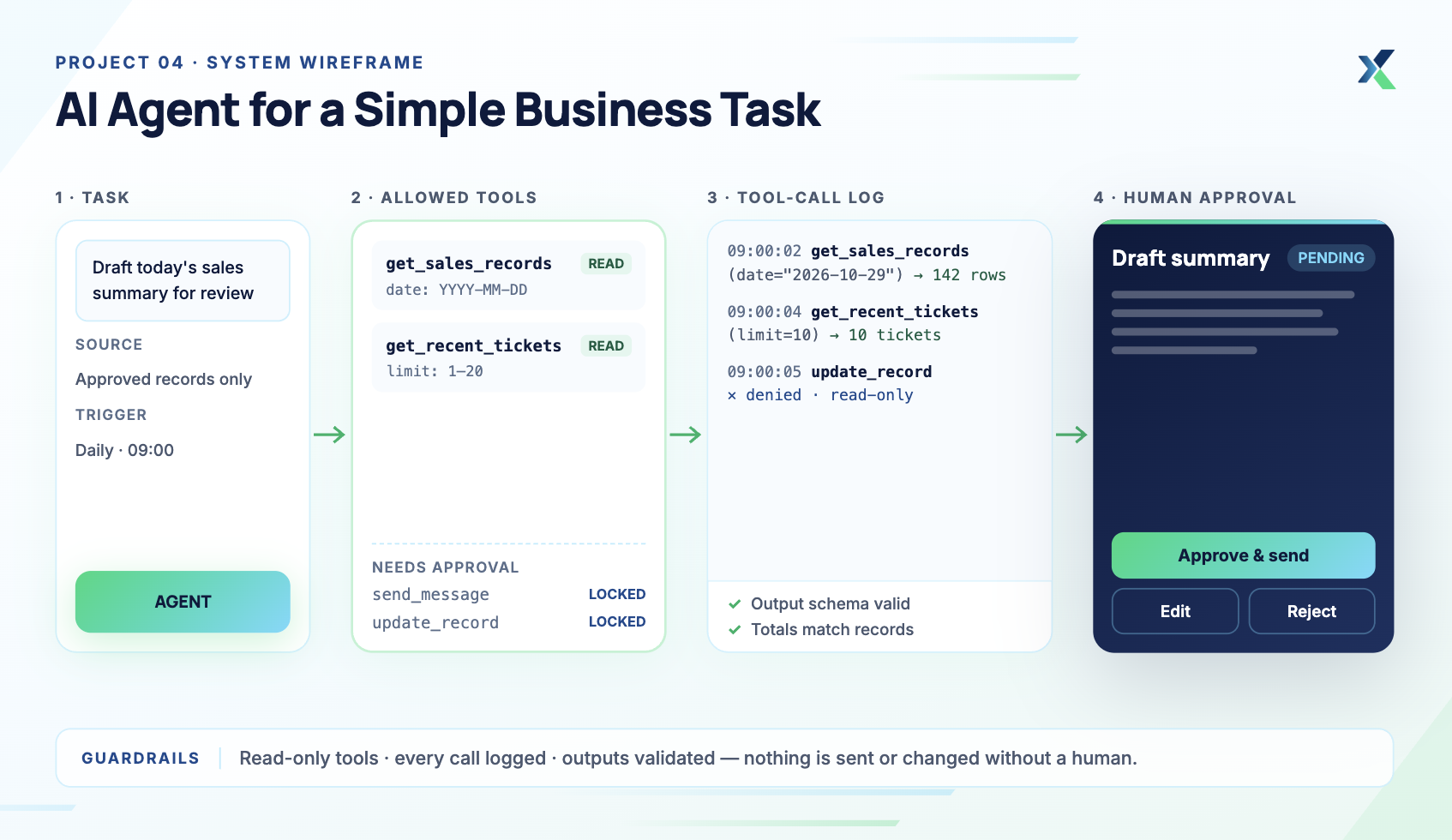
Customer scenario: A team spends hours preparing routine reports from approved records. Staff need a tool to draft summaries for review.
Difficulty: Intermediate. Estimated time: 8–12 hours.
What to build: Create an AI agent that drafts summaries, such as a daily sales summary, from approved records. Give it a small set of tools, such as fetching records or looking up recent support tickets, and let the model decide which to call. Our guide on building AI agents walks through the process from model to deployment.
Suggested technologies: Python, a model API with function or tool calling, mock business APIs or a test database, and a simple web interface.
What to handle: Define exactly which tools the agent can call and with which arguments, and keep them read-only. Require human approval before it sends a message or changes a record. Validate model outputs and log every tool call for review. Before you call it done, work through this checklist of things to check before deploying an AI agent.
Portfolio deliverables:
A working demo with sample records
A list of allowed tools and their restrictions
Tool-call logs and permission tests
Test cases for incorrect or incomplete outputs
A short safety note and a recorded walkthrough
Demonstrates: AI integration, tool design, permission controls, and human review.
5. Application Monitoring and Incident Reports
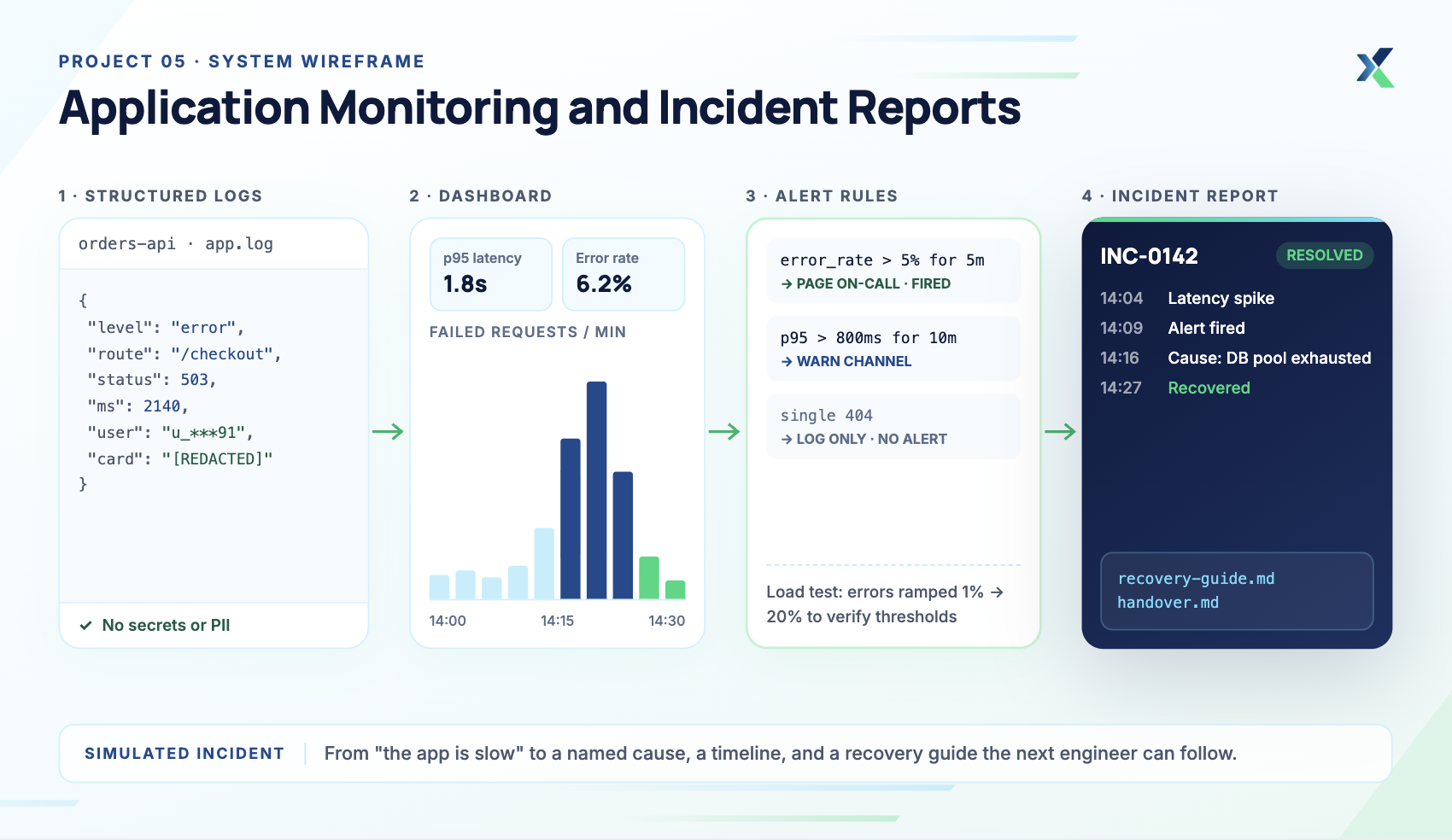
Customer scenario: A business application sometimes slows down or stops responding. The team has no clear information about the cause.
Difficulty: Intermediate. Estimated time: 6–10 hours.
What to build: Create a small application with logging and basic monitoring. Track errors, response times, and failed requests, and display the important events on a simple dashboard.
Suggested technologies: Python or Node.js, structured logging, and a monitoring tool. Use a local application or a test deployment.
What to handle: Keep passwords and private customer data out of the logs. Set alerts that matter instead of alerting on every event. Test how the system behaves as errors increase.
Portfolio deliverables:
A dashboard showing sample application metrics
Example logs and alert rules
A simulated incident report with findings
A short recovery and handover guide
Demonstrates: Monitoring, debugging, incident analysis, and reliability engineering.
6. AI Output Evaluation Tool
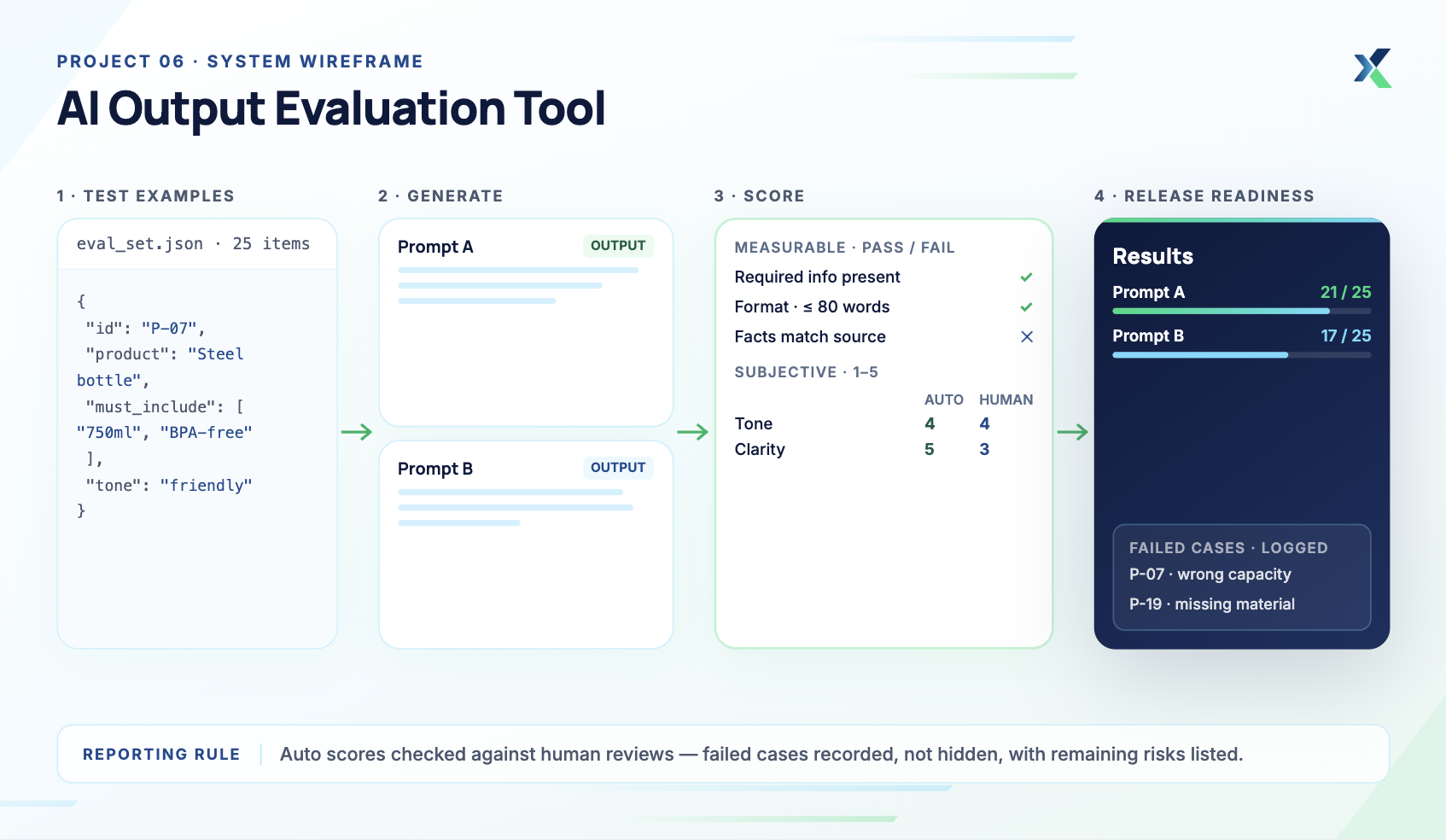
Customer scenario: A company uses AI to draft product descriptions. Its team needs a consistent way to check output quality.
Difficulty: Intermediate. Estimated time: 6–10 hours.
What to build: Build a tool that evaluates AI outputs against simple criteria, such as accuracy, required information, format, and tone. Compare outputs across a small set of test examples.
Suggested technologies: Python, an AI API, JSON, and a testing framework. Use a small, documented dataset.
What to handle: Separate measurable checks from subjective ratings. Compare automated scores with human reviews. Record failed cases instead of hiding poor results.
Portfolio deliverables:
A reusable set of evaluation examples
Test results and a summary of common failures
A short report comparing different prompts or model outputs
A release-readiness summary with remaining risks
Demonstrates: Testing, evaluation, data analysis, and release planning.
7. Deployable Application With Clear Handover
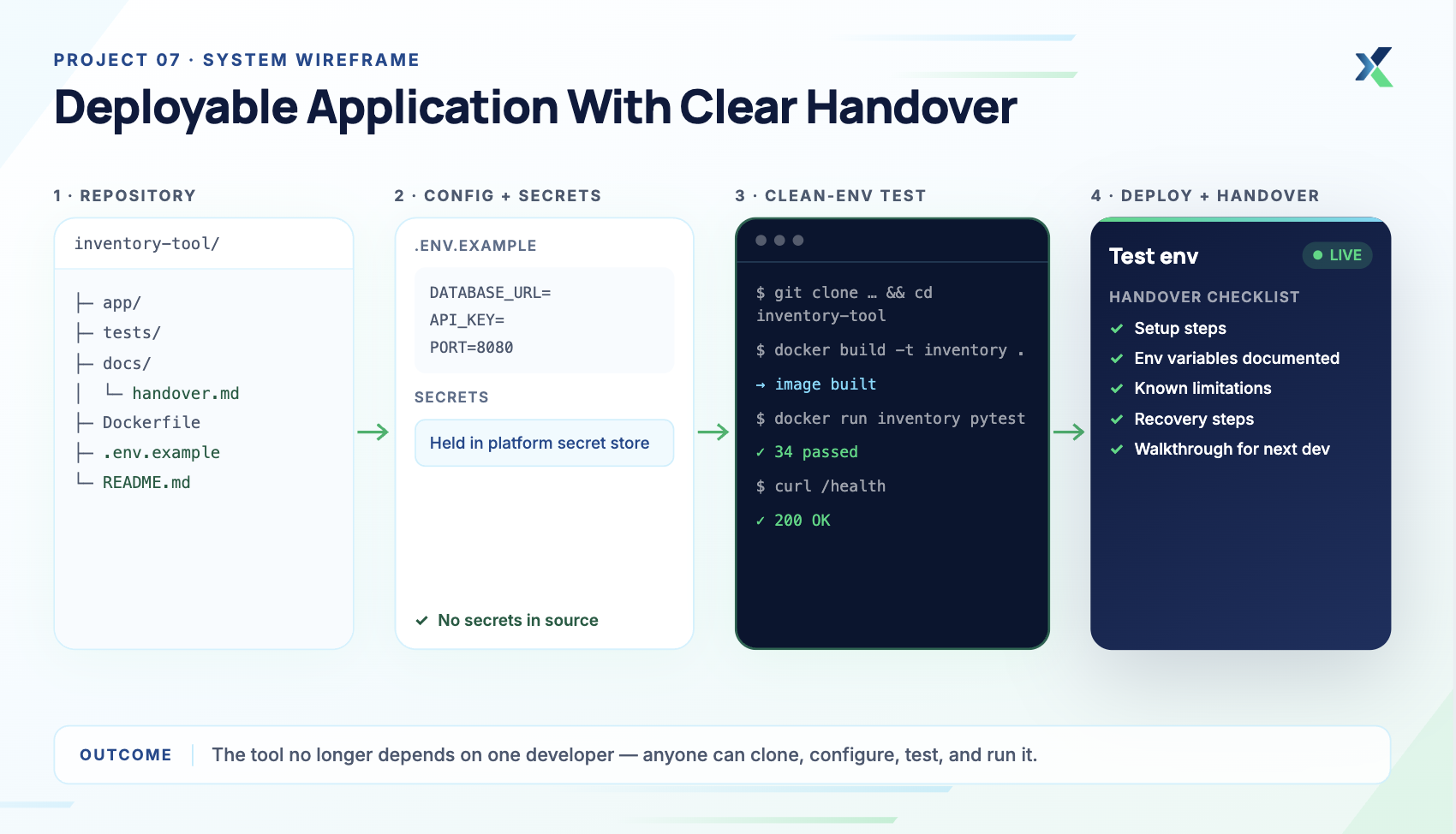
Customer scenario: A business has a useful internal tool, but only its original developer knows how to run it.
Difficulty: Beginner to intermediate. Estimated time: 6–12 hours.
What to build: Take a small application and prepare it for another developer. Package its setup, configuration, and tests, and deploy it to a test environment if time allows.
Suggested technologies: Python or Node.js, Git, Docker, and a deployment platform. Choose tools that fit your application.
What to handle: Store secrets outside the source code. Document environment variables and setup steps. Test the installation on a clean environment, and explain known limitations and recovery steps.
Portfolio deliverables:
Source code with a clear repository structure
A README with installation and usage instructions
Automated tests and deployment notes
A short walkthrough for the next developer
Demonstrates: Deployment, reproducibility, testing, and technical handover.
Some AI tools let you use them a limited number of times without creating an account. They can help with early research and brainstorming, though access rules and available features change over time.
Explore the best AI tools with no sign-up for quick experimentation. Check each tool's current access requirements before relying on it, since some features may still require registration or payment.
Use these tools to:
Brainstorm project ideas and possible features
Break a large task into smaller steps
Compare approaches to a technical problem
Draft sample questions for testing
Understand unfamiliar terms before reading the documentation
Verify technical suggestions against official documentation, and don't assume an AI-generated answer is correct. Never submit private customer information or credentials.
How to Choose the Right FDE Portfolio Project
Not every FDE project suits every stage, so choose one that matches your current skills and career goals. You should be able to explain every important part of it, because interviewers will ask. Our roundup of agentic AI interview questions hiring managers actually ask shows the depth they expect.
Your current focus | Suitable project | Useful evidence |
|---|---|---|
Learning APIs | Customer support integration | Working requests, error-handling examples, and integration tests |
Exploring AI | Document question-answering assistant | Source references and evaluation results |
Reducing manual work | Workflow automation | Workflow diagram and test cases |
Building AI features | AI business agent | Tool-call logs, permission tests and review controls |
Learning debugging | Monitoring project | Dashboard, logs and incident report |
Testing AI systems | AI evaluation tool | Test dataset, comparison report and release summary |
Preparing applications | Deployable application | README, automated tests and deployment instructions |
Start with one project you can finish and explain. Add another only when it demonstrates a different skill.
How to Build an FDE Portfolio Project (in One Weekend!)
Yes, you read it right. A weekend is enough for a small prototype, though usually not for a production deployment. Keep the scope tight and get the main use case working first. Here are our quick, tried-and-tested steps.
Day One: Build the Core Solution
Define the business problem. Write down who needs the solution and why. Identify the one main task the application must complete.
Sketch the system. List the APIs, data, and tools you need, and draw a simple diagram before writing any code.
Build the main workflow. Get the smallest useful version working first. Skip features that don't support the main task.
Test the basic cases. Check valid inputs, missing data, and failed requests. Record any limitations you discover.
Day Two: Test, Document and Present
Improve reliability. Fix the important errors and add automated tests. Make sure the application handles unexpected input safely.
Prepare the repository. Organize the code, tests, examples, and documentation.
Write the README. Explain the problem, solution, setup, usage, tests, and limitations.
Create a short demo. Show the main workflow and explain your design choices. A brief screen recording helps reviewers understand the result quickly.
Write a handover note. Explain how another developer can run and maintain the project.
A simple repository structure could look like this:
project-name/
├── src/          # Application code
├── tests/        # Automated tests
├── docs/         # Architecture and workflow notes
├── examples/     # Sample or synthetic data
└── README.md     # Setup, usage and limitations
Adjust the structure to fit the project. Small projects don't need extra folders.
How to Use AI Tools When Building FDE Projects
AI tools can speed up your work, but you remain responsible for everything they produce. They help you understand unfamiliar code, draft test cases, and outline documentation. Fact-check their output before you rely on it.
Use AI tools to:
Explain API documentation or unfamiliar code
Suggest test cases for likely failures
Review your code for obvious bugs
Draft a first version of your README and technical notes
Compare different approaches to a problem
You can build a strong FDE project without AI. An API integration, a workflow automation, a monitoring system, or a clean deployment all stand on their own. Add AI only when you can name the business problem it solves better than a simpler approach.
Keep three cautions in mind:
Never share customer data, passwords, or API keys with a tool that isn't approved for that data.
Test any AI-generated code before you include it in your project.
Know the limits of the tools you use, and document them where they affect your results.
What to Include in Your FDE Portfolio
Each project should help a reviewer understand both the problem and your solution. Include evidence of your technical work and your customer-focused thinking.
For every project, aim to provide:
Problem statement: The customer need, in plain language.
Working demo: The main use case, running.
Source code: An organized repository.
Architecture diagram: How the parts connect.
Tests: Normal cases and likely failures.
README: Clear setup and usage instructions.
Results: Actual measurements, where you have them.
Limitations: What remains unfinished.
Handover material: What another person needs to use the solution.
Use public or synthetic data in your examples, and remove secrets and private information from screenshots and code. If you report time savings, explain how you measured them. Never claim customer results you haven't verified.
Common FDE Portfolio Mistakes to Avoid
Building too much: A large unfinished project proves little. Finish one complete workflow before adding features.
Ignoring the customer problem: Code alone doesn't explain its business value. Describe the problem and show how your solution helps.
Skipping error handling: A demo that works once may still fail often. Test missing inputs, timeouts, and invalid responses.
Making unsupported claims: Don't invent performance gains or customer feedback. Label estimates and simulated results clearly.
Leaving out documentation: Reviewers shouldn't have to guess how your project works. Include setup instructions and a short architecture explanation.
Using AI without a clear purpose: An AI model doesn't automatically improve a project. Choose the simplest approach that solves the problem.
Final Thoughts
Your Forward Deployed Engineer portfolio should show how you turn business problems into reliable technical solutions. Start with a small API integration or automation workflow, then add projects that show testing, deployment, and customer communication.
Focus on one or two finished, tested solutions first. Explain your decisions and be honest about the limitations. One clear, complete project shows more than several unfinished demos.
Frequently Asked Questions
1. Which FDE portfolio project should I build first?
Choose a project that matches your current skills. Beginners can start with an API integration or workflow automation. Developers with AI experience can build a document assistant or an evaluation tool. Either way, pick a problem you can explain clearly.
2. Can beginners build an FDE portfolio without professional experience?
Yes. Beginners can use mock business scenarios, public datasets, and synthetic records to demonstrate their skills. Label simulated results clearly and explain what each project proves. Keep expectations realistic, though: the median Indian FDE posting in the AnalytixLabs census asked for five years of experience, so a portfolio works best alongside an engineering background.
3. How many projects should an FDE portfolio include?
Start with one or two complete projects. Add more only when they show skills your existing projects don't. Clear documentation and reliable results matter more than quantity.
4. Do Forward Deployed Engineers need AI skills?
Not for every project. Much FDE work, including API integration, backend development, automation, debugging, and deployment, doesn't involve AI. Add AI only where it solves a real problem in the project.
5. Do FDE portfolio projects need a live deployment?
No. A working local demo is still useful. Include setup instructions, tests, screenshots, and a clear explanation, and deploy the project when it adds value and fits your skills.
6. What programming languages should I use?
Choose a language you can use confidently. Python and JavaScript both support APIs, automation, and web applications. The quality of your solution matters more than the language.
7. How can I show business value without real customers?
Use a realistic scenario and define a clear success measure. Test your solution with sample data and report the actual results. Label simulated scenarios and estimated savings honestly.