This is a guest post by Unified Infotech team.
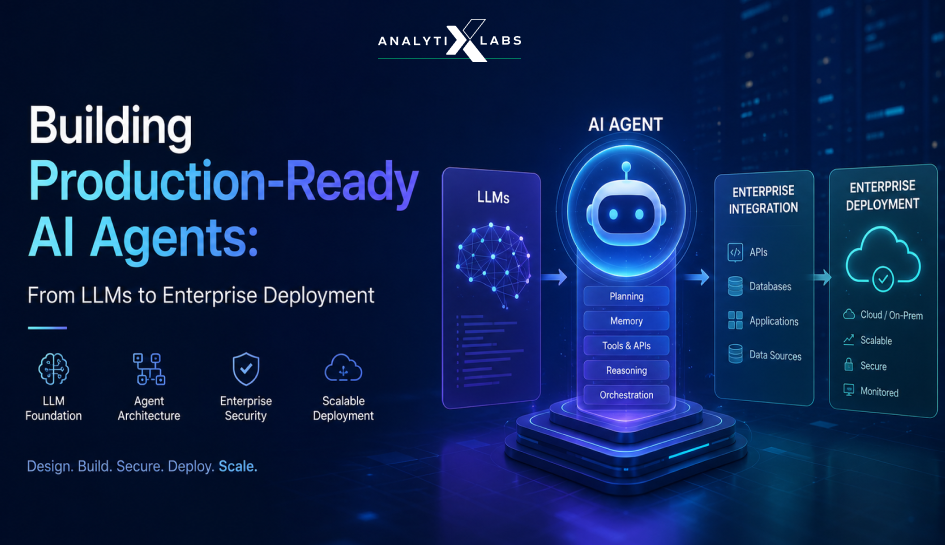
Almost everyday we are looking at new AI agents taking up autonomous roles across industries. Whether it is EncoreAI raising a $30M funding to train and deploy AI agents that can work alongside customer support, or the launch of Oracle's Supervisor Agent that can reason and decide on how to handle a challenge - AI agents are everywhere. And why not. These AI agents are now your workspace buddy that can reason and use logic to deliver insights and decisions that can fastrack a business decision.
AI agents are reducing cost and increasing speed of work manifold times. This is why 84% of organizations are keen on increasing their AI investments while 74% enterprises expect to grow revenue through AI initiatives. Looking at how the market is moving, it will be a shame if you don't know how to build AI agents, especially when companies are looking for engineers who can help them build their own AI agents.
Why Enterprises need AI Agents instead of Chatbots?
Most already have a chatbot. Very few have an agent that can finish a task on its own. The bottleneck was never a shortage of answers. It was the absence of something that could take action across all those systems on its own. That gap between a demo and a deployment is exactly where AI agent development stops being a prompt-engineering exercise and becomes a real engineering problem.
Enterprise budgets are moving fast because of it. Gartner projects that 33% of enterprise software applications will include agentic AI by 2028, up from less than 1% in 2024, and that at least 15% of day-to-day work decisions will be made autonomously by agents in the same window. Yet Gartner also predicts that more than 40% of agentic AI projects will be canceled by the end of 2027, undone by runaway cost, unclear value, or weak controls. The difference between these two outcomes is almost entirely in how the agent was built.
This guide covers the full path: what an AI agent is, why enterprises are adopting them, the types worth building, the step-by-step build with code, and how to ship one to production without it collapsing under real traffic.
Let's start.
What is an AI Agent?
AI agents are software systems that take a goal, plan a sequence of steps, act through tools and APIs, observe the result, and adjust course, all with minimal human intervention. The distinction that matters for this guide is simple: a chatbot answers a question; an AI agent completes a task.
If you want the full conceptual foundation first, including the reasoning loop, ReAct, and single versus multi-agent architectures, the technical breakdown of how agentic AI works covers it.
Everything below assumes that foundation and focuses on how to build AI agents that hold up in production rather than in a demo.
Before we proceed, let's understand why AI agents are overpowering chatbots.
Chatbots vs. AI agents
Imagine this scenario.
Every month, the accounts payable team at a mid-size manufacturer runs the same marathon. Invoices arrive by email, by vendor portal, and occasionally still by fax. Someone opens each one, matches it against a purchase order in the ERP, checks the goods-receipt note in a second system, flags the mismatches in a spreadsheet, and routes the rest for approval. A three-day close stretches into ten, and no one can point to exactly where the time went.
A chatbot cannot fix this. Ask it what a purchase order is and it will explain perfectly. However, it cannot open the ERP, read the receipt note, and route the exception.
A chatbot deflects a support ticket. An agent resolves it, updates the CRM, and triggers the refund without a human touching it.
Chatbot | AI agent | |
|---|---|---|
Core action | Answers questions | Completes tasks |
Tools | None, or simple lookup | Calls APIs, databases, and functions |
Flow | One response, then done | Plan, act, observe, adjust |
Human role | Reads the reply and acts on it | Sets the goal, handles exceptions |
AI agents can compress the multi-step, cross-system processes that quietly drain time. Procurement approvals, compliance checks, invoice reconciliation, and ticket resolution all involve moving between tools, and that hand-off time is where the cost hides. An agent collapses those steps into a single autonomous run.
That also changes the economics. A chatbot deflects work; an agent completes it, which is why spend is shifting from conversational AI toward AI agents that drive business decisions. The value is not headcount replaced, it is wait time removed between steps that used to sit in someone's queue.
What are the Types of AI Agents in Enterprise?
Not all agents carry the same autonomy, and autonomy is what changes how you build, staff, and govern them. It is also where vendors blur the line: Gartner has warned about widespread "agent washing," rebranding chatbots and RPA scripts as agents without the underlying capability. These four types differ in kind, from least to most autonomous.
Type | Autonomy | What it does | Enterprise example |
|---|---|---|---|
Assistant / copilot | Human in the loop | Drafts, summarizes, suggests, while a person approves | A sales copilot that drafts follow-up emails |
Single-task workflow | Bounded, automated | Owns one well-scoped process end to end | An invoice-matching agent that flags exceptions |
Multi-agent system | Coordinated | An orchestrator routes work to specialist agents | Procurement: one checks stock, one confirms dates, one updates the ledger |
Autonomous process | Human on the loop | Runs a full process, escalates only exceptions | A support agent that reads a ticket, refunds, and updates the CRM |
Copilot agents are the safest start: a wrong output is a rejected suggestion, not a bad action.
Single-task agents fit narrow, rules-heavy work like the invoice case above.
Multi-agent systems fit workflows spanning several domains. If you are heading this way, design for multi-agent coordination and delegation up front.
Autonomous process agents deliver the most leverage and demand the most governance, since a mistake is an action taken, not a suggestion made.
The rule: match the type to the risk. Start with copilots where judgment matters, move to autonomous agents where the workflow is well-defined and the downside is contained.
What Makes an AI Agent Production-ready?
A prototype is judged by whether it produces the right answer once. A production-ready AI agent is judged by what it does on its worst day: under concurrent load, against a malicious input, when the model changes silently, and when a single step hangs.
Four properties have to hold at the same time:
Bounded behavior: every step is validated, and every failure has a defined fallback.
Bounded cost: token spend is capped per workflow, and repeat work is cached.
Bounded access: every action runs with the permissions of the user who triggered it.
Observable drift: accuracy and hallucination rate are tracked continuously, not discovered through a complaint.
Below are the steps on how you enforce each one.
How to Build AI Agents: Step by Step Guide
Building an agent is less about the model and more about the system you wrap around it. Here is the build order:
Define the task and its boundaries.
Choose the base model.
Route each task to the right model.
Give the agent tools.
Design the reasoning loop.
Add memory.
Secure the agent.
Deploy, monitor, and evaluate.
Step 1: Define the task and its boundaries
Start with the job, not the technology. Define the single task the agent will own, the systems it must touch, what a good outcome looks like, and where it must stop and hand off to a human. An agent with a fuzzy mandate is the most common reason a pilot never ships. Write the success criteria down before you write any code.
Step 2: Choose the base model
The model is the reasoning core, and it sets the ceiling on everything above it. A raw LLM only predicts the next tokens: it has no memory, cannot take an action, and does not check its own output. That is why the first technical decision is which model to build on, judged against what an agent actually leans on rather than against leaderboard scores.
Evaluate candidates on six things:
Instruction following and reasoning: can it hold a multi-step plan without drifting?
Native tool or function calling: can it call tools with well-formed arguments?
Structured output: can it reliably return schema-valid JSON, so downstream steps do not break?
Context window: how much state, retrieved context, and tool output fits in one step?
Latency and cost: both compound across every step of every run, so a slightly better but far slower model can make the whole agent unusable.
Hosting and data residency: an API-hosted frontier model is fastest to start; a self-hosted open-weight model gives control over data, tuning, and cost at scale. Security review often forces this call early.
Once a model clears those bars, you rarely use it raw. Adapt it to your domain in this order, cheapest and fastest first:
Prompting and context engineering: A clear system prompt, good examples, and a tightly scoped task solve more than teams expect, and they cost nothing but iteration time.
Retrieval-augmented generation: Feed in facts the model was never trained on, such as internal docs or live records, at run time. This is the memory layer in Step 6, and for most enterprise agents it does the heavy lifting.
Also read: What is RAG and How it Defines ML PipelineFine-tuning: Reserve it for a specialized tone, format, or vocabulary the base model keeps getting wrong. It adds a data pipeline and a retraining cadence you own forever, so treat it as the last lever, not the first.
Prove the model before you build on it. Run a small evaluation of tasks that look like your real workload and measure the two capabilities agents depend on most: schema-valid structured output and correct tool calls. If it fails here, no architecture above it will save you.
def qualify_model(model, eval_cases) -> dict:
    structured_ok, tool_ok = 0, 0
    for case in eval_cases:
        out = model.generate(case.prompt, tools=case.tools)
        if is_valid_schema(out, case.schema):            # can it return usable JSON?
            structured_ok += 1
        if calls_expected_tool(out, case.expected_tool):  # right tool + args?
            tool_ok += 1
    n = len(eval_cases)
    return {
        "structured_output_rate": structured_ok / n,
        "tool_call_accuracy":     tool_ok / n,
    }

# Gate the decision: a model that fails these is not a foundation, whatever its benchmark scores.
scores = qualify_model(candidate, eval_cases)
assert scores["structured_output_rate"] > 0.95
assert scores["tool_call_accuracy"] > 0.90
Step 3: Route each task to the right model
No serious agent runs one model for everything. Match the model to the job:
Small model: classification, tagging, extraction.
Mid-tier model: summarization, structured output.
Frontier model: multi-step reasoning, planning.
A router that picks the tier per task is the difference between a sane inference bill and one that kills the project.
from enum import Enum

class Complexity(Enum):
    SIMPLE   = "simple"    # classification, tagging, extraction
    MODERATE = "moderate"  # summarization, structured generation
    COMPLEX  = "complex"   # multi-step reasoning, planning

# Swap these for your provider's actual tiers.

MODEL_TIERS = {
    Complexity.SIMPLE:   "small-fast-model",
    Complexity.MODERATE: "mid-tier-model",
    Complexity.COMPLEX:  "frontier-model",
}

def route(task_type: str, payload: str) -> str:
    complexity = classify_complexity(task_type, payload)  # cheap heuristic or small classifier
    return MODEL_TIERS[complexity]
Routing also protects the budget. Add a token cap per workflow so a runaway loop cannot generate a five-figure bill overnight, and add semantic caching so similar past queries are reused instead of recomputed. A cache hit skips the model round trip entirely, which cuts both cost and latency.
def cached_call(prompt, cache, model, token_budget):
    hit = cache.semantic_lookup(prompt, threshold=0.92)
    if hit:
        return hit  # skips the LLM round trip: cheaper and faster
    if estimate_tokens(prompt) > token_budget:
        raise TokenBudgetExceeded(prompt_id=prompt.id)  # fail loud, before the spend
    response = model.generate(prompt)
    cache.store(prompt, response)
    return response
Step 4: Give the agent tools
This is the step that turns a language model into an agent. Tools are the functions, API calls, and database queries the agent is allowed to make. Each tool needs a clear description so the model knows when to reach for it, and strict input validation so it cannot be misused.
tools = [
    {
        "name": "issue_refund",
        "description": "Refund a paid order. Use only after verifying the order is eligible.",
        "input_schema": {
            "type": "object",
            "properties": {
                "order_id": {"type": "string"},
                "amount":   {"type": "number", "minimum": 0},
            },

            "required": ["order_id", "amount"],
        },
    },
]
Step 5: Design the reasoning loop
Production agents run a plan, act, observe cycle: break the goal into steps, take one step, check the result, then decide the next move. This keeps the agent from charging ahead on a bad assumption and gives you a natural point to log each decision. The loop only helps if every step is verified, so validate each output against a schema and retry with tighter constraints on failure. Add a step-level timeout so one hung step cannot stall the whole workflow.
from pydantic import BaseModel, ValidationError
class StepResult(BaseModel):
    action: str
    output: dict
    confidence: float
def run_step(agent, step, max_retries: int = 2) -> StepResult:
    for attempt in range(max_retries + 1):
        raw = agent.execute(step, timeout=30)  # step-level timeout, not a global one
        try:
            return StepResult.model_validate_json(raw)
        except ValidationError as error:
            step = tighten_constraints(step, error)  # feed the failure into the next attempt
    raise AgentStepError(f"step failed schema validation after {max_retries} retries: {step.id}")
Step 6: Add memory
An agent without memory starts from zero every time. Two layers do different jobs, and mixing them up is where memory architectures go wrong.
Short-term context | Long-term retrieval | |
|---|---|---|
Holds | Current task, recent tool calls | Internal docs, past interactions, policies |
Lives in | The active session | Vector database or knowledge graph |
Used | Every step | Only when outside context is needed |
Risk if mismanaged | Token cost climbs fast | Slow, stale, or irrelevant results |
Long-term retrieval is a filtered lookup, not a dump of everything into the prompt.
docs = vector_store.similarity_search(
    query,
    k=5,
    filter={"org_id": org_id},  # never let one tenant retrieve another's context
)

context = "\n\n".join(d.page_content for d in docs)
Short-term state cannot live inside one process once thousands of users hit the same agent. Move it to an external layer like Redis so the state survives restarts and scaling, and so atomic writes prevent race conditions.
import json
import redis
r = redis.Redis(host="agent-state", decode_responses=True)
def load_session(session_id: str) -> dict:
    raw = r.get(f"session:{session_id}")
    return json.loads(raw) if raw else {"history": [], "scratchpad": {}}
def save_session(session_id: str, state: dict) -> None:
    r.set(f"session:{session_id}", json.dumps(state))  # atomic write, no race
Step 7: Secure the agent
Every API or database an agent can touch is a door someone can walk through. Gartner and OWASP both rank prompt injection as the top agent risk: an attacker does not need system access if they can hide instructions inside a document the agent reads. Enforce security at the tool-call layer, not just at login.
RBAC: tie every action to the triggering user's permissions, not the agent's own access.
PII masking: strip sensitive fields before they reach the model or tool.
Audit logging: record every action so it is traceable.
Input sanitization: clean any document the agent ingests.
def secured_tool_call(tool, args: dict, user) -> dict:
    if not user.can(tool.permission):
        raise PermissionError(f"{user.id} lacks {tool.permission}")  # RBAC, tied to the human
    args = mask_pii(args)              # strip PII before it reaches the tool or model
    result = tool.run(**args)
    audit_log.write(user=user.id, tool=tool.name, args=redact(args))
    return result
Step 8: Deploy, monitor, and evaluate
Shipping an agent looks nothing like running a script locally. Run it in a container so versions are reproducible and rollback is a config change. Then watch it, because agents degrade quietly: a model update or a data change can drop accuracy with no error thrown.
def nightly_eval(agent, golden_set):
    results = []
    for case in golden_set:
        out = agent.run(case.input)
        results.append({
            "task_completed": grade_completion(out, case.expected),
            "hallucination":  detect_hallucination(out, case.sources),
        })

    report = aggregate(results)
    if report.accuracy < ACCURACY_THRESHOLD or report.hallucination_rate > MAX_HALLUCINATION:
        alert_oncall(report)  # catch the drift, not the customer
    return report
Traditional CI/CD assumes deterministic output; agents are not. Replace exact-match assertions with acceptable-range checks, and gate every deployment on cost and safety, not just correctness.
def test_refund_agent():
    out = agent.run(SAMPLE_TICKET)
    assert out.resolution in ACCEPTABLE_RESOLUTIONS  # a range of valid outcomes, not one string
    assert out.tokens_used < 8000                    # cost guardrail in CI
    assert out.pii_leaked is False                   # security regression check
Why do AI Agent Projects Fail?
Most failures are not model failures. The model usually works; the system around it does not. The common causes map directly onto the steps above:
No clear task or success metric, so the pilot never has a target to hit.
Cost runs away because reasoning loops are unthrottled and uncached.
State is trapped in one process, so the agent breaks under concurrency.
The agent is over-permissioned, so security blocks it from production.
There is no continuous evaluation, so quality drifts silently until a customer notices.
Each is an engineering problem with a known fix, not a limit of the technology. That is why Gartner's cancellation forecast is a build-quality warning, not a verdict on agents themselves.
Where to Start?
Building AI agents for enterprise use is a discipline, not a demo. Define the task, choose and prove the base model, right-size it per task, give it validated tools, structure the reasoning loop, split memory correctly, lock down access, and evaluate continuously. Get that right and the agent stops being a science project and starts closing the gap between what your teams do and what they should not have to do by hand.
If your team is skilling up to build and ship agents like these, hands-on agentic AI training covers the full path from reasoning loops to multi-agent orchestration and deployment.
FAQs
What language is used to build AI agents?
Python, in almost every case. The major model providers ship Python SDKs, and the agent frameworks (LangChain, LangGraph, CrewAI, AutoGen) are Python-first, so the whole data-to-deployment pipeline lives in one language.
How long does it take to build an AI agent?
A working prototype for one narrow task can take days. A production-ready agent that handles real traffic, with routing, memory, security, and evaluation in place, is typically a matter of weeks to a few months, depending on how many systems it has to integrate with.
How do you make an AI agent production-ready?
Enforce four properties in code: bounded behavior (validate every step), bounded cost (token caps and caching), bounded access (user-scoped RBAC), and observable drift (continuous evaluation). A demo that returns the right answer once meets none of these.
How do you control the cost of running AI agents?
Route each task to the cheapest capable model, cap tokens per workflow, and cache semantically similar queries so repeated work skips the model. Together these usually bring inference cost well below an unmanaged deployment while also cutting latency.