Last quarter, I needed price data on around 2,000 laptops for a regression project. Kaggle had nothing close. I started writing a Scrapy spider, got blocked on page 14, switched to Selenium, and then watched the site quietly redesign two days later, breaking my scraper. It cost me a weekend.
However, AI web scraper tools flipped that. I described the data in plain English, and the tool figured out the rest. No selectors, no proxies, no breakage when the site updated its layout. Want to understand how that happened? This article will walk you through the full process, from a blank notebook to a clean CSV, with an AI web scraper doing the heavy lifting.
By the end, you'll have a working dataset pulled from a live e-commerce site, ready to feed into a price-prediction model. Let's start.
Why Do Data Scientists Need AI Web Scraper Tools?
Data acquisition is still where most data science projects bog down. Anaconda's State of Data Science survey found that data prep accounted for roughly 45% of an analyst's working day, with cleaning and organizing alone taking up another 26% (2020).
Similarly, a 2024 BrowserCat survey, cited by Mordor Intelligence, found that 65% of enterprises now feed AI and ML projects from web-scraped data while adaptive AI extraction has cut maintenance overhead by about 40% versus rule-based scripts.
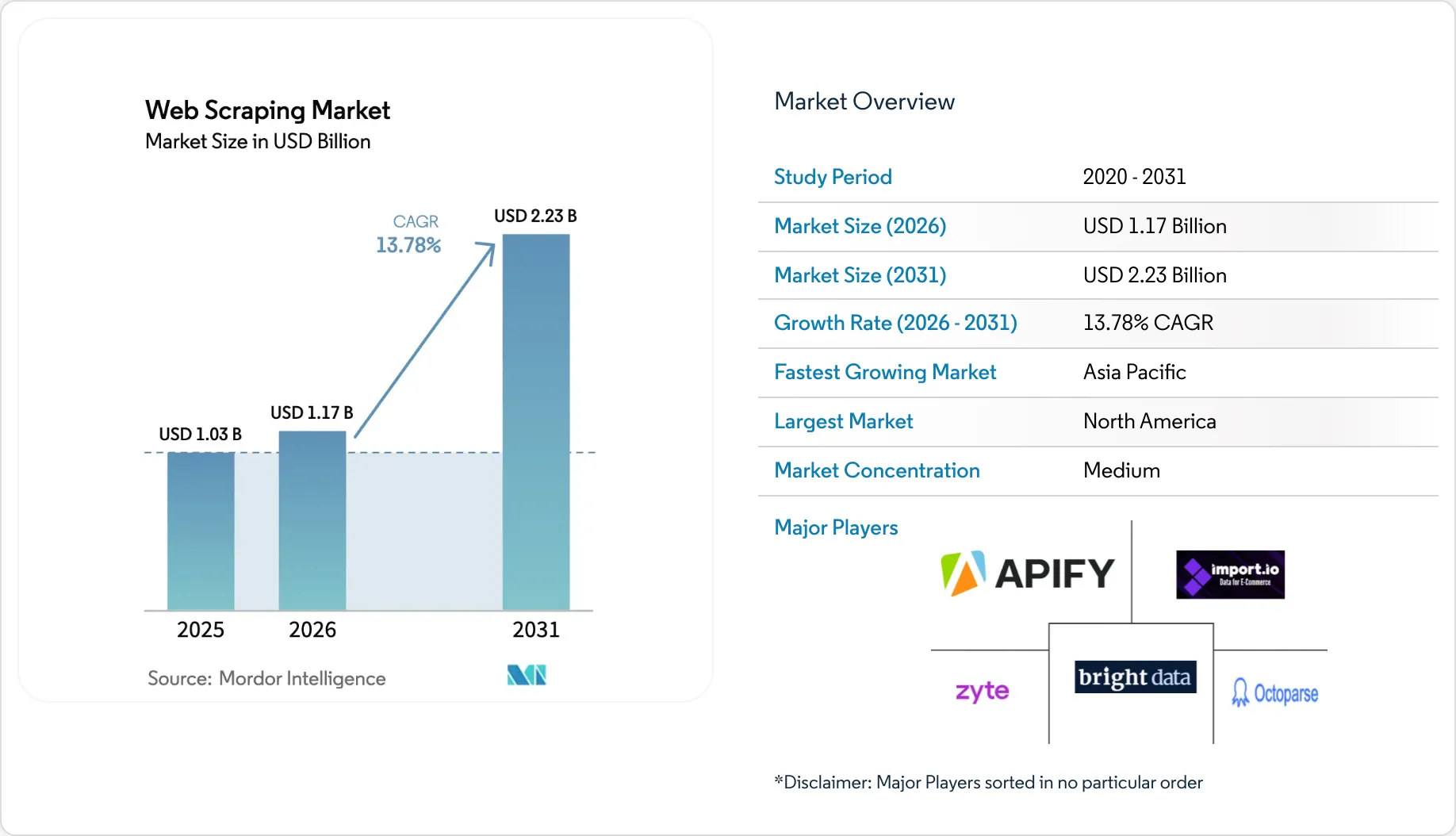
This means that if you've ever inherited a brittle scraper from a previous project owner, that 40% number isn't abstract. It is time to switch to AI-driven web scraper tools.
Three concrete reasons to switch to AI-driven data scraping tools:
Speed. Natural-language prompts replace hours of writing CSS selectors and XPath.
Resilience. Modern AI scrapers re-detect fields when a layout shifts. Your pipeline doesn't break overnight.
Accessibility. Analysts, PMs, and researchers can pull data themselves without bothering an engineer.
If you're newer to the broader workflow, the AnalytixLabs guide to data extraction methods and tools covers the foundations before you layer AI on top.
The use cases stretch well beyond price prediction: review-text scraping for sentiment classifiers, listing data for recommendation systems, property and job feeds for forecasting models, and public company filings for NLP fine-tuning. The pattern holds across all of them: the model is only as good as the dataset you can collect.
What Are AI Web Scraper Tools and How Do They Work?
An AI web scraper is a data-extraction tool that uses large language models and computer vision to read web pages the way a human would. You describe target fields in plain language, and the tool maps them to elements on the page. No XPath, no CSS selectors.
Three components do the work under the hood:
Natural-language understanding translates your prompt ("get me all product titles, prices, and ratings") into a structured extraction schema.
Visual and DOM analysis combines what the page looks like with how it's built, so the scraper still finds the right element when class names change.
Automated navigation handles pagination, infinite scroll, and detail-page clicks without you scripting them.
Here's how AI web scraper tools compare to the traditional scraping tool options most teams have used before:
Aspect | Code (Eg. Scrapy / BS4) | No-Code Visual (Eg. Octoparse) | AI Web Scraper (Eg. Chat4Data) |
|---|---|---|---|
Setup time | Hours to days | Minutes to hours | Seconds to a few minutes |
Skill required | Python, HTML, XPath | Point-and-click logic | Plain English |
Handles layout changes | Manual rewrite | Manual reconfiguration | Auto re-detection |
Best for | Large-scale custom pipelines | Repeatable workflows | Quick, ad-hoc datasets |
Export formats | Custom | CSV, Excel | CSV, Excel, JSON |
Many AI web scraper tools ship as desktop software or Chrome extensions, which is why you'll also see them called a "web scraper Chrome plugin" or "data scraper Chrome extension," depending on the vendor. The form factor is the same: a lightweight scraper tool you install once and trigger on any page you're viewing.
Honest caveat: AI web scraper tools are not the right pick for everything. If you're running a daily 50,000-URL crawl with strict SLAs and fault tolerance, you're better off with Scrapy plus a job scheduler, or pairing a dedicated web scraping API with your own orchestration layer. AI scrapers shine in the ad-hoc, sub-50K range, which covers most data science work but not heavy production ETL.
How Do You Set Up Your AI Web Scraper Tool?
You set up AI web scaper tools the same way you'd install any other software or Chrome extension. There's no Python environment to spin up and no dependencies to manage, which is the whole appeal when you need a quick, ad-hoc dataset.
The setup generally looks like this:
Find the scraper in the App Store or Chrome Web Store and add it to your device or browser.
Confirm the permissions it requests for the sites you plan to work on.
Click the software in your application list, or pin the extension icon to your toolbar.
Create an account. Most tools include free starting credits, usually enough for a couple of small test projects.
That's the whole setup. Now move on to your first dataset.
Step 1: How Do You Define Your Data Collection Goal?
Write down what you want to predict and which fields you'd need to predict it. A five-minute planning step here saves you from collecting half the data and going back twice.
For our running example, suppose you're building a price-prediction model for laptops sold on an Indian e-commerce listing site. The target variable is price. Your features will likely include:
Brand
Model name
Processor
RAM
Storage size
Screen size
Customer rating
Number of reviews
Stock status
That list becomes your prompt later. Keep it simple.
For a refresher on which features matter for which problem types, read our guide on supervised vs. unsupervised tasks: Top machine learning topics.
Step 2: How Do You Identify the Right Target Website?
Pick a website that publicly displays the data you need on a listing page or set of detail pages. The fewer logins, captchas, and paywalls between you and the data, the cleaner your pull will be.
A short pre-flight checklist:
Data is publicly accessible (no login wall).
Listings are visible without aggressive scrolling tricks.
The site's robots.txt does not disallow your target section.
Terms of Service permit non-commercial research use.
Pagination is predictable: numbered pages, a "next" button, or infinite scroll.
For our laptop example, an open e-commerce category page like /laptops?page=1 works well. Its public, paginated, and structured.
Step 3: How Do You Describe Your Fields in Plain English?
Write one sentence that names every column you want, in the language a colleague would understand. The AI handles the mapping to HTML elements.
Open the target listing page, click your scraper tool icon, and type a prompt like:
Pull every laptop on this page. For each one, get the brand, model name, price in INR, processor, RAM, storage, screen size, customer rating, and number of reviews.
My first prompt was actually shorter: "Get every laptop with all specs." The tool returned data, but the columns came back inconsistent. Some rows had RAM, others didn't, and the processor field mixed brand and model into one string. Rewriting the prompt to spell out each field explicitly fixed it on the second try. Plain phrasing works, but plain, specific phrasing works better.
Three things that improved my prompts after a couple of iterations:
Be specific about units. "Price in INR", "RAM in GB". Better type inference downstream.
Name the row identifier. "Every laptop", "each property listing". This anchors the repeating pattern.
Add a 'skip if missing' rule for optional fields. Keeps your dataset rectangular.
Review the preview, rename any columns the AI guessed wrong, and confirm.
Step 4: How Do You Handle Pagination and Detail Pages?
Enable the scraper's auto-crawl options before you run extraction. Most AI tools handle all three common pagination patterns without configuration.
Pattern | What it looks like | What to do |
|---|---|---|
Numbered pages | page=1, page=2… | Tick "follow numbered pagination" |
Next button | "Next →" link at bottom | Tick "follow next button" |
Infinite scroll | New items load on scroll | Tick "auto-scroll until end" |
For richer datasets, also turn on detail-page extraction. This tells the scraper to click into each listing for fields not shown on the summary page: full specs, seller info, and shipping details. For instance, with Chat4Data, you can also specify at the start how many pages of information you want to extract or whether detail-page data is needed.
A real snag from my first run: I had auto-scroll enabled but forgot to tick the detail-page checkbox. The output had brand and price, but no processor specs. A 30-second re-run with the second box ticked filled in the missing fields. Worth double-checking your settings before launching a 30-minute extraction.
Quick warning: detail-page extraction multiplies runtime and credit usage. Test on 50 listings before unleashing it on 5,000.
Step 5: How Do You Export and Clean the Dataset in Python?
Export the dataset as CSV or Excel, then load it into a pandas DataFrame to handle missing values, fix data types, and engineer features. The cleaning script is short because most of the heavy parsing already happened upstream.
Click Export and choose CSV. Then in your notebook:
import pandas as pd
import numpy as np


# Load the scraped CSV
df = pd.read_csv("laptops_raw.csv")


# Clean price: remove currency symbol and commas, convert to int
df["price"] = (
    df["price"]
    .str.replace("₹", "", regex=False)
    .str.replace(",", "", regex=False)
    .astype(int)
)


# Extract numeric values from RAM and storage
df["ram_gb"] = df["ram"].str.extract(r"(\d+)").astype(float)
df["storage_gb"] = df["storage"].str.extract(r"(\d+)").astype(float)


# Convert rating to float, handle missing
df["rating"] = pd.to_numeric(df["rating"], errors="coerce")


# Drop rows where the target variable is missing
df = df.dropna(subset=["price"])


# Quick sanity check
print(df.dtypes)
print(df.describe())
df.to_csv("laptops_clean.csv", index=False)
If you want a deeper look at building production pipelines around this kind of work, read our guide to Python for Data Engineering that covers scheduling, validation, and warehousing. That's the next layer when a one-off extract turns into a refresh-on-demand dataset.
Real-World Example: Scraping E-commerce Listings for a Price Model
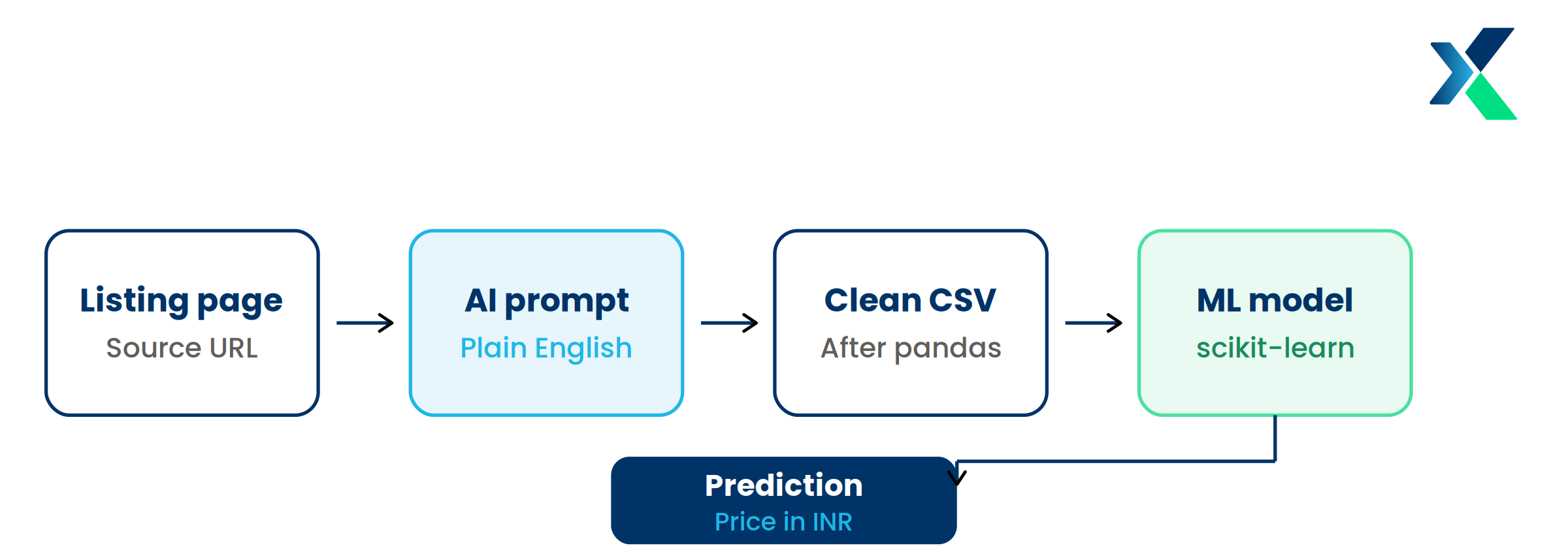
Tying the five steps together with a concrete project: predicting laptop prices from product specifications.
Goal: Train a regression model that estimates the fair price of a laptop from its specs alone.
Pipeline:
Define fields: brand, processor, RAM, storage, screen, rating, reviews, price (target).
Pick the source: a public e-commerce category page with 20 paginated pages.
Prompt the scraper: natural-language description of the nine fields.
Extract: auto-pagination through 20 pages, detail-page crawl for full specs. About 10 minutes total.
Clean and model: pandas cleanup, then a baseline RandomForestRegressor from scikit-learn.
Sample output (first three rows):
Brand | Processor | RAM (GB) | Storage (GB) | Screen | Rating | Reviews | Price (INR) |
|---|---|---|---|---|---|---|---|
HP | i5-1235U | 16 | 512 | 14" | 4.3 | 1,247 | 58,990 |
Lenovo | Ryzen 5 5500U | 8 | 512 | 15.6" | 4.2 | 892 | 47,490 |
ASUS | i3-1215U | 8 | 256 | 15.6" | 4.1 | 432 | 39,990 |
Honestly, the output was cleaner on the first run than I expected. A baseline model trained on this dataset typically reaches 80-85% R² with minimal tuning, not because the model is clever, but because the inputs were clean to start with. Most of the work usually spent parsing free-text spec strings was already done by the scraper.
How Do You Choose the Best Web Scraping Tools for Your Use Case?
Not every project needs the same scraper. The best web scraping tools for a one-off academic dataset are very different from what you'd pick for a recurring enterprise feed. A quick way to decide:
Ad-hoc data science projects: An instant data scraper extension gets you a dataset in minutes. No setup overhead, no maintenance. This is the sweet spot for thesis work, hackathons, and quick proofs of concept.
Recurring business dashboards: A no-code visual scraping tool (Octoparse, ParseHub) handles repeatable workflows with scheduling built in.
Production-grade pipelines: A managed web scraping API (Bright Data, ScraperAPI, Apify) handles proxies, captchas, and retries at scale. Pair it with Scrapy or Playwright for full control.
Most data science teams need two of these, not all three. Start with the instant scraper for exploration, then graduate to an API-backed pipeline only when the dataset becomes a recurring asset.
What Are the Best Practices for Ethical AI Web Scraping?
Treat the target site the way a guest would treat a host. Collect only what you need, at a respectful pace, and only what's clearly public.
A short checklist your team should adopt:
Read robots.txt first. It's at domain.com/robots.txt. Sections marked "Disallow" are off-limits.
Respect Terms of Service. Some sites forbid automated collection regardless of public access.
Throttle your requests. Even AI tools should pause between page loads. Aim for human-like pacing.
Avoid personally identifiable information. Names, emails, and phone numbers carry GDPR and DPDP Act exposure.
Cite the source in any published analysis or model card.
Refresh datasets on a schedule, not continuously. Most ML projects don't need real-time data.
The global web scraping software market is forecast to reach $2.28 billion by 2030. As it grows, regulatory scrutiny grows with it. Building ethical habits now is cheaper than retrofitting compliance later.
Conclusion
You don't need a week of engineering work to build a quality dataset for your next ML project. Modern AI web scraper tools take you from "I need data" to a clean, model-ready CSV inside an afternoon. No Python, no proxies, no XPath.
The five-step workflow scales from a 100-row prototype to a 50,000-row dataset. Pair it with disciplined cleaning in pandas and ethical sourcing, and you'll spend more time modeling and less time chasing data.
Install an AI web scraper, open the listing site you've been meaning to scrape, and run a single-page test. If it takes you longer than 5 minutes, something's off with the prompt, not the tool.
Frequently Asked Questions
What is an AI web scraper?
An AI web scraper is a data-extraction tool that uses natural language and machine learning to identify and pull structured data from websites. It replaces hand-coded scripts and CSS selectors. Most are delivered as a web scraper Chrome extension you can run on any page you're already viewing.
What are the best AI web scraper tools for data scientists?
For ad-hoc, quick datasets, Chrome-based instant data scraper extensions like Chat4data or similar are the fastest path from a live page to a clean CSV. For repeatable point-and-click workflows, Octoparse and ParseHub work well. For large-scale production pipelines, pair Scrapy or Playwright with a managed web scraping API such as Bright Data, ScraperAPI, or Apify. The comparison table earlier in this article maps each option to the project size and skill level it suits best.
Do I need to know Python to use an AI web scraper?
No. The whole point of an AI scraper is no-code data extraction. You describe what you want in English, and the tool handles the rest. Python becomes useful only after extraction, for cleaning the CSV and feeding it into your model.
How do you scrape data from a web page if it uses JavaScript?
Modern AI scrapers render the page in a real browser before pulling data. JavaScript-heavy sites and single-page applications work without extra setup. This is one of the biggest advantages over older request-based libraries like requests + BeautifulSoup.
Is web scraping legal for machine learning datasets?
Scraping publicly accessible, non-personal data is legal in most jurisdictions, but you must respect each site's Terms of Service and robots.txt. Avoid PII, copyrighted content, and login-walled material. Those carry the highest legal risk under GDPR, CCPA, and India's DPDP Act.
What's the difference between a web scraping tool and an AI web scraper?
Traditional web scraping tools rely on rigid rules: XPath, CSS selectors, or visual point-and-click. They break when a site's layout changes. An AI web scraper interprets pages semantically and adapts to layout shifts automatically. Think of it as the difference between a recipe and a cook who can improvise.