Did you know the global data creation will roughly triple between 2025 and 2029, climbing past 180 zettabytes in 2025 and reach almost 400 zettabytes by 2028. That is a fast growth curve and most of it is messy, scattered across dozens of systems. Every click, payment, sensor reading, and support ticket your organization handles creates data. How do you handle so much data then?
A data warehouse is how you turn that chaos into answers. It is a central, structured store of historical and current data, built so you can run fast queries and reliable analytics on it. Without one, your sales numbers, web logs, and finance records might just sit in separate silos that rarely agree with each other!
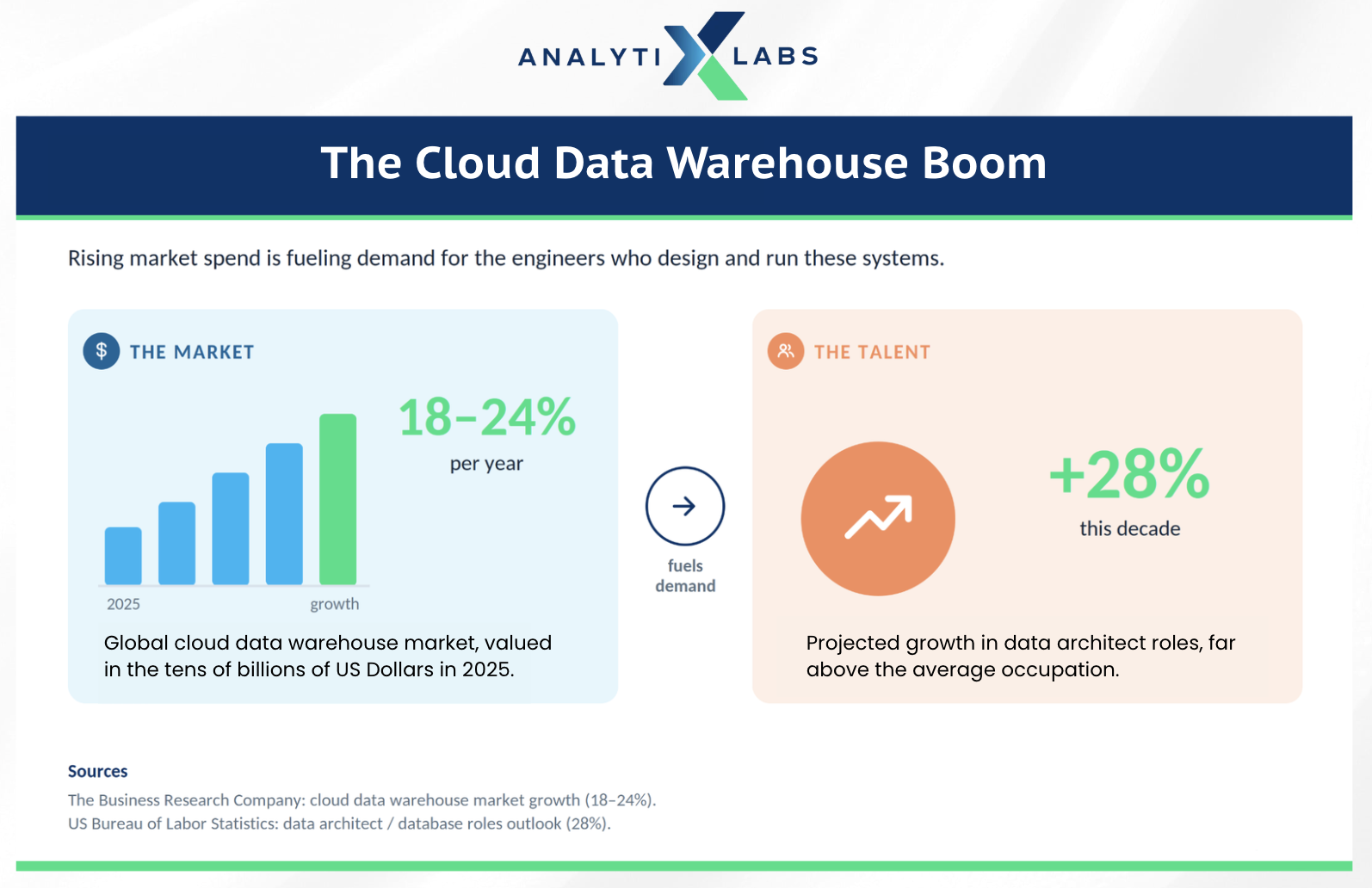
Industry research firms had put the cloud data warehouse market in the low tens of billions of US dollars in 2025. They estimated its yearly growth at roughly 18 to 24 percent, depending on how the segment was defined.
That kind of spending tends to follow a deeper trend, and this one is no exception. As the market grew, the need for the engineers who design and run these systems also rose. Infact, the US Bureau of Labor Statistics projects about 28 percent growth for data architect roles this decade, far above the average occupation.
This guide answers what a data warehouse is, how it works, and how the modern cloud and lakehouse era has changed it. It is written for two readers at once. If you are new to data, you get plain explanations. If you are experienced, you get the architecture detail, trade-offs, and trends that matter in 2026.
Lets start.
What is a Data Warehouse?
A data warehouse (often shortened to DWH) is a system that collects data from many sources, organizes it into a consistent structure, and stores it for analysis and reporting. Think of it as a single, well-labeled library for your organization's data, rather than a pile of disconnected spreadsheets and apps.
A warehouse does not usually analyze data on its own. It stores data in a query-friendly shape so that business intelligence tools, dashboards, and analysts can ask questions of it (often using SQL for data analysis).
The warehouse holds the answers. The tools on top retrieve them.
The classic questions that a warehouse answers are comparative and historical, such as:
Which products earned the most revenue this quarter versus last?
Which regions are slowing down?
How does this month's customer behavior compare to the same month a year ago?
Because a warehouse keeps deep history, it lets you spot trends instead of only looking at today.
Data Warehouse Charateristics
Bill Inmon, an early authority on the field, described a data warehouse using four properties. They still hold up today.
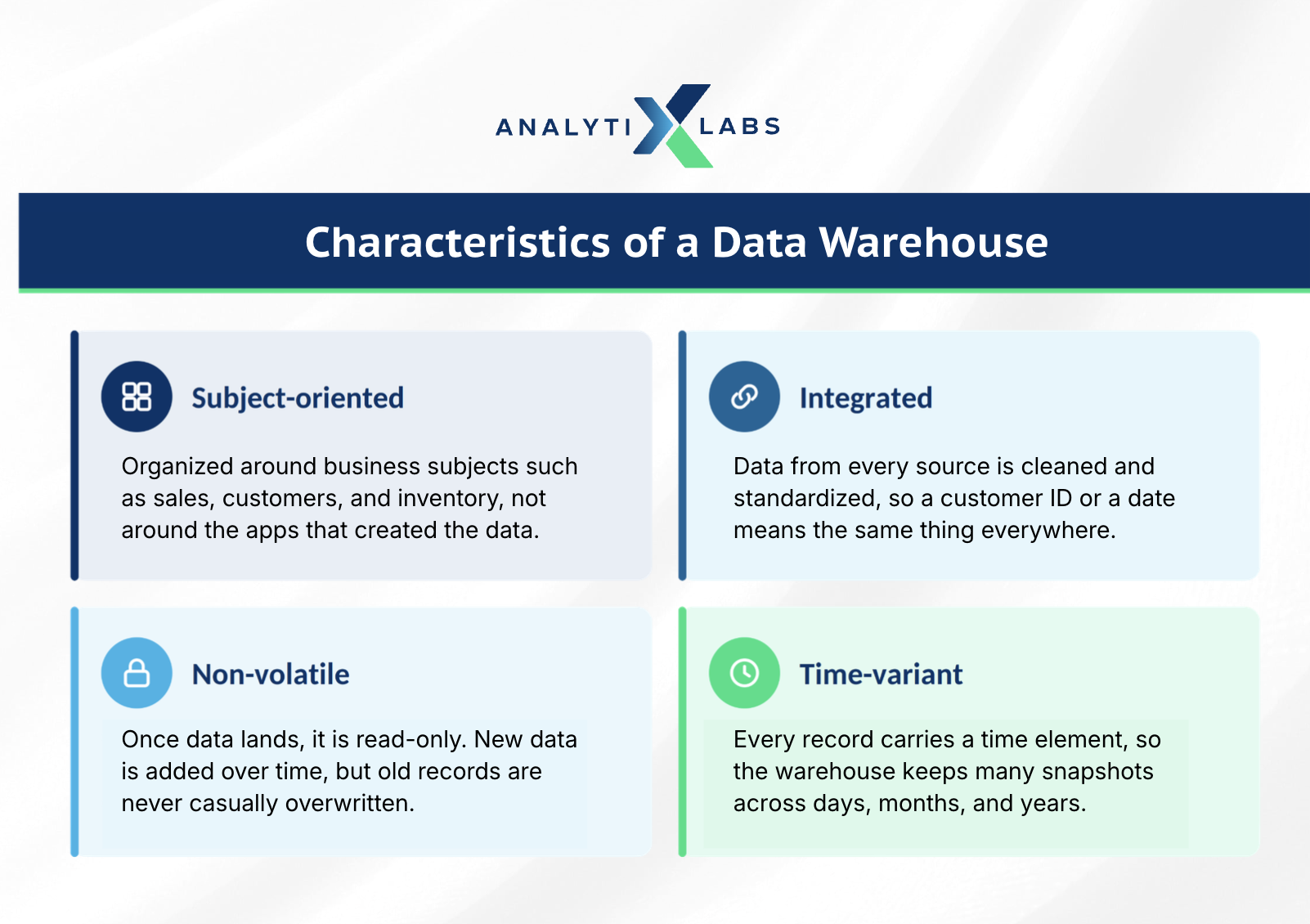
Subject-oriented: Data is organized around business subjects such as sales, customers, or inventory, not around the apps that produced it. This makes it natural to answer "who are our top five customers" rather than digging through raw system tables.
Integrated: Data from different sources is cleaned and standardized into one consistent format. A "customer ID" or a date means the same thing everywhere, which removes the conflicts that plague siloed systems.
Non-volatile: Once data lands in the warehouse, it is generally read-only. New data is added over time, but old records are not casually overwritten, so you can always reconstruct what happened and when.
Time-variant: Records carry a time element, so the warehouse can store many snapshots across days, months, and years. This is what powers trend analysis.
But the question still remains: how is a data warehouse different from a database?
Database vs. Data warehouse
People often confuse a data warehouse with a regular database, but they solve different problems.
A transactional database (OLTP) is built to record live transactions quickly, such as placing an order or updating a balance. It prioritizes fast, frequent writes.
A data warehouse (OLAP) is built to read and analyze large volumes of data that have already been collected. It prioritizes fast queries over huge historical datasets.
In fact, databases often feed the warehouse, which is why a warehouse is sometimes called a "database of databases."
How a Data Warehouse Works: Architecture and Components
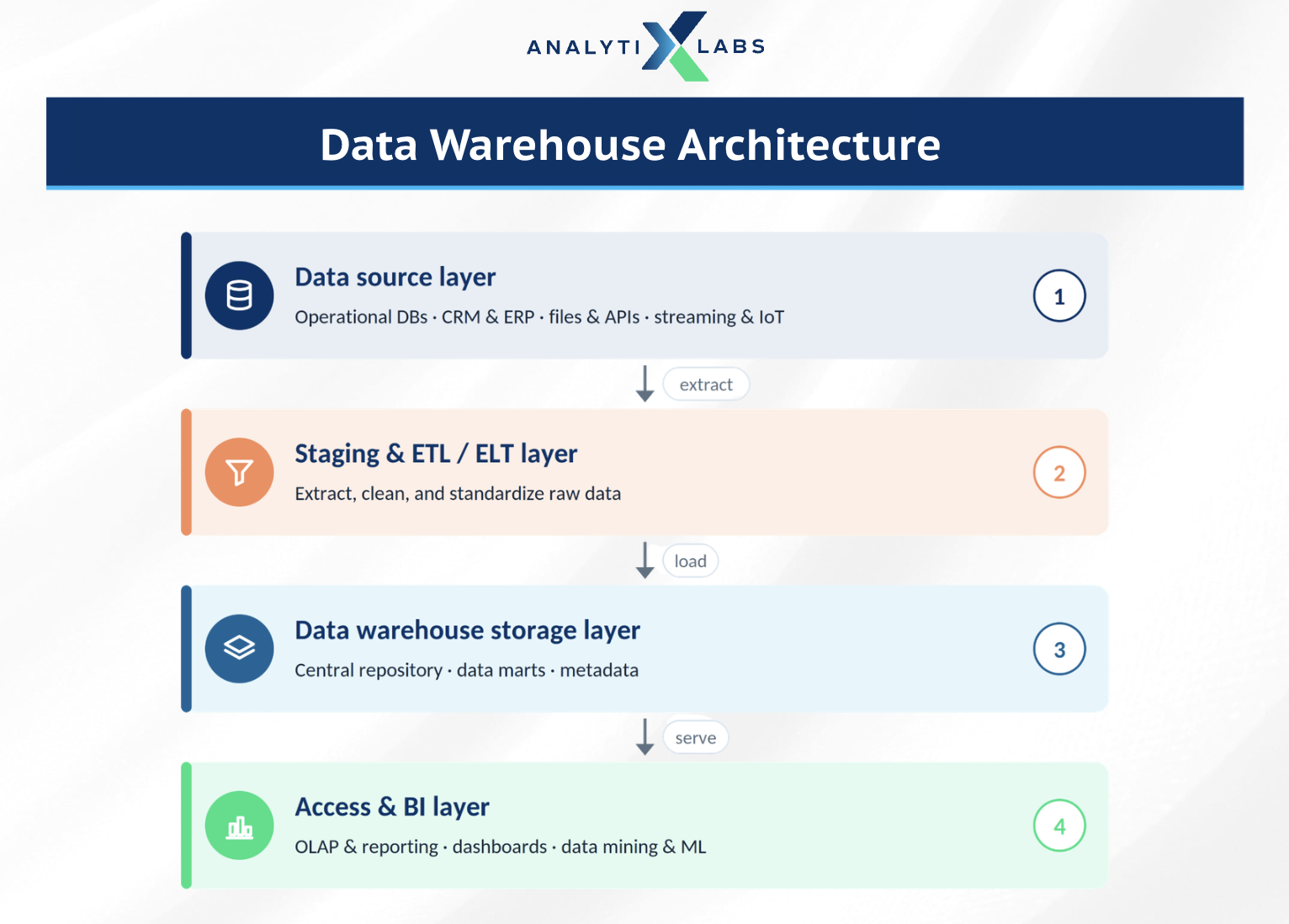
A data warehouse is best understood as a layered system. Data flows in one direction, from the raw sources where it is created, through a processing stage that cleans and standardizes it, into the central store, and finally out to the tools that people use to make decisions.
Each layer has a clear job, and understanding those jobs is the key to understanding the whole architecture.
The Four Architectural Layers
Most warehouse architectures, whether on-premises or cloud-native, organize into four layers.
The data source layer is where your raw data originates. This includes transactional databases that run your applications, business systems such as CRM and ERP, flat files and APIs, and increasingly streaming and IoT feeds. None of this data is analysis-ready yet. It is scattered, formatted differently, and often duplicated across systems.
The staging and ETL/ELT layer is the processing engine. Here the warehouse pulls data from every source, cleans it, resolves conflicts, and reshapes it into one consistent structure. A staging area acts as a temporary holding zone where this work happens before anything reaches the main store. This layer is what turns messy inputs into trustworthy, standardized records.
The storage layer is the warehouse itself. It holds the central repository of structured, query-ready data, along with any data marts that serve specific teams and a metadata repository that records what every field means and where it came from. This is the single source of truth the rest of the organization relies on.
The access and BI layer is the front end. It is where analysts run OLAP queries, where dashboards turn rows into visual insight, and where data mining and machine learning models read the warehouse to find patterns. People interact with this layer, not with the raw storage beneath it.
Architects often describe these layers in terms of tiers, and the number of tiers reflects how much separation exists between storage and analysis.
Single-Tier, Two-Tier, and Three-Tier Designs
A single-tier architecture tries to keep everything in one place to minimize stored data. It is rare in practice because it cannot separate analytical processing from day-to-day operations.
A two-tier architecture separates the warehouse from the source systems, which improves performance, but it can struggle to scale as the number of users grows.
The three-tier architecture is the classic model and the one most enterprise warehouses follow.
The bottom tier is the warehouse database server, where data is loaded and stored, along with the staging and metadata functions. The middle tier is an OLAP engine that organizes data for fast, multidimensional analysis. The top tier is the collection of front-end client tools that analysts and managers use to query, report, and visualize.
Separating these tiers is what lets a warehouse serve many users and heavy analytics without slowing down.
The processing layer can run in two orders, and the difference matters.
ETL vs ELT
Traditionally, warehouses used ETL: Extract, Transform, Load. In this case, you have to first pull data out of source systems, transform it on a separate server, then load the finished result into the warehouse.
This made sense when storage and compute were expensive, so you only stored polished data.
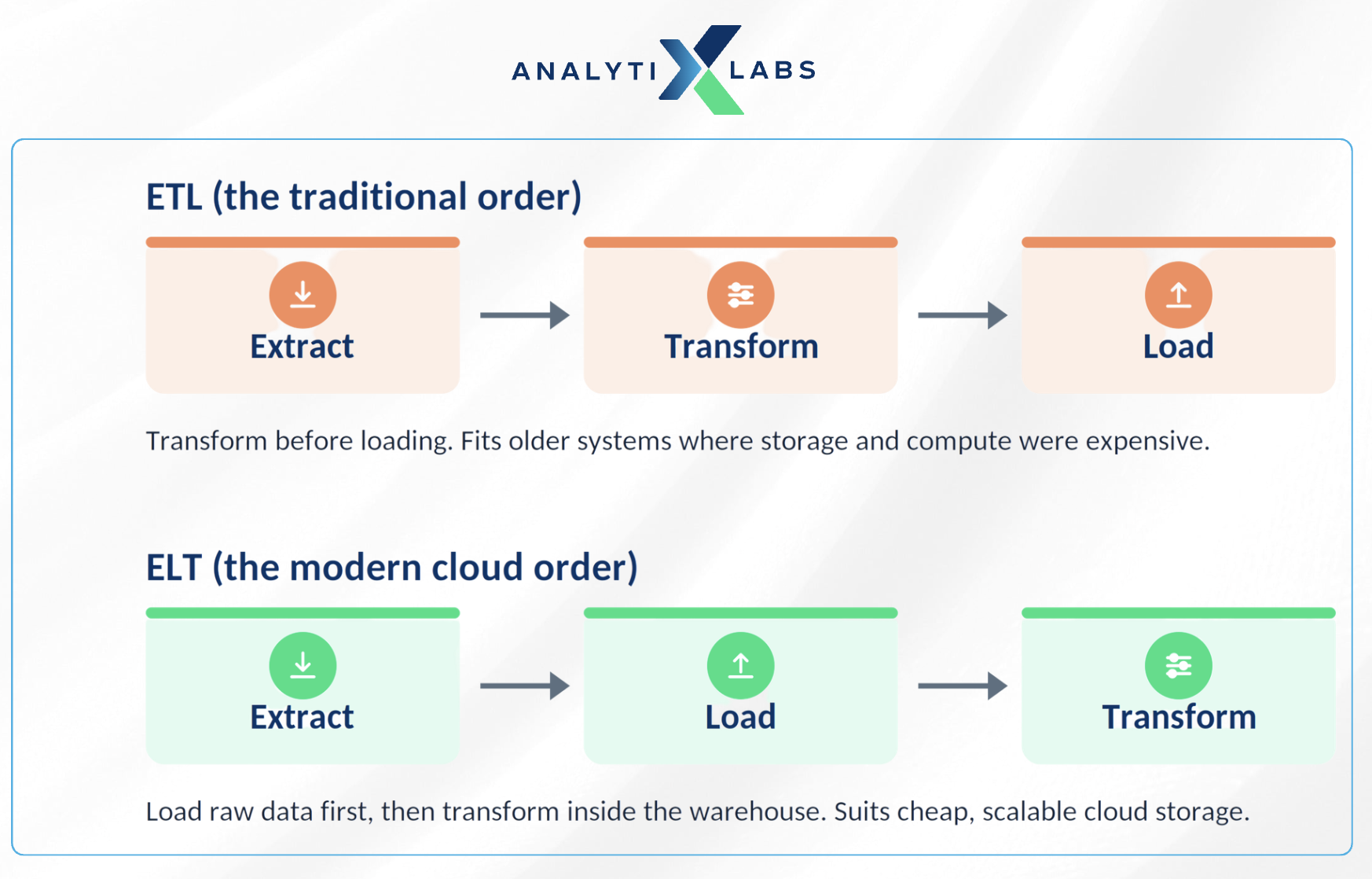
Modern cloud warehouses flipped this into ELT: Extract, Load, Transform. Now, you load raw data into the warehouse first, then transform it inside the warehouse using its own powerful compute. ELT is faster to set up, keeps the raw data available, and suits the cheap, scalable storage of the cloud. To go deeper on how data moves between systems, read our guide on building a data pipeline.
The answer to what is data warehouse is incomplete without discussing the core components of a data warehouse.
Four Core Components of Data Warehouse
Central repository
This is the core store where structured, query-ready data lives. It is usually a columnar layout optimized for analytics. A retailer holding three years of sales here can total revenue by region across billions of rows in seconds, something a transactional database would choke on. It matters because it becomes your single source of truth, so teams stop arguing over whose numbers are right.
Staging and integration layer
This is where data ingestion, cleaning, and standardization happen before data is trusted enough to query. If one customer shows up as "J. Smith" in your CRM and "Smith, John" in billing, this layer reconciles both into a single clean record. It is what makes the "integrated" characteristic real, because without it the warehouse simply inherits the conflicts already sitting in your source systems.
Metadata layer
Often called the "data about the data," it catalogs where each field came from, what it means, and how it is structured. When an analyst finds a column named "revenue," metadata confirms it is net revenue in US dollars, sourced from billing and refreshed nightly, so they use it correctly. This is essential for governance and discovery, especially in a regulated industry like banking where it provides the audit trail that proves where a reported number originated.
Access and BI tools
This is the front end, the query tools, reporting tools, and dashboards that people actually use. A sales manager should be able to open a dashboard and read regional performance without writing a single line of SQL. These tools matter because a warehouse delivers no value until people can question it, turning a vast technical store into everyday answers for non-technical teams.
Together, these four components form a chain of trust. Raw data enters through staging, lands in the central repository, is described and governed by metadata, then reaches people through BI tools. A weak link anywhere breaks that chain, which is why each component deserves equal attention when you design a warehouse.
Schemas: How the Data Is Modeled
Inside the warehouse, data is shaped using a schema, which is a blueprint for how tables relate. The three you will hear about most are the star schema, the snowflake schema, and the galaxy schema.
The star schema is the most common, with a central fact table (such as sales) linked to descriptive dimension tables (such as product, customer, and time). It is simple, fast to query, and a sensible default for most analytics work.
Types of Data Warehouses
Not all warehouses serve the same need. There are three classic types that cover most situations.
Enterprise Data Warehouse (EDW). A centralized warehouse that serves the whole organization. It provides one unified, governed view of data across departments and is the backbone of enterprise reporting.
Operational Data Store (ODS). A store designed for near real-time operational reporting on current data, such as today's transactions. It often acts as a staging area that feeds the larger EDW.
Data Mart. A focused subset of a warehouse built for a single team or function, such as finance or marketing. It gives one department fast, relevant access without the complexity of the full warehouse.
Warehouses also differ by where they run.
On-premises warehouses live in your own data center and give you maximum control, but they are expensive to scale and maintain. Cloud warehouses, on the other hand, run on managed platforms and have become the default choice for most new projects, which brings us to the biggest shift in the field.
Cloud-Native Warehouses and the Rise of the Lakehouse
The defining change in modern data warehousing is the move to cloud-native platforms. Older articles talking about what is data warehouse often skip this, but it is the single most important update to understand in present date.
What Makes a Cloud Warehouse Different?
The key innovation is the separation of storage and compute.
In a traditional warehouse, storage and processing power were bundled together, so scaling one meant paying for both.
Cloud-native platforms split them apart. You store data cheaply and spin up processing power only when you run queries, then scale it back down. You pay for what you use, and many teams can query the same data at once without slowing each other down.
The leading cloud-native warehouses include the following.
Snowflake. A platform built around independent scaling of storage and compute, with features like zero-copy cloning that let teams share data without duplicating it.
Google BigQuery. A serverless warehouse where you query petabyte-scale data without managing any infrastructure, paying mainly by the data your queries scan.
Amazon Redshift. AWS's managed warehouse, now offered in a serverless mode that automatically provisions capacity for your workload.
Azure Synapse and Microsoft Fabric. Microsoft's analytics platforms that unify warehousing, big data, and reporting in the Azure ecosystem.
Databricks SQL. A warehouse layer that sits on top of a lakehouse, which leads to the next concept.
Data Warehouse vs Data Lake vs Lakehouse
As organizations started collecting unstructured data such as images, audio, and raw logs, the warehouse alone was no longer enough. That gap created two newer architectures.
A data lake stores massive amounts of raw, unstructured data cheaply, but it lacks the structure and reliability of a warehouse. A lakehouse, pioneered by Databricks, combines both. It adds warehouse-style structure, reliability, and SQL performance directly on top of low-cost lake storage.
What makes a lakehouse possible is the open table format, a layer that brings reliability and transaction support to files in a lake. The three you will hear most often are Delta Lake, Apache Iceberg, and Apache Hudi. These formats are why structured analytics can now run directly on lake storage.
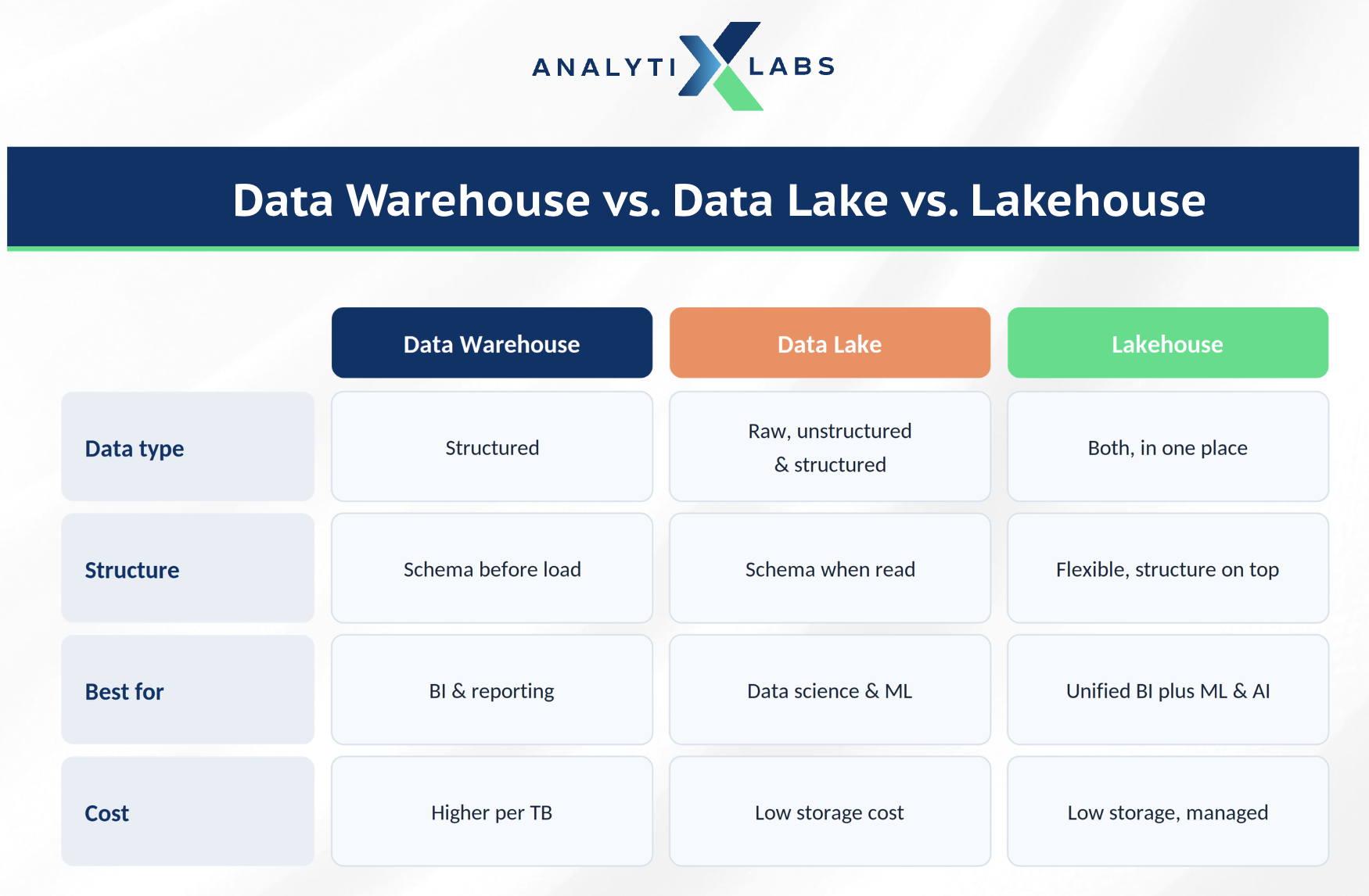
For a closer comparison of the older two patterns, read our deep dive on data lake vs data warehouse.
Data Warehouse Use Cases Across Industries
When trying to understand what is dara warehouse, it is essential you know how data warehouse functions real-time across industries.
A warehouse earns its cost when it answers questions a business cannot easily answer otherwise. A few real-world patterns show how.
Retail and e-commerce. A retailer consolidates point-of-sale, website, and loyalty data into one warehouse. It can then identify its highest-value customers, spot seasonal demand, and decide where to direct inventory and promotions.
Banking and finance. Banks rely on warehouses for regulatory reporting and risk analysis, where audit trails and consistency are non-negotiable. Many fintechs add a lakehouse for real-time fraud detection on more diverse data.
Healthcare. A hospital network can use a warehouse to generate treatment and outcome reports across departments, supporting better clinical decisions and research collaboration.
Streaming and media. Platforms analyze huge volumes of viewing data in the cloud to power recommendations and understand what content keeps audiences engaged.
Now that we have answered what is data warehouse and how it functions across industries, let us look at the benefits, challenges, and future of data warehousing.
Benefits, Challenges, and the Future of Data Warehousing
The Benefits
A well-built warehouse delivers clear advantages. It integrates scattered sources into one trusted view, so departments stop arguing over whose numbers are right. It speeds up data retrieval and powers business intelligence, since BI tools work best on standardized data. To see how this connects to broader reporting, read our take on business intelligence vs business analytics.
Above all, a warehouse improves decision-making. Leaders can compare current performance against years of history, learn which initiatives worked, and adjust strategy with evidence rather than instinct.
The Challenges
Warehouses are not free of trade-offs. Building and maintaining one can be costly and resource-heavy, especially with on-premises systems. Data preparation is time-consuming, and hidden quality issues in source systems can go unnoticed for a long time. Traditional warehouses also struggle with unstructured data, which is exactly the gap that lakehouses now fill.
Where the Field Is Heading?
The future of warehousing is being shaped by a few strong trends. AI and machine learning are moving directly into the warehouse, so teams can run models and generative AI workloads where the data already lives. Open table formats are becoming standard, blurring the line between warehouse and lake.
Two more shifts are worth watching. Zero-ETL integrations aim to move data between systems with far less manual pipeline work. And real-time analytics is becoming the expectation, not the exception, as businesses demand fresh answers in seconds rather than overnight. The direction is consistent. Warehouses are getting more open, more automated, and more AI-ready.
Conclusion
Data warehouses remain the backbone of modern analytics, and the surge in global data has made them more relevant, not less. What has changed is the architecture. The field has moved from rigid, on-premises systems toward cloud-native platforms that separate storage and compute, and toward lakehouses that unify structured and unstructured data for both BI and AI.
If you understand the core concepts in this guide, the four characteristics, the components, the types, and the cloud and lakehouse shift, you are ready for the data roles employers are hiring for today.
FAQs on What is Data Warehouse
What is a data warehouse in simple words?
A data warehouse is a central system that gathers data from many sources, organizes it into a consistent structure, and stores it for analysis and reporting. It acts as one trusted source of historical and current data for an organization.
What is a data warehouse with an example?
Imagine a retail chain that pulls sales, website, and loyalty data into one warehouse. Managers can then ask which products sold best this quarter, who their top customers are, and how demand shifts by season, all from a single place.
What are the main types of data warehouses?
The three classic types are the Enterprise Data Warehouse (EDW), which serves the whole organization, the Operational Data Store (ODS) for near real-time operational data, and the Data Mart, a focused subset built for one team or function.
What is the difference between a data warehouse and a database?
A database is built to record live transactions quickly, while a data warehouse is built to analyze large volumes of historical data. Databases often feed the warehouse, which then powers reporting and analytics.
What is a cloud data warehouse?
A cloud data warehouse is a managed warehouse that runs on cloud infrastructure, such as Snowflake, Google BigQuery, or Amazon Redshift. Its main advantage is the separation of storage and compute, which lets you scale and pay for each independently.
Is a data warehouse the same as a data lake or lakehouse?
No. A warehouse stores structured, query-ready data. A data lake stores raw, mostly unstructured data cheaply. A lakehouse combines both, adding warehouse-style structure and reliability on top of low-cost lake storage.