What is Claude AI? Claude AI is a family of large language models built by Anthropic, driving the shift from AI as an interesting technology to a tool people rely on every day. You can use it through chat apps on the web, desktop, and mobile, through a developer API, and through tools for coding, spreadsheets, and browsing. Claude AI handles text, images, and documents, and can call external tools to complete multi-step tasks.
For anyone working in data science, analytics, or AI engineering, Claude sits alongside OpenAI's GPT models and Google's Gemini. It is one of the three model families you are most likely to encounter in production systems and in job descriptions. This guide covers what Claude AI is and is not, how to use Claude in day-to-day analytical work, and how Claude vs Gemini vs ChatGPT compare for data professionals.
What Is Claude AI In Practice?
For instance, you are an analyst by profession. Your typical Monday morning starts with a Slack message from the product team saying the churn scores look wrong. However, nothing was deployed, and the model is unchanged. So something upstream moved.
You start by pasting the last two weeks of the validation metrics log into Claude, along with the feature list, and asking which features are most likely responsible, given that the drop is concentrated in one customer segment. Claude comes back with three candidates and the reasoning for each, including one you hadn't considered: a categorical feature whose cardinality would spike if a new plan tier was added to the product catalog.
That turns out to be it. A new plan tier launched Friday, and the encoder was fit on the old categories, so every new-tier customer is landing in the unknown bucket.
From there, the work is fast. You hand Claude the encoding step from the pipeline and ask for a version that handles unseen categories gracefully instead of silently defaulting. You get working code, plus a note that the same problem exists in two other transformers in the same file, which you haven't looked at yet.
Then comes the part nobody enjoys. Product wants an explanation by 11 am, and the honest explanation involves the words "target encoding" and "unseen category." You paste your technical summary into Claude and ask for a version a product manager can act on, in four sentences, without analogies. You edit two words and send it.
Before closing the ticket, you ask Claude to draft the postmortem note and a monitoring check that would have caught this: an alert on the proportion of records falling into unknown categories per feature, per day. It writes both. You add the threshold yourself, because Claude has no idea what normal looks like for your data.
Total elapsed time is about ninety minutes, compared to most of a day if you had bisected the pipeline manually and written the stakeholder note from a blank page.
The value is not that Claude knew the answer. It did not, and it offered three hypotheses rather than one. The value is that it quickly compressed the search space, caught two related bugs you hadn't looked for, and absorbed the writing overhead that surrounds every incident. Diagnosis, threshold-setting, and deciding what to tell the stakeholder still stayed with you. That is what debugging a pipeline with Claude actually looks like.
That distinction runs through the rest of this guide. Before the workflows, though, the basics: who builds Claude, what the model family looks like, and where the safety positioning comes from.
Who Builds Claude, and Why the Safety Positioning Matters?
Anthropic was founded in 2021 by a group of former OpenAI researchers, and it operates as a public benefit corporation with an explicit research-first mandate. The company publishes model cards, a responsible scaling policy, and a transparency hub, which is a meaningful difference from labs that ship first and document later.
The technical idea most associated with Anthropic is Constitutional AI. In conventional alignment work, human labelers rank model outputs and the model learns from those preferences. Constitutional AI adds a written set of principles, the constitution, that the model uses to critique and revise its own responses during training. Human feedback still matters, but a large share of the alignment signal comes from the model evaluating itself against stated rules rather than from labelers reacting to individual outputs.
Whether that stated positioning holds up under commercial pressure is a fair question, and Anthropic's own leadership appears to be asking it.
Axios reported in August 2026 that CEO Dario Amodei has privately voiced concern that new hires are joining for the compensation rather than the mission, a worry sharpened by a valuation that could turn a large share of the company's 2,500-plus employees into millionaires.
Subsequent reporting from Fortune described the company adding culture interviews that ask candidates how they would feel if Anthropic abandoned its commercial ambitions on safety grounds and the equity went to zero.
Separately, all seven cofounders have pledged to give away 80% of their wealth, with Amodei publicly arguing that AI-driven wealth concentration is itself a societal risk.
The reaction was not uniformly generous. Anthropic pays some of the highest salaries in the industry, and critics noted the tension between worrying about money-motivated hires and outbidding everyone for them. But the episode matters for a practical reason: it shows the safety framing is load-bearing inside the company rather than a marketing layer applied afterward, which is exactly what you want to understand before building on someone's models.
Why should a practitioner care about any of this?
Because the approach produces observable behavior. Claude tends to hedge on uncertain claims, ask clarifying questions instead of guessing at ambiguous requirements, and refuse a narrower band of requests than you might expect. In production, that reads as more predictable output and fewer confidently wrong answers. It also means occasional friction on legitimate technical work, which is a real tradeoff rather than a marketing point. Teams building on Claude generally accept that tradeoff deliberately.
The Claude Model Family
Claude models are tiered on capability, cost, and speed. Higher tiers reason better over long, complex tasks. Lower tiers respond faster and cost far less per token, which matters enormously once you are running thousands of calls a day.
Model | Positioned For | Context Window | Relative Cost |
Claude Fable 5 | Highest available capability, long-running agents | 1M tokens | Highest |
Claude Opus 5 | Complex agentic coding and enterprise work | 1M tokens | High |
Claude Sonnet 5 | Best balance of speed and intelligence | 1M tokens | Moderate |
Claude Haiku 4.5 | Fastest, most cost-efficient | 200K tokens | Lowest |
A fifth model, Claude Mythos 5, shares Fable 5's capability tier but is currently available only to approved organizations under Anthropic's Project Glasswing, not through self-serve access.

All four self-serve models accept text and image input, produce text output, work across languages, and support tool use. Fable 5, Opus 5, and Sonnet 5 offer a one-million-token context window while Haiku 4.5 runs a 200K window.
Recommended Working Decision Rule:
Default to Sonnet 5: It covers most production workloads at a fraction of the frontier price.
Escalate to Opus 5 for long-horizon, agentic, or large-codebase reasoning. Anthropic recommends it as the starting point for complex agentic and enterprise work.
Reach for Fable 5 only when you have measured that Opus is not enough. It needs to earn the spend.
Drop to Haiku 4.5 for high-volume classification, extraction, routing, and summarization.
Note: Knowledge cutoffs vary by model rather than moving in step with the tier. The newest or most expensive model is not necessarily the one with the most recent knowledge, so check the per-model documentation rather than assuming.
Claude Capabilities: From an Analyst and AI Professional POV
Capability lists are easy to write and hard to use. Here is each major capability framed by what it changes about analytical work, which is Claude for analysts rather than Claude in the abstract.
Large context window
A one million token window is, in practical terms, a mid-sized codebase, or a full data dictionary plus a schema dump plus two quarters of documentation, in a single request. The effect is that you can stop chunking. You no longer need a retrieval pipeline to ask a question that spans three documents. You paste all three and ask, and an entire class of setup work disappears.
Extensive tool use
You describe the functions available, Claude decides which to call and with what arguments, receives the result, and continues reasoning. This is what makes anything agentic possible. It is the mechanism behind every agent workflow you will build: query the warehouse, inspect the result, decide the next query. Without it, a model is a text generator. With it, it can complete a task.
Independent code execution
Claude runs real Python in a sandbox rather than suggesting it to you and then having you run it yourself. It can load your CSV, profile it, plot the distribution, and tell you what it found. The difference matters most in exploratory work, where the value is in iteration speed. Because every round trip through your own terminal costs momentum.
Vision and document reading
Claude reads images and scanned files, which covers most of the artifacts analysts actually receive: dashboard screenshots, scanned reports, charts in a PDF nobody has the underlying data for, whiteboard photos from a requirements meeting. You can hand it a competitor's published chart and ask it to estimate the underlying numbers into a table. And it will do it smoothly!
Extended thinking
The model works through a problem before it answers, spending more compute when the task is harder. You use it when a question has several steps that depend on each other, because that is exactly where a fast answer tends to be shallow. You benefit most when working out why a pipeline fails for one customer segment and not the rest, or choosing between two modeling approaches, or reasoning about cause and effect in a messy dataset.
File creation
Claude generates working Excel files with live formulas, PowerPoint decks, and Word documents. These are finished deliverables, not descriptions of what a deliverable should contain. For an analyst whose week ends with a stakeholder deck, that collapses the last mile.
Multilingual capability
Customer feedback, support tickets, and survey responses arriving in Hindi, Bengali, Tamil, or code-mixed English are ordinary in Indian data work, and most global write-ups of these tools ignore it. Claude handles classification and sentiment work across them without a separate translation step.
How Data And AI Professionals Actually Use Claude?
The capabilities above are shared to varying degrees across all frontier models. What follows is Claude for data professionals in practice. Here's how that translates into hours saved in a real week.
Below are some use cases where Claude comes in handy regularly.
Exploratory Analysis And Data Profiling
The standard opening move is to hand Claude a sample of the data and the business context, then ask what is wrong with it before asking anything else.
This works better than asking for code first because the failure modes in real data are boring and specific: inconsistent date formats across sources, silent type coercion, duplicate keys that survived a bad join, categorical fields where the same value appears in four spellings, and nulls that mean "not applicable" in one column and "not collected" in another.
Claude is good at spotting these from a sample because they are pattern problems.
A useful prompt structure you can copy and paste on Claude right away:
Here are sample rows and the schema. This is [business context]. Before writing any code, list what you think is wrong with this data and what you would check first. Rank by how much it would distort a [model type] built on it.
Follow with the code request once you agree with the diagnosis.
Also Read: What is Exploratory Data Analysis?
SQL, In Both Directions
Writing SQL from a schema is the obvious use. The less obvious and more valuable use is reading it.
Most analysts inherit queries. A long query with several CTEs, written by someone who left the company, feeding a dashboard the CFO looks at weekly. Paste it in Claude and ask what it does, what assumptions it makes, and what would break it. You get a plain-language summary, a list of implicit assumptions, and usually two or three bugs the original author did not notice.
The same applies to optimization. Ask for a rewrite that produces identical output with better performance, then ask it to explain what it changed and why, so you can verify rather than trust.
Feature Engineering And Modeling Support
Claude is genuinely useful as a thinking partner in the design phase and genuinely dangerous as an authority in the evaluation phase.
Good uses include
Brainstorming candidate features from a domain description
Sanity-checking whether a proposed train-test split leaks information
Explaining why a metric is inappropriate for an imbalanced problem
Generating the boilerplate around cross-validation and hyperparameter search
Bad uses include:
Accepting its judgment on whether your model is good: It has not seen your data distribution, your business cost of a false negative, or your deployment constraints. It will still produce a confident-sounding assessment.
Documentation That Otherwise Never Gets Written
Model cards, data dictionaries, pipeline README files, and handover notes are necessary and permanently deprioritized. Point Claude at the code and have it draft; then edit.
This is among the highest-return uses because the alternative isn't a worse document; it is no document. Ask for the draft to flag its own gaps, so you get a list of things only you can answer rather than confident invention.
Building And Deploying Agentic Systems
An agent is a model running in a loop. It decides what to do, does it, looks at what came back, and decides again. Tool use lets it act on something outside the conversation, and extended thinking lets it choose sensibly between steps. Together they turn a model that answers questions about a task into one that can work through it. If you are learning to build agents, Claude is both the thing you build with and a reasonable tutor while you do it.
The surrounding tooling matters here as much as the model:
Claude Code runs in the terminal, VS Code, or JetBrains and works against your actual repository rather than pasted snippets. Included in every paid plan.
The Model Context Protocol (MCP) is an open standard for connecting models to external systems. Connectors exist for databases, warehouses, ticketing systems, and analytics tools, and you can write your own.
Skills package reusable instructions so a recurring workflow behaves consistently across sessions.
The API is available directly and through Amazon Bedrock, Google Cloud, and Microsoft Foundry, which matters when procurement or data residency is tied to an existing cloud contract.
This cluster of skills, building agentic systems and deploying them inside a customer's real environment, is the core of the Forward Deployed Engineer role, one of the fastest-growing AI job titles in India right now. If the deployment side interests you more than the modeling side, that guide covers the path into the role.
Translating Technical Work For Stakeholders
A large share of analytical work is restating it for people who will never read the code, and that rewriting eats more of the week than most analysts admit. Claude handles the first pass well: it turns model results into a business summary, a pipeline failure into an incident note, and a methodology into something a non-technical committee will sign off on.
Two prompt habits improve this sharply: name the audience and their decision ("a marketing director deciding whether to fund a retention campaign"), and set a hard length. Without a length constraint, you get four paragraphs where two would land better.
Learning And Upskilling
Claude is an effective tutor for the awkward middle of learning, where you understand the concept but cannot yet implement it. Ask it to explain the same idea at three levels, or to critique your implementation and explain the reasoning behind each correction rather than just fixing it.
Resources Worth Bookmarking:
Anthropic Academy for free courses on building with Claude
The prompt engineering guide in the platform documentation, which is unusually practical
The Claude Cookbook on GitHub for working code patterns
The MCP documentation if you are building connectors
Claude for data professionals is a skill set, not just a tool choice. Employers are hiring for these skills. AnalytixLabs' Agentic AI and Generative AI programs cover LLM fundamentals, prompt engineering, and agent development with hands-on projects.
Also read: Top 20 GenAI Prompts to Drive Effective Results.
Working Habits That Can Drive Good Results on Claude:
These habits are what separate Claude for analysts that saves hours from Claude that produces plausible noise.
Give context before asking: Role, data, constraint, audience. Most weak output traces to a prompt that omitted the constraint that actually mattered.
Ask for the diagnosis before the code: You catch wrong assumptions while they are cheap.
Use Projects to persist schemas, style guides, and standards across a whole workstream rather than re-pasting them.
Make it show reasoning on anything analytical. You are checking the logic, not the answer.
Ask what it is unsure about: Claude will tell you, and that list is where you should focus your verification.
Now that you know how Claude can function as an active assistant to analysts and AI professionals (real-time), the next obvious question is Claude vs Gemini vs ChatGPT: how does it actually differ from its two closest peers?
Claude vs. Gemini vs. ChatGPT For Analytical Work
Disclaimer: All three are capable, and none of them is clearly ahead across the board. Benchmark leadership rotates every few months, and anyone claiming a permanent winner is selling something.
The below comparison is scoped to analytical and AI engineering work, not general use.
Dimension | Claude | ChatGPT | Gemini |
Code quality on repo-scale work | Widely preferred by developers; strong multi-file reasoning | Strong; broadest language coverage | Competitive, improving fast |
Agentic reliability | Strong tool-use discipline, mature MCP ecosystem | Strong; largest third-party plugin ecosystem | Solid; best inside Google Cloud |
Long-document analysis | Very large context on the top tiers | Long context available | Long context, strong retrieval |
Notebook and data workflow | Code execution, file creation, Excel integration | Code interpreter, mature data analysis mode | Native to Colab, BigQuery, Sheets |
Handling uncertainty | Tends to flag it; conservative on unsupported claims | Tends toward confident completion | Middle ground |
Enterprise deployment | Bedrock, Google Cloud, Microsoft Foundry | Azure OpenAI, direct API | Vertex AI, deep Workspace integration |
We recommend picking by workload:
Claude for repo-scale coding, agent development, long-document analysis, and anywhere a confidently wrong answer is expensive.
ChatGPT when you need multimodal generation, or when an existing ecosystem integration solves the problem outright.
Gemini when your stack is BigQuery, Colab, and Workspace, and native integration beats a marginal capability difference.
Most teams running serious workloads use at least two and route by task. Treating Claude vs Gemini vs ChatGPT as a permanent vendor decision, rather than a per-task one, is the common mistake.
Also read: Role of ChatGPT in Modern Data Science
Tool Limitations:
Every limitation below applies to all three. The differences are in degree and in how each vendor's defaults express them.
Limitations | Claude | ChatGPT | Gemini |
Knowledge cutoff | Varies by model; check per-model documentation | Varies by model | Varies by model |
Hallucination on specifics | Lower rate on unsupported claims; still fails on figures, citations, and API signatures | Higher tendency toward confident completion | Comparable; search grounding helps when enabled |
Non-determinism | Same prompt, different output. Validate downstream | Same | Same |
Cost at frontier tiers | Frontier tiers cost many times the entry tier | Similar spread | Similar spread |
Over-refusal | Occasionally declines legitimate security and red-team work | Less restrictive in practice | Less restrictive in practice |
Context degradation | Recall weakens toward the window limit | Same | Same |
Statistical judgment | No access to your distribution or business costs. Will still sound confident | Same | Same |
On Claude vs ChatGPT, and on Gemini too, these are differences of degree rather than kind: no vendor has solved any row in this table. The last row matters most and gets written about least.
None of these models can tell you whether your model is good enough to ship. That judgment requires knowledge of your data, your cost of error, and your deployment constraints, and it will always stay with you.
Also read: 10 Things to Check to Stop Your AI Agent from Failing
Claude Pricing Details
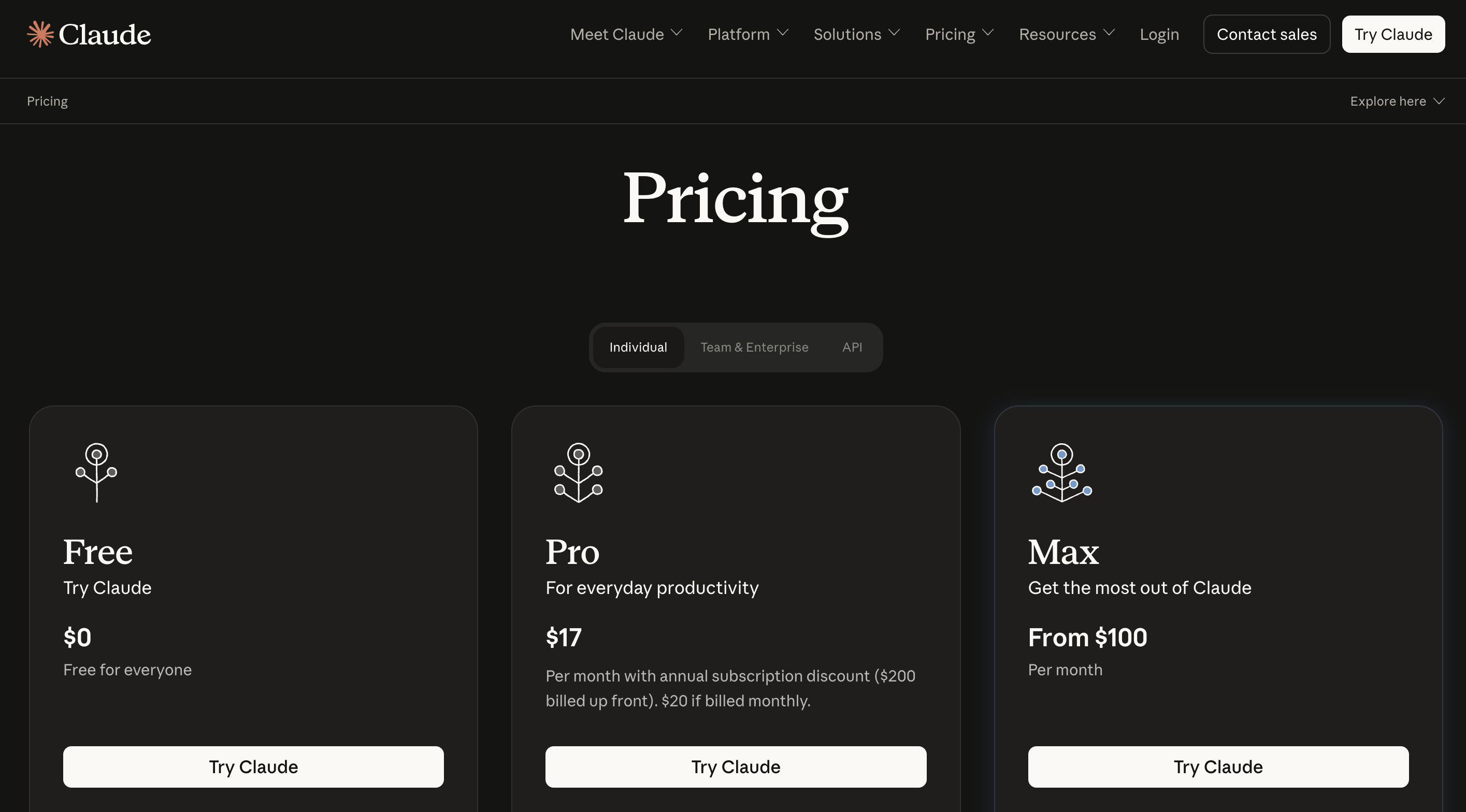
Claude is available on a free tier, paid individual plans, team and enterprise plans, and a usage-billed API.
Anthropic's pricing page lists current rates for all of these, and they change often enough that any figure quoted in an article is worth rechecking before you budget against it.
What is more durable is understanding how the cost behaves, and this applies equally to all three vendors:
Output costs several times more than input: Long responses, not long prompts, drive most bills. Constraining response length is the single easiest saving.
Batch processing halves the cost of asynchronous workloads across every major provider. If the result does not need to come back in real time, batch it.
Prompt caching cuts repeated-context cost dramatically: Structure prompts so the stable context sits first and the variable part last, and the cache does the rest.
Some providers charge more above a context threshold: Retrieval pipelines that stuff large documents into every call can cross that line without you noticing.
Tool calls bill separately: Web search, grounding, and code execution are metered outside token costs and will not appear in your per-token estimate.
For an individual analyst, the standard paid tier is the right starting point. Claude's Pro plan includes Claude Code, which matters if coding is a large part of your work. To begin, sign up at claude.ai for the chat interface, or open a Console account at platform.claude.com for API access. Both are free to start, making them the cheapest way to test how Claude works with your data before you commit any budget.
This brings us to the end of how to use Claude for analytics and data effectively, while understanding the functional differences between the three most hyped AI tools - Claude, Gemini, and ChatGPT.
If you arrived asking what Claude AI is, the short answer is a general-purpose model family that earns its place in an analytics workflow through tool use, code execution, and long-context reading rather than chat alone.
Below are some commonly asked questions about using Claude for data tasks (specifically). If you have additional questions, write them down in the comments section, and we will try to add them to the FAQ list.
FAQs
What Is Claude AI In Simple Terms?
Claude AI is a family of large language models built by Anthropic. In practice, it is an assistant you can hand data, code, documents, and images to, and which can also run Python and call external systems to finish a task rather than only describe one.
Claude Vs Gemini Vs ChatGPT: Which Is Best For Data Work?
There is no single winner, so the comparison above is scoped dimension by dimension. As a rough split: Claude for repo-scale coding and agent development, ChatGPT for multimodal generation, and Gemini when your stack is already BigQuery, Colab, and Workspace. Most data teams end up using at least two.
Which Claude Model Should I Use For Data Analysis Work?
Use Sonnet 5 for most of it. Move to Opus 5 for multi-file debugging, agent development, or reasoning across a large codebase. Use Haiku 4.5 for high-volume extraction and classification when cost and speed matter most.
Can Claude Connect To My Database Or Data Warehouse?
Yes, through connectors built on the Model Context Protocol. Connectors exist for common databases and analytics tools, and you can build your own. Check your organization's data policy before connecting production systems.
Claude Vs ChatGPT: Is Claude Better For Coding?
On Claude vs ChatGPT for code, Claude is widely preferred for repository-scale work, where tasks span multiple files and require holding a codebase in context. For isolated snippets, the difference is small. Benchmark your own workload rather than trusting either vendor's chart.
Will Using Claude Train Anthropic's Models On My Data?
Not on Team and Enterprise content by default. Consumer plans offer an opt-out. Verify current terms against Anthropic's policies before putting sensitive data into any AI tool, and treat this as a question you re-check rather than settle once.
Can Claude Run Python And Produce Real Files?
Yes. It executes Python in a sandboxed environment and generates working spreadsheets, documents, and decks rather than describing them.
How Do I Stop It Hallucinating Column Names And API Signatures?
Give it the actual schema and documentation rather than relying on recall, ask it to flag anything it is uncertain about, and verify every specific before it reaches production. This is a workflow problem, not a model problem.
Do I Need To Learn Prompt Engineering To Use Claude Professionally?
You need the working habits more than the terminology: give context before asking, name the audience and constraints, request diagnosis before code, and ask what it is unsure about. Anthropic's prompt engineering guide covers the rest, and it is short.