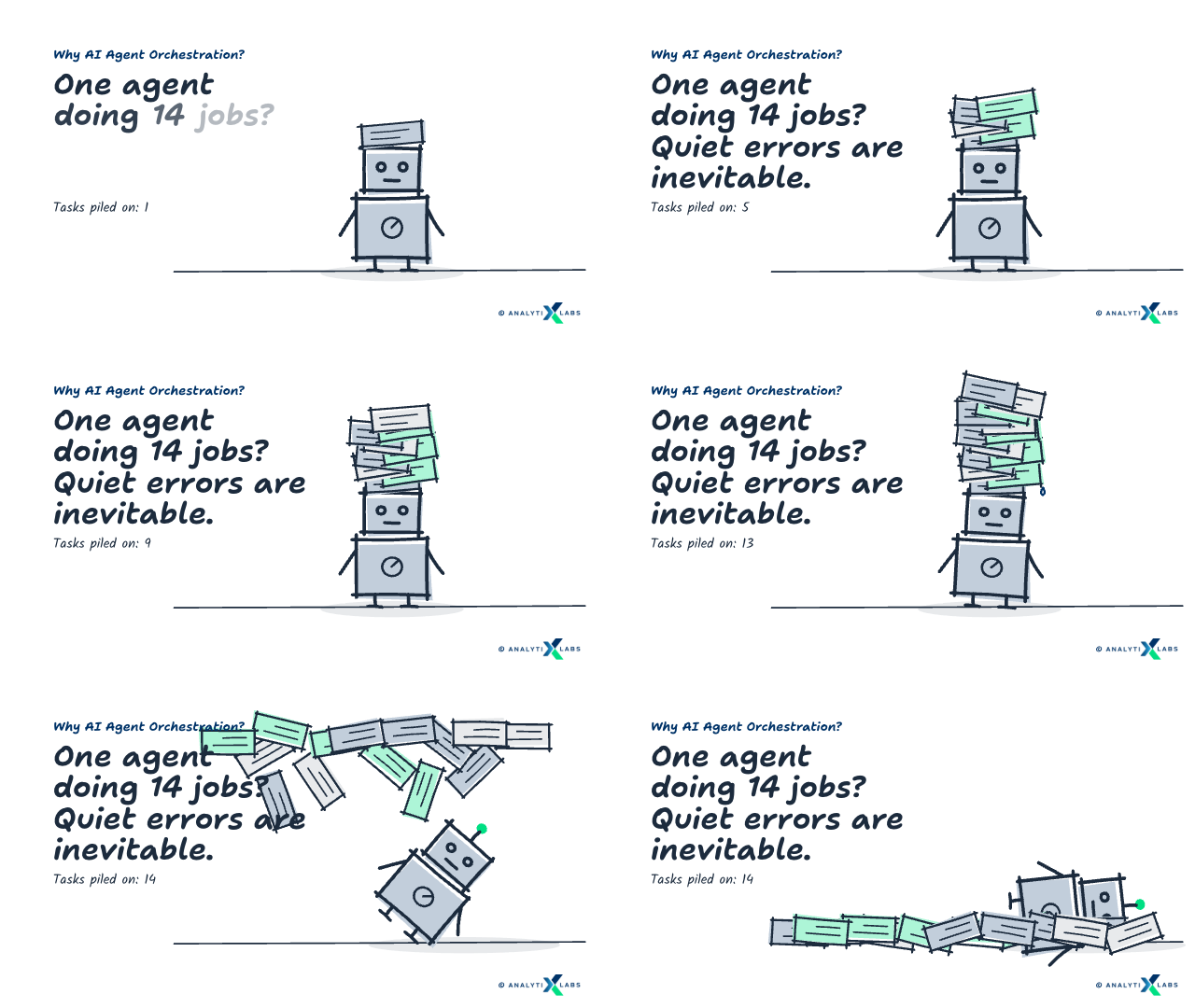
You build one agent, and it works. It reads a ticket, pulls the customer record, and drafts a reply. For a week, it looks like the problem is solved. Then the workflow grows. Six steps become fourteen, and suddenly the agent starts failing somewhere around step nine. The problem is, it never shows "error". Instead, it delivers a confident answer built on data that it never fetched.
Quiet failure hurts! And you find that out only when a customer does.
The cause is rarely the model. It is load. This is because one agent carrying fourteen responsibilities gets fourteen chances to pick the wrong tool; and, well, it does pick the wrong one at some point without knowing it. Unfortunately, it has no mechanism to detect that it picked the wrong tool.
On the flip side, if you are cautious, you will spot the warning signs well before the first real failure.
Your single agent hits its limit when:
|
The list has a clear takeaway - you have to split the work. Each agent will have one job, a short prompt, and a small set of tools. Splitting solves the overload issue. But it also creates a new set of problems - someone has to now decide which agent runs, in what order, and with what information. This is where agent orchestration comes in. AI agent orchestration is the decision layer. This article covers what it is, how it is built, and what it costs you when it breaks.
What is AI Agent Orchestration?
AI agent orchestration is the coordination layer that runs a group of specialist AI agents as one system. It decides which agent runs next and what context that agent receives. It also decides what happens to each output, and when the work ends.
Most explanations reach for the same comparison. The agents are musicians in an orchestra. The orchestrator is the conductor who keeps them playing in time. This comparison is a fair start, but it stops one step short. A conductor sets tempo for players who already know what to play. An orchestrator also picks who plays, hands each one its sheet music, and ends the piece.
Strip away the metaphor, and you are left with the working definition. Orchestration is the code and logic that sits above your agents and controls the flow between them.
What an Orchestrator Actually Does
The flow control breaks into four jobs. Each one fails differently when you leave it out.
Routing: It picks the right agent for the current state of the work.
Context passing: It hands that agent the data it needs, and nothing more.
Sequencing and termination: It decides whether to continue and when to stop.
Failure handling: It retries, reroutes, or escalates to a human.
You can implement those four jobs in two ways. The choice decides how much of your routing logic stays readable later.
An LLM-driven supervisor: A model reads the current state and reasons about which agent should run next. It copes with inputs you never anticipated, but its logic lives in a prompt rather than in code.
Deterministic code: A function checks the state against rules you wrote in advance. It cannot improvise, but it costs nothing to run and repeats exactly. Every change shows up in a code review as a line-by-line diff.
Teams that start with a supervisor often rebuild on code later. A model that chooses the next step can also choose wrong. Every wrong choice costs a paid call before you find out.
Agent, Chatbot, LLM, and Copilot: Where the Lines Sit
Before going further, we need to separate four terms. People use them interchangeably in most coverage, and that habit hides the distinction orchestration depends on.
A large language model, or LLM, predicts text from text. Every other system below is built on top of an LLM. What separates them is how much each may do with it.
System | What it does | Chooses its next action? | Calls tools? |
|---|---|---|---|
LLM | Maps your input to generated output in a single turn. | No | No |
Chatbot | Wraps an LLM or fixed rules in a conversation interface. | No | Rarely |
Copilot | Assists one human action inside an application. | No. You drive. | Sometimes |
AI agent | Takes a goal, plans steps, calls tools, reads results, loops. | Yes | Yes |
Orchestrated system | Coordinates several agents toward a single goal. | Yes, at two levels | Yes |
The table above answers the question people ask most often. Is ChatGPT an agent or an LLM? The interface is a chatbot, and the engine is an LLM. It behaves as an agent only when it browses, runs code, or works through multi-step tasks with tools.
Agentic behavior is therefore a property of what a system does, not a label a product carries. For a more detailed explanation, read how agentic AI works.
The same logic applies one layer down, to the models the agents run on. Generative AI foundations produce the text, the plans, and the tool calls every agent depends on. Orchestration becomes necessary only once a single model can no longer hold the whole job.
AI Orchestration, Agent Orchestration, and Multi-Agent Orchestration
One more set of terms causes confusion, this time between three kinds of orchestration. They differ by what they coordinate. Choosing the wrong one might point you to the wrong tools.
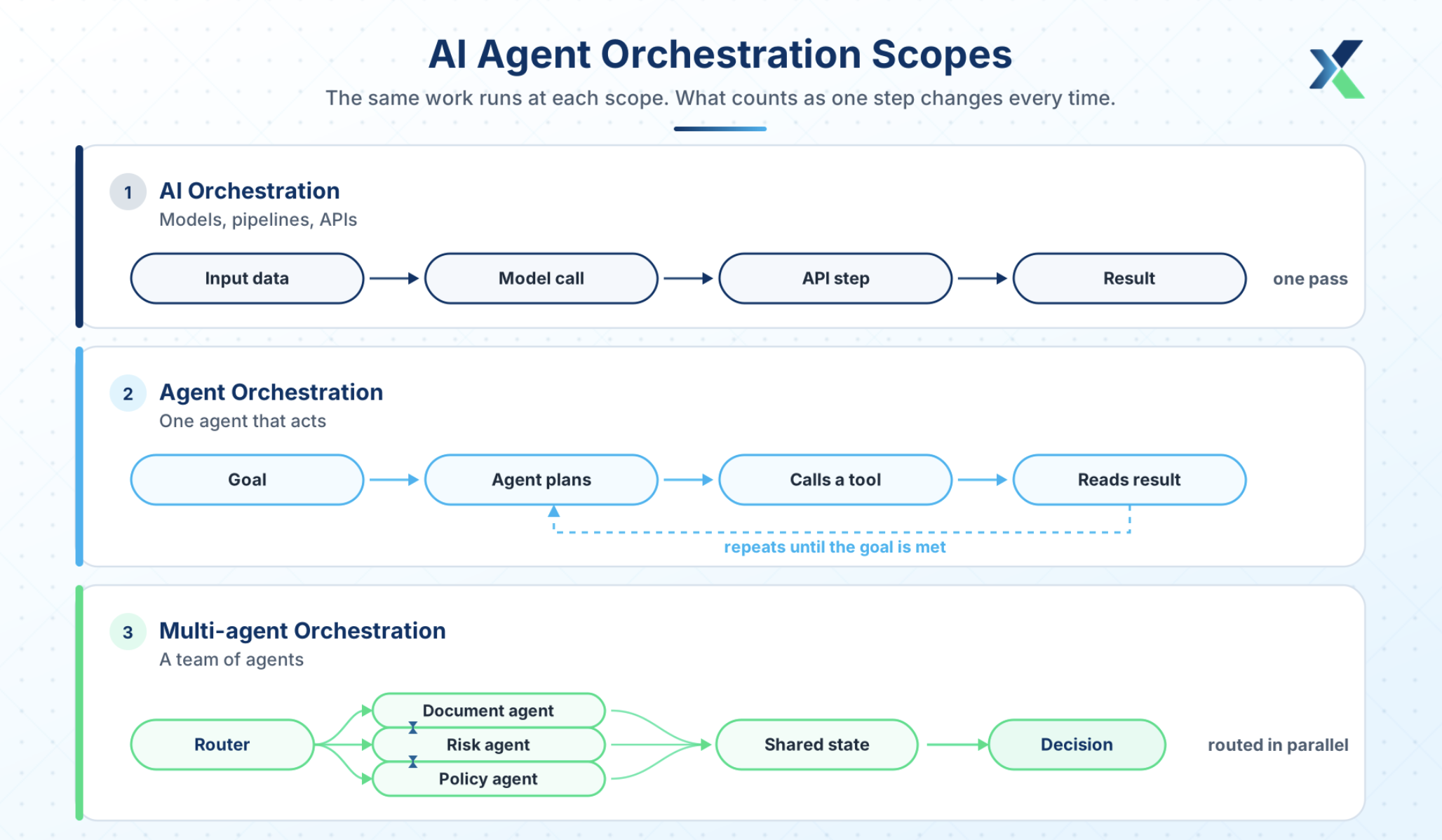
AI orchestration is the widest of the three. It coordinates models, data pipelines, and APIs so they run together as one system.
Agent orchestration narrows that scope to autonomous agents. The unit of work becomes an agent that decides and acts, rather than a model that returns a prediction.
Multiagent orchestration in AI adds the coordination problem between those agents. You now manage role allocation, agent-to-agent messaging, and what happens when two agents reach different conclusions.
All three scopes need somewhere to run, and that foundation looks the same in each case. It is worth walking through layer by layer.
AI Agent Orchestration Architecture: The Five Layers
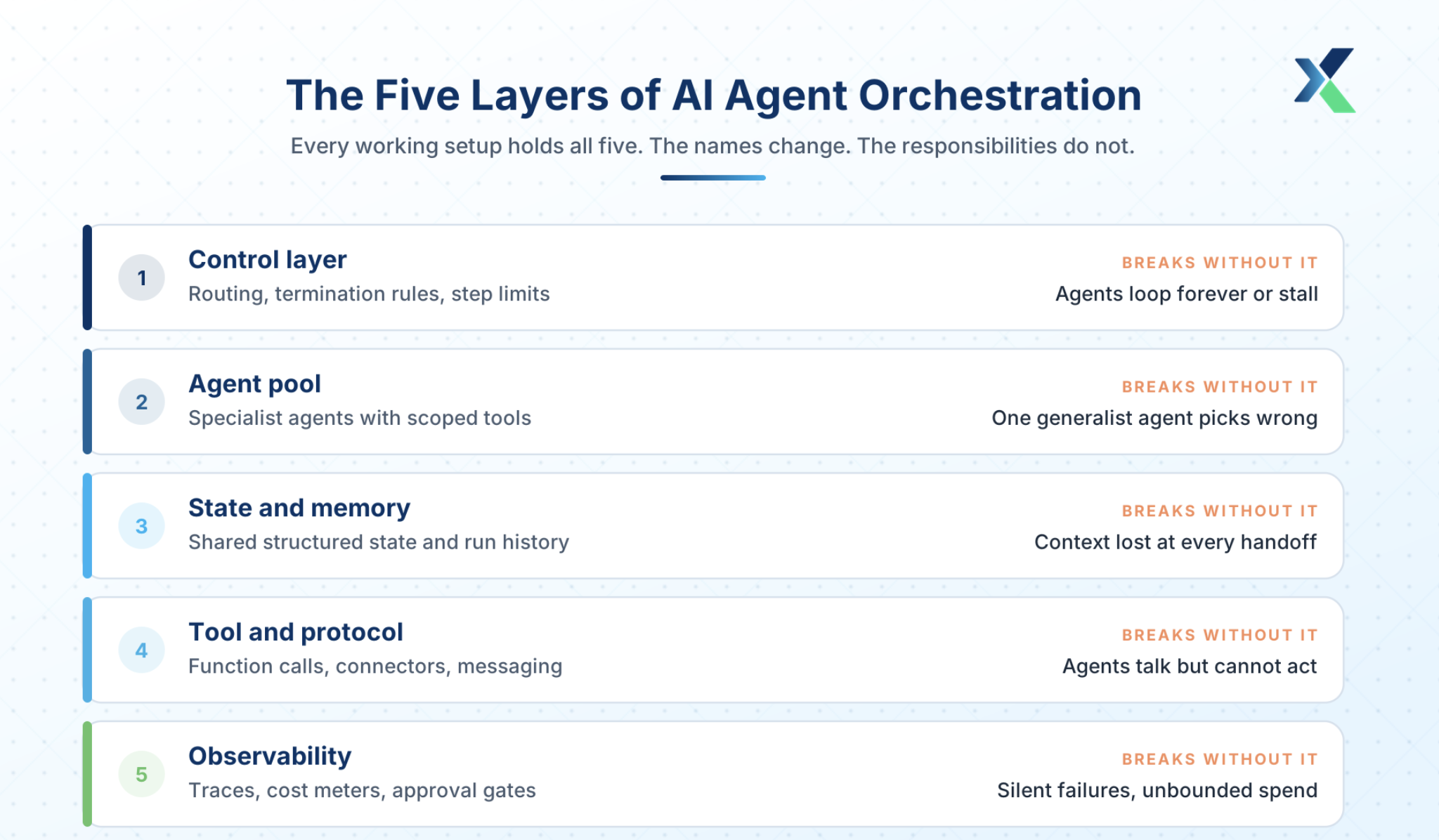
Whichever scope you work at, the same five layers appear. Vendors call them different names, but the responsibilities don't change.
Layer | What it holds | What breaks without it |
|---|---|---|
Control layer | Routing logic, termination rules, step limits | Agents loop forever or stall on tasks nobody owns |
Agent pool | Specialist agents with scoped prompts and tools | One generalist agent with thirty tools and poor selection |
State and memory | Shared structured state, run history, long-term stores | Context loss at every handoff, and repeated work |
Tool and protocol | Function calling, API connectors, agent messaging | Agents can talk but cannot act |
Observability | Traces, cost meters, approval gates, scoped credentials | Silent failures and unbounded spend |
Let's understand the five layers with one common use case: a bank triaging loan applications with a document agent, a risk agent, and a policy agent.
1. Control Layer: The Orchestrator
This layer holds the routing logic, the termination conditions, and the step limits. It is the only part of the system that knows the shape of the whole job, which is why every other layer answers to it.
In our bank loan example, the control layer is a single function. It reads the state, names the next agent, and returns FINISH once the run is done. So if the application has no extracted fields yet, it sends the work to the document agent and nowhere else.
It is imperative to keep that function in its own module, separate from the agents it calls. You will change routing far more often than you change an agent, and mixing the two makes both harder to test.
The reason is simple. Once a routing rule lives inside an agent's prompt, editing that rule edits the agent, and its real job shifts as a side effect.
The conflict arrives when two agents each hold part of the routing. The document agent hands work to the risk agent, and the risk agent hands it straight back because a field looks empty. Neither prompt is wrong on its own, so no single file explains the loop.
But with routing in one module, that rule lives in one place and changes in one place.
Routing only matters, though, if there is something worth routing to. That is what the next layer provides.
2. Execution Layer: The Agent Pool
This layer holds the agents themselves. Each one owns a single job and the tools that job needs. For instance, in our bank loan example, the system has three agents, each with one job. The document agent reads the application and extracts fields, the risk agent scores credit, and the policy agent checks the eligibility rules.
If you give one agent all three jobs, it must choose tools from a very long list at every turn. This increases the chance of picking the wrong tools, which leads to more plausible wrong answers. The impact is a failure you cannot locate.
The output is wrong because the prompt covers three jobs, and none tell you which instruction caused the failure.
But with one job per agent, a wrong output is automatically pointed to one agent, one prompt, and one short tool list. Again, three agents working in silos aren't a system; they need to deliver what they found somewhere. That is where the next layer comes in.
3. State and Memory
This layer holds the working state of a run, the record of what has happened, and any long-term store. In short, it is what one agent leaves behind for the next one to pick up.
In our loan example, that state is a single object. The document agent writes the extracted fields into it, and the risk agent then reads those fields and writes a score. If you use a chat transcript instead, every agent has to reread the conversation to find what it needs. That transcript grows with each turn, so the reading gets slower and less reliable as the run goes on.
The impact is work done twice. The policy agent misses a number buried in the document agent's prose, asks for it again, and you pay for a second extraction. Structured state prevents that, because a field is either filled or empty. Any agent can check which in one line of code, without rereading anything.
State, though, only records what happened inside the system. Doing anything outside it needs a different layer.
4. Tool and Protocol Layer
This layer is how agents reach anything beyond themselves. It holds function calls, API connectors, and schemas that describe what each one accepts.
In our loan example, each loan agent uses it differently. The document agent calls an OCR service to read a scanned form, the risk agent queries a credit bureau API, and the policy agent reads a rules table from the bank's own database.
Take this layer away, and those agents can only describe what should happen. That matters because a model always produces text, even with no tool behind it. So the failure here is not an error message. The risk agent simply writes a plausible credit score instead of fetching the real one, and the run completes looking healthy.
The same layer also carries agent-to-agent messaging. That is how the policy agent asks the document agent for a missing field, rather than filling the gap with a guess. With four layers in place, the system can decide, remember, and act. What it still cannot do is tell you what it did.
5. Observability and Guardrails
This last layer holds the traces, cost meters, approval gates, and scoped credentials. Teams usually postpone it because nothing visibly breaks without it on day one. A trace records each hop of a run. It logs which agent ran, what it was handed, and what it returned.
Without that record, a wrong decision gives you only the final answer. You cannot tell whether the risk agent scored badly or scored an application with empty fields. These two causes need opposite fixes. One is a prompt problem, and the other is a handoff problem, so guessing wrong costs you a week.
Guardrails are the other half of this layer. Scoped credentials stop the policy agent from writing to the loan ledger, and an approval gate holds any decision above a set amount until someone signs off.
Without those limits, one confused agent reaches as far as its credentials allow. The damage from a bad run is then whatever you connected it to.
If you look at the table above, notice what the right-hand column has in common. Each failure stays invisible until it becomes expensive, and that is one reason buying the layers bundled appeals to teams.
A multi-agent AI platform is simply these five layers sold as one managed product. Whether you build them or buy them, you still own all five.
The layers tell you what to build. The next question is how work should move through them.
Orchestration Patterns and When to Use Each
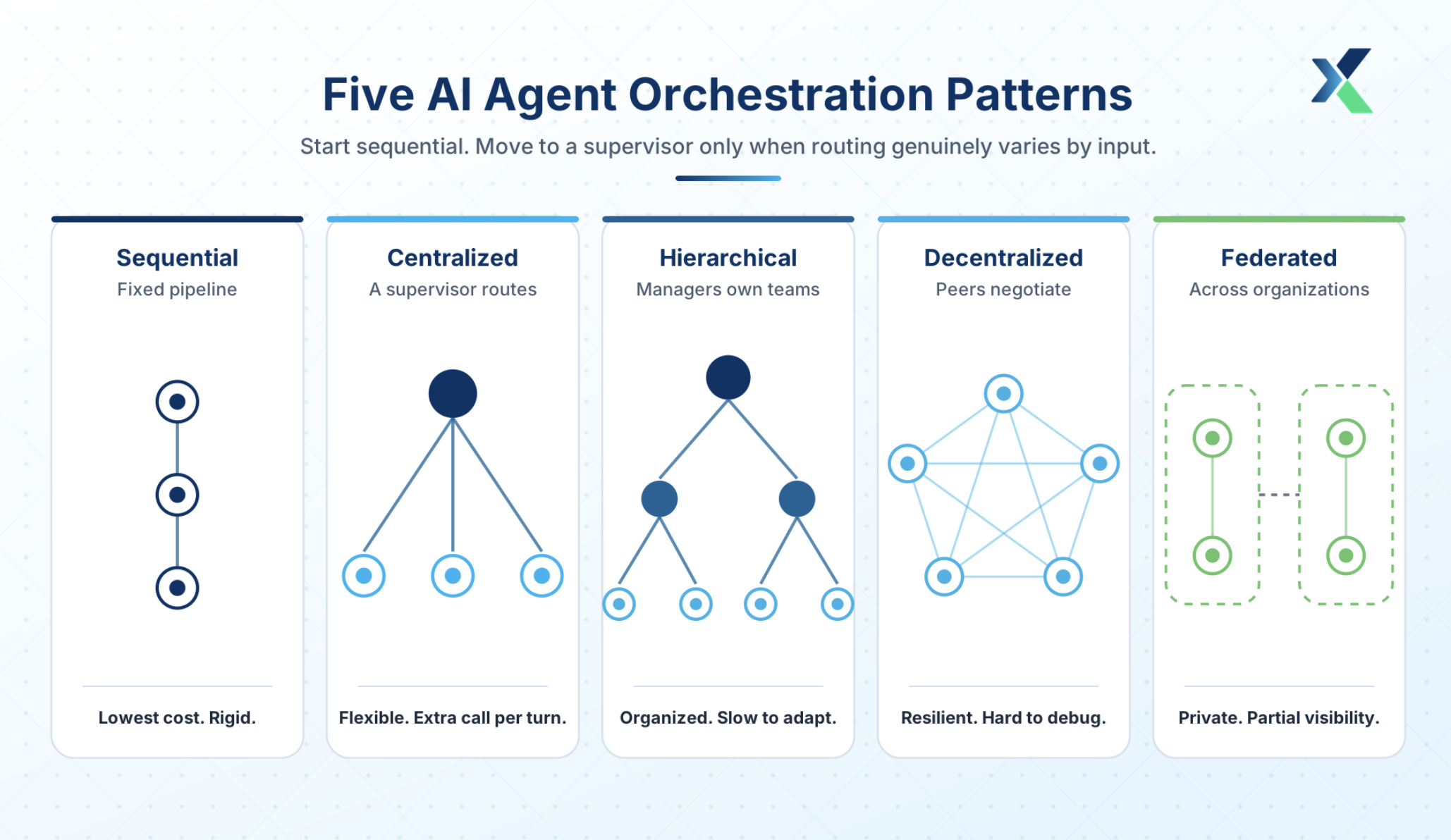
Five patterns cover almost everything running in production today. They differ in who decides what happens next, and that single choice drives cost, speed, and how easily you can debug a bad run.
1. Sequential
Agents run in a fixed pipeline, and each one hands its output to the next. Use it when the steps never change, such as extract, then validate, then summarize.
The weakness is the flip side of that strength: a fixed order cannot adapt when an input arrives in an unexpected shape. Regression suites tolerate that well, since their steps are known in advance. That is why AI agents in software testing usually start sequentially before adding anything smarter.
2. Centralized, or Supervisor
One supervisor reads the current state and picks the next agent on every turn. Use it when inputs vary enough that a fixed order would waste steps on work nobody needs.
That flexibility comes at a cost, because every turn adds a supervisor call before any real work happens. The supervisor also becomes the one component whose failure stops the entire run.
3. Hierarchical
Manager agents own teams of worker agents, and those managers coordinate with each other. Use it when a workflow spans distinct domains, such as finance, legal, and operations, where no single router would understand all three.
The structure keeps large systems organized, but it also fixes the shape of the work. Changing how two domains interact then means changing the hierarchy, not just a prompt.
4. Decentralized
Peer agents negotiate directly with each other, with no central controller. Use it when resilience matters more than control, since losing one agent does not stop the others.
You trade debugging for that resilience. With no central router, there is no single trace to read, so you reconstruct each run from the messages peers sent each other.
5. Federated
Agents coordinate across organizational boundaries without sharing the underlying data. Use it where privacy rules or regulations block a shared datastore, such as banking or healthcare.
Visibility is the limit here. You can see what the other side returned, but not how it got there, which makes joint debugging slow.
Laid out together, those trade-offs become easier to weigh side-by-side.
Pattern | How work routes | Best for | Cost and latency | Main failure mode |
|---|---|---|---|---|
Sequential | Fixed pipeline, agent to agent | Known, stable workflows | Lowest. One pass. | Rigid. Cannot adapt to odd inputs. |
Centralized | Supervisor picks the next agent each turn | Inputs that vary and need routing | High. Extra call per turn. | Supervisor is a single point of failure. |
Hierarchical | Managers own teams of agents | Large workflows across domains | High. Two coordination layers. | Rigid layers slow adaptation. |
Decentralized | Peer agents negotiate directly | Resilience over control | Variable. Chatter grows fast. | Hard to debug. No single trace. |
Federated | Agents coordinate across organizations | Privacy or regulatory boundaries | High. Trust overhead. | Partial visibility across the boundary. |
One recommendation follows directly from the table. Start sequential, and move to a supervisor only when routing genuinely varies by input.
Most teams do the reverse, because a supervisor feels more intelligent than a fixed pipeline. They then pay for an extra model call on every turn, when a simple rule could have made those same decisions for nothing.
The clearest way to see that cost is to build a supervisor yourself and count the calls it adds.
How to Build a Supervisor-Orchestrated System: A Worked Example
Take the same loan application triage, handled by those three specialist agents. The document agent extracts fields, the risk agent scores credit, and the policy agent checks eligibility rules.
A supervisor sits above them and decides who runs next and when the run ends. The code below stays framework-agnostic, so you can port it to any orchestration library once the shape makes sense.
Three helpers appear in the snippets and stay deliberately generic, because every stack implements them differently.
The function llm() sends a prompt to your model, summarize() compresses state into a short description, and trace() writes a structured log line.
Step 1: Define the shared state
from typing import TypedDict

class RunState(TypedDict):
    application: dict          # raw input
    extracted: dict            # document agent output
    risk_score: float | None   # risk agent output
    policy_result: str | None  # policy agent output
    completed: list[str]       # agents already run
    steps: int                 # loop guard
State here is a typed object rather than a chat transcript, and that choice matters more than it first appears. Transcripts grow with every turn, drift away from the facts, and lose their structure along the way.
Typed state survives handoffs intact instead. Each agent reads the fields it needs and writes only its own, so no agent overwrites another's work by accident.
Step 2: Write the supervisor
WORKERS = ["document_agent", "risk_agent", "policy_agent"]

def supervise(state: RunState) -> str:
    if state["steps"] >= 8:
        return "FINISH"              # hard loop guard
    prompt = (
        f"Workers: {WORKERS}. Completed: {state['completed']}. "
        f"State: {summarize(state)}. "
        "Reply with one worker name or FINISH."
    )
    return llm(prompt).strip()
Read the step cap before the prompt, because the cap carries the heavier load. An orchestrator with no hard limit will loop on an ambiguous task until the budget runs out.
So set that cap first and tune the prompt afterward. It is the cheapest safety net in the whole system.
Step 3: Run the loop with tracing
def run(state: RunState) -> RunState:
    while True:
        nxt = supervise(state)
        trace("route", step=state["steps"], chose=nxt)
        if nxt == "FINISH":
            return state
        state = AGENTS[nxt](state)
        state["completed"].append(nxt)
        state["steps"] += 1
The trace call is not decoration, and it earns its place the first time a run goes wrong. Without a record of each hop, you cannot explain why the system approved an application it should have declined.
Now count the model calls in that loop. A five-hop run costs six, because the supervisor thinks once before every hop. That sixth call is exactly what flexible routing buys you.
You can read orchestration code. Writing it under production constraints is a different skill. Our Agentic AI Course builds both, with live projects. Check Your Eligibility.
Orchestration Tools and Frameworks You Will Meet
The above example deliberately used no framework. Frameworks give you the same loop with state handling, retries, and tracing already written. They differ mainly in how much of the control flow they let you see.
So, you need to learn the categories, not the product names. Names change every few months, while the categories below have held steady.
Open-Source Frameworks
Three shapes dominate the open-source side.
Graph-based frameworks make control flow explicit as nodes and edges, which suits workflows you will need to audit later.
Role-based frameworks let you define agents as a crew with assigned responsibilities, which suits research and content work where strict ordering matters less.
Conversation-based frameworks have agents coordinate by messaging each other, which suits open-ended problems with no fixed path.
Whichever shape you choose, inspect the state model and the trace format before anything else. You will spend more hours reading traces than writing agents, so the format you inherit shapes your debugging for the life of the system.
Enterprise Platforms
Enterprise platforms bundle those same five layers with governance, connectors, and identity management.
For instance, Salesforce ships agents that act on its CRM data, Microsoft positions Copilot as an assistant layer with agent extensions, and IBM packages orchestration with enterprise governance controls.
The trade-off here is setup time against flexibility. These platforms get you running quickly and make later migration harder, which suits teams integrating AI agents into a workforce where governance matters more than stack control.
How to Choose Between Open-source Frameworks and Enterprise Platforms?
These two groups cover most of what you will evaluate, so the decision comes down to criteria rather than category. Score every option on four pointers as below.
Control flow visibility: Can you see and version the routing logic, or is it hidden in prompts?
State persistence: Can a run pause, survive a restart, and resume?
Human approval support: Can you gate a step and wait for a person?
Observability hooks: Can you export traces and costs into your existing monitoring?
The fourth criterion decides more than the other three, because a framework you cannot trace will pass every demo and then fail your first incident review. Incident reviews are where orchestration really gets judged, so it helps to know in advance what usually goes wrong.
What Breaks in Production and How to Prevent It
Tutorials stop at the happy path, where every agent returns clean output on the first attempt. Production starts after that point, and five failures account for most of the pain.
Context Loss at Handoff
Agent three asks for data that agent one already pulled, because nothing carried that result forward. Runs get longer and costlier, and two agents sometimes reach contradictory conclusions from different data.
Fix it by passing structured state instead of conversation history. Make every agent declare the fields it reads and writes, so gaps surface in code review rather than in production.
Runaway Loops
Two agents hand the same task back and forth, each waiting for the other to finish it. Nothing throws an error, so nothing alerts you, and the bill grows quietly in the background.
Cap steps, tokens, and wall-clock time on every run. Then treat a run that hits a cap as a failure to investigate, never as a limit to raise.
Silent Failure
The run completes, and the output looks reasonable, but it is wrong. One agent returned a plausible guess because its tool call failed and nothing checked the result before moving on.
Trace every hop and log tool inputs alongside outputs, so a guess stays distinguishable from a real fetch. Keep a replay harness as well, so you can rerun a known bad case against new code.
Unmeasurable Quality
Agent systems often have no single correct output to grade against, because two different paths can both be valid. Accuracy scoring stops being useful the moment that happens.
So grade the trajectory instead of the answer alone. Check whether the right agents ran, in a sensible order, using the tools you expected them to use.
Oversized Blast Radius
One compromised or confused agent can write to production systems. That risk grows with every tool you connect, because each connection widens what a single bad decision can touch.
Scope credentials per agent, so each one holds the minimum access its job requires. Then put a human approval gate on any action that writes, pays, or sends.
Those five fixes compress into a checklist worth keeping beside the code.
Start with the simplest pattern that works. Add a supervisor only when routing genuinely varies.
Give every agent one job and the smallest tool set that job needs.
Cap steps, tokens, and wall-clock time on every run.
Trace every hop before you ship, not after the first bad run.
Gate any action that writes, pays, or sends behind human approval.
Evaluate the path the system took, not only the answer it returned.
Skills and Roles That Orchestration Work Demands
Every line on that checklist is an engineering habit, not an AI technique. That tells you what the role actually demands, and it leans further toward software engineering than most people expect.
Python, with real comfort in typing, async code, and concurrency.
API design, because agents act through interfaces you will define.
System design for partial failure, including retries, timeouts, and idempotency.
LLM evaluation, so you can grade a trajectory and not just an answer.
Cost modeling per run, since every routing decision is a billable call.
Security scoping, so one agent cannot reach what it has no business touching.
Those skills map onto a handful of job titles: AI engineer and agent platform engineer cover most build roles, forward deployed engineer covers the client-facing version, and MLOps engineer covers the reliability side.
The thread running through all four is the same. Teams want people who can ship an agent system that survives a bad week, and demoing one on a good day is a different skill. It is also the summary of everything above.
Orchestration is a design discipline rather than a framework choice, and the teams that succeed cap, trace, and scope before they scale.
So, start with the simplest pattern your workflow allows. Add coordination only when the work genuinely demands it, and let the failures you have actually seen decide what you add next.
Frequently Asked Questions
What is AI agent orchestration in simple terms?
AI agent orchestration is the coordination layer that makes several specialist AI agents work as one system. It decides which agent runs next, what context that agent receives, and when the job is finished. Think conductor, not musicians. Without it, agents duplicate work, lose context between steps, or stall on tasks nobody owns.
What is the difference between an AI agent and ChatGPT?
ChatGPT is a chat interface over a large language model. It answers your prompt and stops. An AI agent takes a goal, plans steps, and calls real tools. It reads the results and keeps going until it meets the goal. The difference is autonomy and tool access, not the underlying model.
Is ChatGPT an example of agentic AI?
Partly. In plain chat mode, it only responds to prompts, so it is not agentic. When it browses, runs code, or executes multi-step tasks with tools, it behaves as an agent. Agentic AI is a property of a system, not a product label. The test is simple. Does the system choose its own next action and act on the result?
What is an orchestrator for AI agents?
An orchestrator routes work between agents. It assigns each task to the right agent and passes the state that agent needs. It then decides the next step from the result. It ends the run when the goal is met, or a limit is hit.
What are the main types of AI agent orchestration architecture?
Five patterns cover most systems. Sequential runs agents in a fixed pipeline. Centralized uses one supervisor to route work. Hierarchical adds manager layers over agent teams. Decentralized lets peer agents negotiate directly. Federated connects agents across organizations without sharing raw data. Many production systems combine two, often a supervisor over sequential sub-pipelines.
Which tools are used for AI agent orchestration?
Three categories. Graph-based open-source frameworks give you explicit control flow and state. Role-based frameworks let you define agents as a crew with assigned responsibilities. Enterprise platforms from vendors such as Salesforce, Microsoft, and IBM bundle orchestration with governance and connectors. Choose on control flow visibility, state persistence, approval support, and observability hooks.