There are four primary collection data structures in Python, viz., list, tuple, set, and dictionary. Among them, lists and tuples appear very similar. Both store ordered data, support indexing, allow duplicates, and can hold mixed data types. Interestingly, despite their surface-level similarities, several important differences between list and tuple in Python exist if you dig a bit. In this article, the focus is on exploring these nuances, examining performance, memory behavior, internal mechanics, and practical implications in depth. Let’s start this discussion by having a basic idea regarding the difference between tuple and list in Python.
What Is the Difference Between List and Tuple?
The core difference between tuple and list in Python is mutability. A list is mutable, i.e., its editable – elements can change after creation. A tuple, however, is immutable, which means that its elements cannot be modified.
Additional basic differences between list and tuple in Python are that lists use square brackets [] and have several methods, while tuples use parentheses () and have limited methods.
Now you might think there isn’t much to discuss regarding list vs tuple. And while the difference of mutability seems simple enough, this single difference affects performance, memory behavior, and internal mechanics in more ways than you might expect. While a quick comparison between a list and tuple in Python is as follows, later on, the aim is to have a deeper understanding of the differences between these two data structures.
| Features | LIST | TUPLE |
|---|---|---|
| Mutability | Mutable | Immutable |
| Syntax | [] | () |
| Size | Dynamic | Fixed |
| Methods | Many | Limited |
In order to answer what is the difference between list and tuple in python, you first need to answer what is list and tuple in Python. Let’s take up the list first in this discussion on list vs tuple.
What Is a List in Python?
A Python list is a built-in data structure. It stores an ordered sequence of elements and can also preserve insertion order. Lists use zero-based indexing, meaning the first element is at index 0.
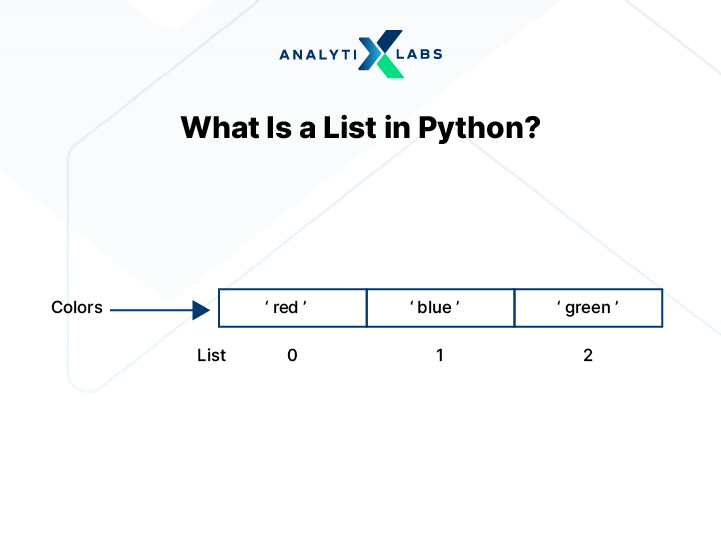
They are undoubtedly one of Python’s most commonly used collection types due to their flexibility. The main features of a list that you should know are as follows-
1. Mutability
Lists are mutable, which means you can modify, replace, insert, or delete elements once you have created a list. This flexibility is key as it makes lists suitable for dynamic datasets where values frequently change.
2. Ordered and Indexed
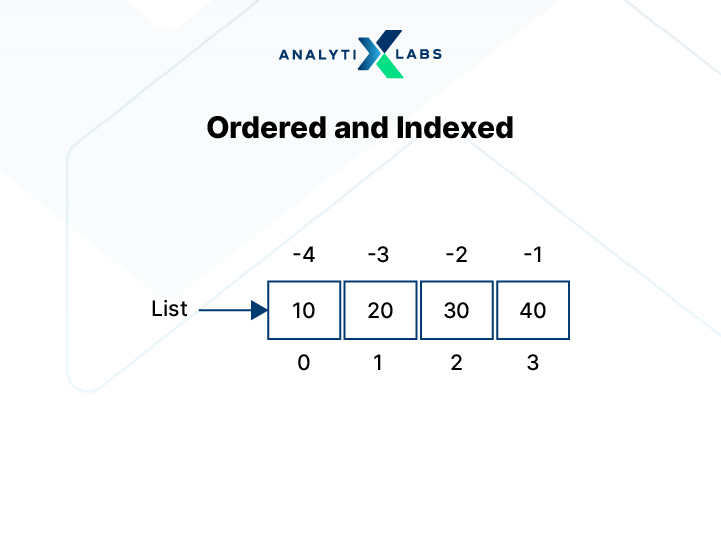
Lists maintain element order and support both positive and negative indexing. Also note that they also allow slicing to efficiently extract subsets of data.
3. Heterogeneous and Nestable
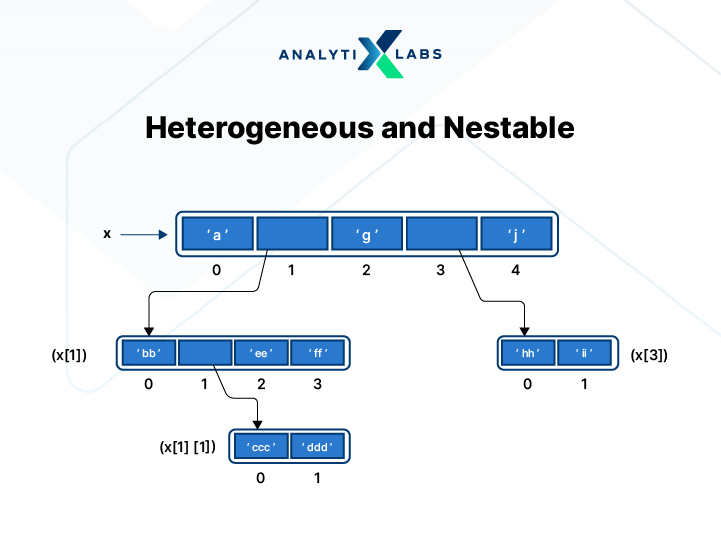
Lists can store mixed data types, including numbers, strings, dictionaries, tuples, and other lists, thereby making them a heterogeneous as well as a nestable data structure. Thanks to this feature, they are able to support real-world data modeling and structured records.
For example, one can create a mixed list having different kinds of data types:
mixed_list = [10, "Python", 3.14, None]

mixed_list

4. Dynamic and Growable
Lists can automatically resize when elements are added or removed. This dynamic memory allocation makes them ideal not only for dynamic but also for evolving datasets.
5. Rich Built-in Operations
Lists support a wide range of operations. This ranges from concatenation and iteration to membership testing (using in and not in) and list comprehensions. It’s because of these capabilities that lists appear extensively across Python programs and libraries.
Now you are one step closer to answering what is the difference between list and tuple in python. Let’s move ahead with the discussion on what is list and tuple in Python and focus on tuple.
What Is a Tuple in Python?
A tuple in Python is also an ordered collection of elements, but it is immutable. Therefore, once defined, its contents cannot be changed. Tuples preserve insertion order and, like lists, use zero-based indexing for accessing elements. They are designed for storing fixed data structures where modification is not required. The key features about tuple that you should know are as follows-
-
Immutability
The main and most obvious feature of a tuple is that it does not allow item assignment, deletion, or appending. Any attempt at modification raises a TypeError. Thanks to this immutability, it improves data integrity and prevents unintended side effects in large programs.
-
Ordered and Indexed
Tuples maintain element order and support positive and negative indexing. Indexing runs in constant time, O(1). This makes access efficient.
-
Heterogeneous and Nestable
A tuple, like a list, can contain mixed data types and can include other tuples and lists.
-
Creation Syntax
Tuples use parentheses with comma-separated values. If you want to create a single-element tuple, it requires a trailing comma, such as (42,). Also, remember that they can also be created using the tuple() constructor from lists, strings, or other iterables.
-
Hashability and Memory Efficiency
Tuples are hashable when all elements are immutable, thus enabling their use as dictionary keys. Also, they generally consume less memory than lists (because they are immutable).
With the basic concepts out of the way, it’s time to understand the difference between list and tuple in Python in detail.
Key Differences Between List and Tuple
While an overview of the difference between list and tuple in Python has been covered at the beginning of the article, it’s crucial to have a deep understanding of this aspect. That’s because tuple vs list while looking similar, have profound consequences if used incorrectly. Below is a list of key difference between list and tuple in Python.
-
Mutability
Mutability is the most critical difference between a tuple vs list.
As discussed earlier, a list is mutable, which means that you can modify its elements after creation. So, for instance, if you have created a list, you can add, remove, or update elements inside a list at any time, which is something I have done below-
# creating a list
numbers = [10, 20, 30]

# updating element
numbers[1] = 25

# adding element
numbers.append(40)

# removing element
numbers.remove(10)
print(numbers)

Thus, the list updates in place without restriction. This is a stark contrast to a tuple, which is immutable, meaning its elements cannot change once defined. Notice below how, when I attempt to modify a tuple, Python raises a TypeError.
# creating a tuple
coordinates = (10, 20, 30)

# updating element
coordinates[1] = 50
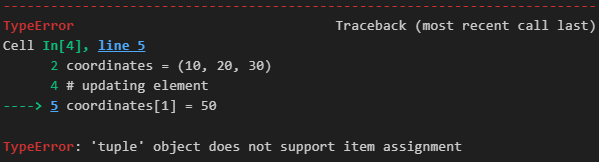
Similarly, tuples also do not allow appending or element deletion.
Therefore, the bottom line is that-
-
lists are mutable and therefore support dynamic data manipulation
-
tuples are immutable, thereby protecting data integrity throughout execution
-
Creation Speed Differences
The second key difference between list and tuple in Python is in terms of performance. The difference arises primarily from mutability and memory allocation behavior. Tuples are generally faster than lists for creation and access operations.
Creating tuples is typically faster than creating lists. This difference occurs because tuple creation requires fewer bytecode instructions. For example, disassembly using Python’s dis module shows that tuple literals are loaded directly using a LOAD_CONST instruction, while list literals require BUILD_LIST and LIST_EXTEND operations.
from dis import dis
def my_list():
    x = [10, 20, 30, 'xyz']
    y = x[0]
def my_tuple():
    x = (10, 20, 30, 'xyz')
    y = x[0]
print("Disassembly of List Function:")
dis(my_list)
print("")
print("Disassembly of Tuple Function:")
dis(my_tuple)
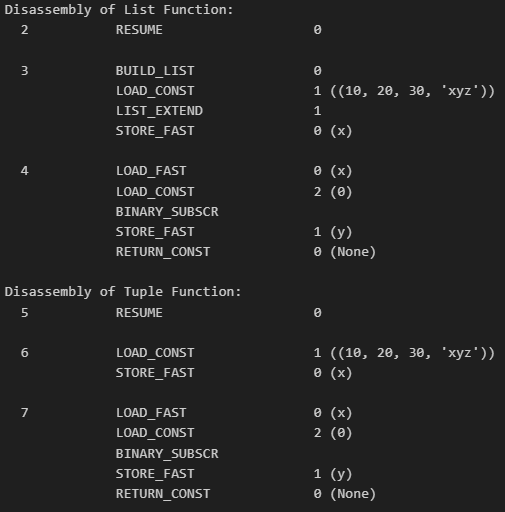
This means list creation involves additional bytecode steps, thereby increasing execution overhead.
-
Memory Usage Differences
Memory usage plays a key role in the difference between list and tuple in Python. The difference is generally significant because lists are dynamic, while tuples are fixed in size. Lists require additional memory to support resizing operations. Tuples, on the other hand, allocate only the memory required for their elements at creation.
-
Data Security and Hashability
Another downstream effect of immutability is that it directly affects data security and hashability. Because tuples are immutable, their contents cannot change after creation. This property protects data from accidental modification during program execution. Lists, however, are mutable and can change at runtime. This flexibility increases the risk of unintended updates.
A key technical difference lies in hashability. Do note that tuples are hashable if all their elements are hashable. Also, hashable objects can be used as a dictionary key, for example:
coordinates = {
    (10, 20): "Location A",
    (30, 40): "Location B"
}

coordinates

This works because tuples are immutable. Lists, on the other hand, are not hashable and cannot be used as dictionary keys. Attempting to use a list as a key raises a TypeError.
coordinates = {

    [0, 20]: "Location A",

    [30, 40]: "Location B"

}
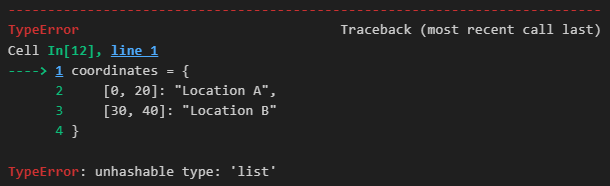
This distinction becomes critical in scenarios involving mapping, caching, or lookup tables.
Therefore, because tuples guarantee immutability, they provide structural reliability and safer sharing across program components, thereby enhancing data security. Lists, however, prioritize flexibility over structural guarantees and safety.
-
Syntax and Usage Differences
Another fundamental difference between a list and tuple in Python is that they differ clearly in their literal syntax.
A list uses square brackets [], whereas A tuple uses parentheses ().
For example:
# creating a list
my_list = [1, 2, 3]

# creating a tuple
my_tuple = (1, 2, 3)
Although parentheses are commonly used when creating tuples, do keep in mind that the comma actually defines the tuple. Also note that for a single-element tuple, a trailing comma is mandatory.
single_value = (42,)   # tuple

not_tuple = (42)       # integer
As you can see, without the comma, Python treats it as a regular (scalar) value.
-
Constructor Differences
Lists can be created using the list() constructor.
list(range(5))
Tuples can be created using the tuple() constructor.
tuple(range(5))
Both constructors can convert iterables into their respective types.
-
Packing and Unpacking
Tuples support sequence packing and unpacking. This means it groups multiple values into a single tuple automatically.
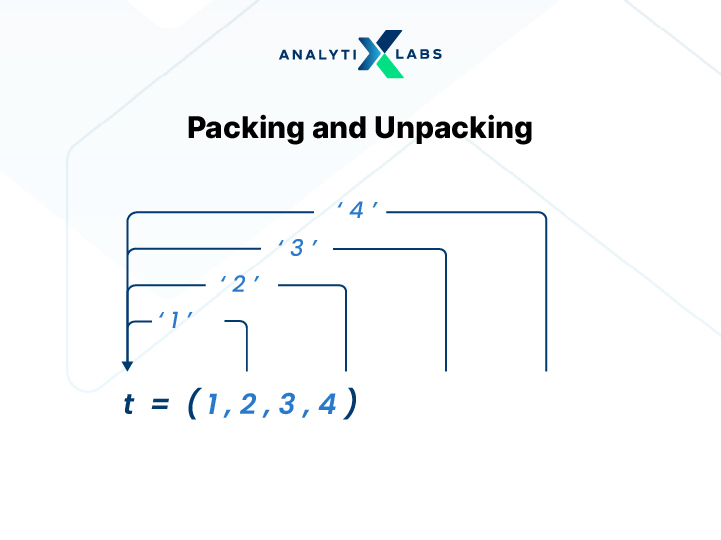
t = (1, 2, 3) # tuple packing
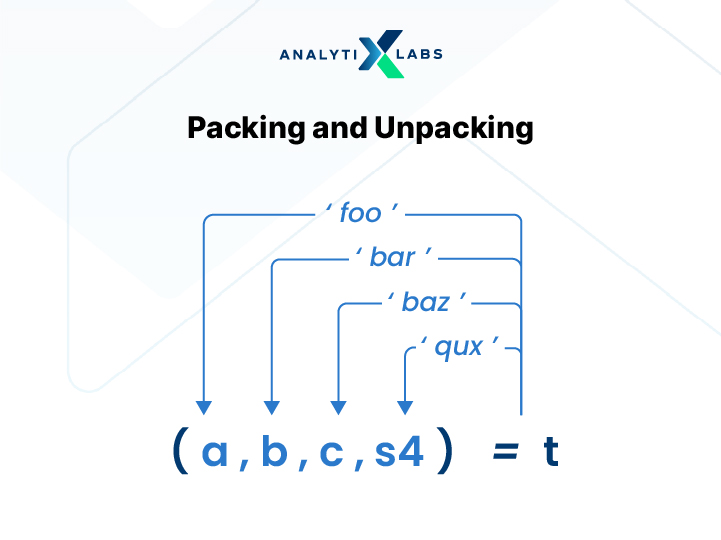
Unpacking assigns tuple elements directly to variables.
a, b, c = t
print(a, b, c)

This syntax assigns values directly without indexing, i.e., eliminating the need for indexing
Tuple unpacking also enables value swapping in a single statement.
x = 10
y = 20

x, y = y, x
print(x, y)

Lists also support unpacking.
a, b, c = [4, 5, 6]
However, tuple unpacking is more idiomatic in Python because it aligns with immutability and constant grouping.
-
Size Flexibility (Dynamic vs Fixed Length)
Size flexibility is another key distinguisher of lists from tuples, especially at a structural level. A list has a dynamic size, meaning it can grow or shrink during execution. This means you can append, insert, or remove elements without recreating the list.
items = [1, 2, 3]
items.append(4)
items.remove(2)
items
The list adjusts automatically after each modification. A tuple, on the other hand, has a fixed length once created. This means you cannot add or remove elements from a tuple, and any attempt raises a TypeError. Because tuples cannot resize, Python allocates memory only once. Lists, however, may reallocate memory as they expand. Thanks to this dynamic behavior, the list dramatically improves flexibility but introduces resizing overhead. In contrast, tuples enforce structural consistency by maintaining a constant length throughout their lifecycle.
-
Built-in Methods
Lists provide a broad range of methods because they are mutable. These include mutator methods that modify data in place. Common list methods include append(), extend(), insert(), remove(), pop(), sort(), and clear().
# creating list
numbers = [1, 2, 3]
print("Initial list:", numbers)

# append element
numbers.append(4)
print("After append(4):", numbers)

# remove element
numbers.remove(2)
print("After remove(2):", numbers)

# insert element at index 1
numbers.insert(1, 10)
print("After insert(1, 10):", numbers)

# pop last element
numbers.pop()
print("After pop():", numbers)

# sort list
numbers.sort()
print("After sort():", numbers)

# clear list
numbers.clear()
print("After clear():", numbers)
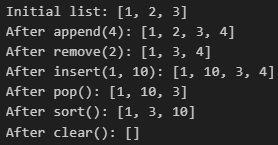
These operations directly alter the list structure. Also, lists support slicing assignments, allowing multiple elements to be replaced at once.
# creating list
numbers = [10, 20, 30, 40, 50]
print("Original list:", numbers)

# replacing elements from index 1 to 3
numbers[1:4] = [200, 300]
print("After slicing assignment:", numbers)

These extensive methods make lists suitable for frequent insertions and deletions.
# creating list
l1 = [10, 20, 30]

# viewing methods
print([method for method in dir(l1) if not method.startswith("_")])

Tuples, in contrast, support very few built-in methods.
# creating tuple
t1 = (10, 20, 30)

# viewing methods
print([method for method in dir(t1) if not method.startswith("_")])
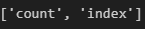
Because tuples are immutable, they only provide accessor methods such as count() and index().
values = (1, 2, 2, 3)
values.count(2)
values.index(3)
values
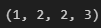
As you can see, tuples do not support append(), remove(), or insert(). Such a restriction helps in reducing accidental structural modifications.
In short, lists expose a rich modification interface, while tuples intentionally limit operations to preserve immutability.
-
Iteration and Lookup Efficiency (Micro-performance)
Beyond object creation speed, lists and tuples also differ slightly in iteration and element access efficiency. Tuples often perform marginally better in tight loops because they are immutable and stored in a fixed memory layout. As lists need to account for dynamic resizing and mutability, this introduces minor internal overhead.
Also, because tuples occupy a single, fixed memory block, Python can optimize traversal more effectively. However, while the difference per operation is small, it can accumulate in large loops or performance-sensitive systems. With that being said, in typical applications, the improvement is negligible. However, in compute-heavy workloads, tuples can offer small but consistent micro-performance benefits during repeated access and iteration tasks.
-
Copying Behavior and Memory Reference Behavior
Copying behavior also differs significantly between lists and tuples because of mutability.
-
List Copying Behavior
Assigning one list to another variable does not create a new list. Rather, it creates a second reference to the same memory object.
original = [1, 2, 3]
copy = original

print("Original ID:", id(original))
print("Copy ID:", id(copy))

copy[0] = 99

print("Original after modification:", original
Copy also changes original. In order to create a true copy, you have to use list.copy(), slicing, or the list() constructor.
copy = original.copy()
print("New Copy ID:", id(copy))

Now the memory address differs. This behavior is critical in large programs where unintended mutations cause bugs.
-
Tuple Copying Behavior
Tuples behave differently because, again, they are immutable. Here, assigning a tuple to another variable is safe since its contents cannot change.
t1 = (1, 2, 3)
t2 = t1

print("Tuple ID:", id(t1))
print("Assigned ID:", id(t2))

Here, both reference the same object, but immutability prevents any side effects. Thus, assigning a tuple to another variable does not risk accidental modification. Even operations that appear to “modify” a tuple actually create a new tuple object.
responses = ()
print("Before addition ID:", id(responses))

responses += ("Yes",)

print("After addition ID:", id(responses))

Notice how the memory ID changes after concatenation, with each concatenation creating a new tuple in memory. Python therefore allocates a new tuple instead of modifying the original. This differs from lists, where append() keeps the same memory address. Because each addition creates a new object, tuples are inefficient for dynamic accumulation tasks.
Therefore, again as seen before, lists support efficient in-place modification, while tuples prioritize immutability and structural consistency.
To summarize, a list and a tuple can be differentiated on the following aspects-
| Feature | List | Tuple |
|---|---|---|
| Mutability | Mutable (elements can be added, removed, or modified) | Immutable (elements cannot be changed after creation) |
| Size Flexibility | Dynamic; can grow and shrink | Fixed; size cannot change after creation |
| Syntax | Defined using square brackets [] | Defined using parentheses () |
| Creation Speed | Slightly slower due to dynamic allocation | Faster due to fixed size and immutability |
| Iteration Speed | Slightly slower | Slightly faster |
| Lookup Efficiency | O(1) indexing | O(1) indexing (marginally faster) |
| Memory Consumption | Higher memory usage | Lower memory usage |
| Memory Allocation Strategy | Uses over-allocation to support resizing | Allocates exact required memory once |
| Bytecode Optimization | Requires BUILD_LIST instruction | Uses optimized constant loading |
| Built-in Methods | Extensive API (append, extend, insert, remove, pop, sort, clear, etc.) | Limited API (count, index) |
| Element Reassignment | Supported | Not supported (TypeError on modification) |
| Hashability | Not hashable | Hashable (if elements are hashable) |
| Use as Dictionary Key | Not allowed | Allowed |
| Copying Behavior | Assignment shares reference; explicit copy creates new object | Assignment safe; concatenation creates new tuple |
| Duplicate Elements | Allowed | Allowed |
| Heterogeneous Data Storage | Supported | Supported |
| Indexing & Slicing | Supported | Supported |
| Data Safety | More prone to accidental modification | Safer due to immutability |
| Use Case Orientation | Best for frequently changing data | Best for fixed, constant data structures |
| Structural Stability | Structure can change during execution | Structure remains constant |
To further enrich the understanding, let’s explore the difference between list and tuple in python with examples.
List vs Tuple: Real-World Python Examples
Let’s have a purely practical, code-driven, and demonstrative exercise. This will help in understanding the difference between list and tuple in python with examples.
Example 1 – Modifying a List vs. Modifying a Tuple
As indicated earlier, lists and tuples behave differently during modification.
-
List: In-Place Modification
Lists modify data without creating a new object. What this means is that the list technically has the same memory address before and after modification. Therefore, the list updates in place, which confirms that they are mutable and support in-place changes. Notice how below the memory id of a list before and after modification is the same.
# creating a list
numbers = [10, 20, 30]
print("Original list:", numbers)

print("Before modification ID:", id(numbers))

# modifying the list
numbers.append(40)
numbers[1] = 25

print("After modification ID:", id(numbers))
print("Updated list:", numbers)
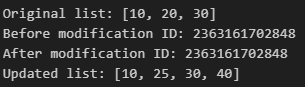
-
Tuple: Attempting Direct Modification
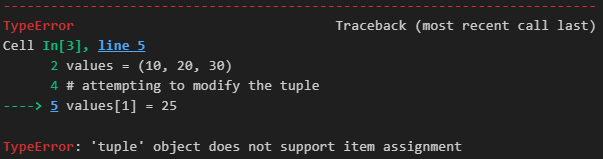
As you have already seen this so many times now, tuples do not allow element reassignment and any attempt to do so raises a type error. Thus, Python prevents any structural modification of tuples.
# creating tuple
values = (10, 20, 30)

# attempting to modify the tuple
values[1] = 25
-
Tuple: Concatenation Creates a New Object
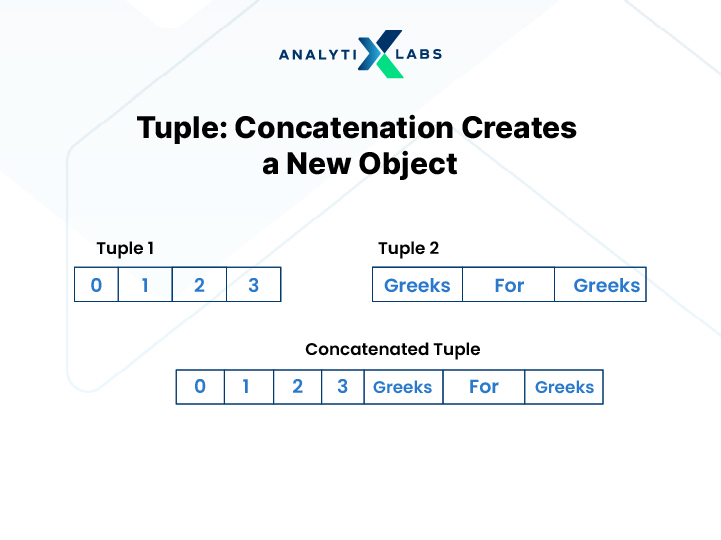
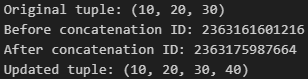
Now observe what happens if you try to “modify” a tuple by using concatenation. Notice how the memory address before concatenation is different from the memory address after concatenation. This shows that Python creates a new tuple object rather than modifying the original one, thereby maintaining the immutability of tuples by design.
# creating tuple
values = (10, 20, 30)
print("Original tuple:", values)

print("Before concatenation ID:", id(values))

# "modifying" the tuple through concatenation
values = values + (40,)

print("After concatenation ID:", id(values))
print("Updated tuple:", values)
Example 2 – Performance and Memory Analysis
There are numerous parameters and ways through which you can assess the performance of tuples and lists. Below are some of the key examples that can help you better understand the difference between a list and a tuple.
-
Creation Speed
You can use the timeit module. It helps you to measure execution time precisely. As you already know, tuple creation is comparatively faster than list creation. Below are the benchmark experiments, where you would notice how tuple creation consistently completes faster than a list. This happens because Tuples require fewer bytecode instructions and also do not allocate extra memory for resizing. Lists, on the other hand, use dynamic allocation logic, making them slow.
import timeit

# creating a list 10,00,000 times and measuring creation time
list_time = timeit.timeit(stmt="[1, 2, 3, 4, 5]", number=1000000)

# Creating a tuple 10,00,000 times and measuring creation time
tuple_time = timeit.timeit(stmt="(1, 2, 3, 4, 5)", number=1000000)

print("List creation time:", list_time)
print("Tuple creation time:", tuple_time)

-
Iteration Speed
Let’s also have a look at the iteration speed. Typically and more often than not, tuples show marginally faster iteration. While the difference per loop is small, in performance-critical systems, micro-optimizations accumulate, making this difference noteworthy. The reason why tuple iteration gets completed faster than list iteration is primarily because tuples are stored in a single memory block. Lists, as discussed earlier, require additional handling due to their dynamic resizing capability.
# measuring iteration time over a list 10,00,000 times
list_iter = timeit.timeit(
    stmt="for i in [1,2,3,4,5]: pass",
    number=1000000
)

# measuring iteration time over a tuple 10,00,000 times
tuple_iter = timeit.timeit(
    stmt="for i in (1,2,3,4,5): pass",
    number=1000000
)

print("List iteration time:", list_iter)
print("Tuple iteration time:", tuple_iter)

-
Lookup Time
Let’s also explore how Lookup operations differ for tuples and lists as far as speed is concerned. Below, I create a large list and a tuple containing 10 million elements. I then repeatedly access a fixed index inside a loop to measure how long element lookup takes for each structure. If you notice carefully, while both lists and tuples provide O(1) indexing, the tuple lookup time is slightly lower than that of lists. This is due to the difference arising from internal memory handling and immutability. As stated earlier, while such a small improvement is measurable, it is not dramatic, and in everyday programs, the difference is negligible and may not matter much. However, again, in large-scale numerical processing or performance-sensitive/critical systems, micro-optimizations can matter.
import time

N = 10_000_000

# creating a large list and tuple
b_list = list(range(N))
b_tuple = tuple(range(N))

# measuring lookup time for list
start = time.perf_counter()
for _ in range(N):
    value = b_list[20000]
end = time.perf_counter()
print("Lookup time for LIST:", end - start)

# measuring lookup time for tuple
start = time.perf_counter()
for _ in range(N):
    value = b_tuple[20000]
end = time.perf_counter()
print("Lookup time for TUPLE:", end - start)

-
Memory Consumption
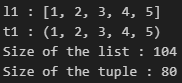
The next key example that can help you understand the practical difference between a tuple and a list is in terms of memory consumption. For example, below I am using sys.getsizeof() to assess the bytes being consumed by a list storing five elements as opposed to a tuple storing identical elements. Notice how tuples occupy less space, i.e., require less memory, compared to a list for storing the same data.
import sys

# creating a list
l1 = [1,2,3,4,5]
print("l1 :",l1)

# creating a tuple
t1 = (1,2,3,4,5)
print("t1 :",t1)

# creating the space occupied by our list and tuple
print("Size of the list :", sys.getsizeof(l1))

print("Size of the tuple :", sys.getsizeof(t1))
-
Memory Growth
To further understand the practical memory implications of list vs tuple, it is important to examine how they grow internally as elements are introduced.
-
Over-allocation in Lists
When elements are appended to a list, Python does not increase memory one element at a time. Instead, it over-allocates memory in advance to reduce the cost of frequent resizing. Let’s understand this in a different way. Let’s say, if Python had resized the list on every append operation, then performance would degrade significantly. To avoid this, Python allocates extra capacity, allowing future elements to be added without immediate reallocation. As a result, list memory increases in noticeable jumps rather than linearly.
For example, below I start with an empty list and progressively append elements while tracking its memory usage using sys.getsizeof(). Notice how the memory doesn’t increase gradually with each append, rather it jumps in larger increments. For instance, from around 56 bytes to 88 bytes, then to 120 bytes, 184 bytes, and beyond. This just confirms Python’s over-allocation strategy.
import sys

# creating an empty list
mylist_1 = []

# getting initial memory size
prev_size = sys.getsizeof(mylist_1)
print(f"No. of elements: 0, Size: {prev_size}, Increase: 0")

# appending elements and observing memory growth
for num in range(1, 20):
    mylist_1.append(num)

    current_size = sys.getsizeof(mylist_1)

    # calculating memory increase from previous step
    diff = current_size - prev_size

    print(f"No. of elements: {num}, Size: {current_size}, Increase: {diff}")

    prev_size = current_size
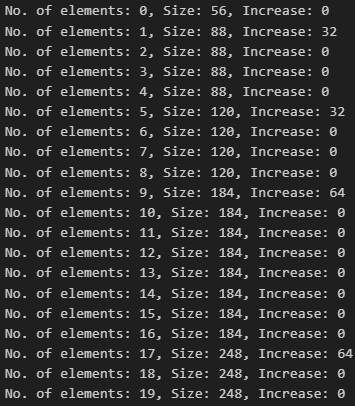
Thus, the memory does not increase with every append operation (linearly) but increases in larger blocks, which, while increasing performance, also increases memory overhead.
-
Tuple Memory Growth Pattern
Tuples, unlike lists, grow in predictable increments and do not over-allocate memory. As they are not mutable, their size gets fixed at the time of creation. Notice how I “add” elements to a tuple by creating new tuples and gradually increasing one element at a time. See how each additional tuple element increased memory by roughly 8 bytes i.e, in a predictable linear manner. That’s because tuples are immutable, and Python stores them in a single contiguous memory block, making them more memory-efficient for large and fixed datasets.
import sys

# starting with an empty tuple
my_tuple = ()
prev_size = sys.getsizeof(my_tuple)

print(f"No. of elements: 0, Size: {prev_size}, Increase: 0")

# gradually creating larger tuples
for i in range(1, 11):

    # creating a new tuple with i elements
    my_tuple = tuple(range(1, i + 1))

    # measuring current memory size
    current_size = sys.getsizeof(my_tuple)

    # calculating memory increase from previous size
    diff = current_size - prev_size

    print(f"No. of elements: {i}, Size: {current_size}, Increase: {diff}")

    prev_size = current_size
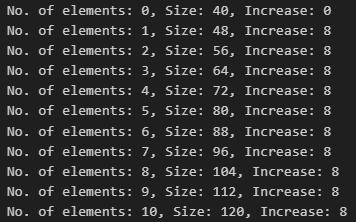
Overall, tuples consume less memory and avoid dynamic reallocation overhead, making them preferable when storage efficiency is critical.
As you can see, the above examples demonstrate and validate the theoretical differences discussed earlier. Now, if you are confident regarding how lists and tuples differ, let’s understand when to use what.
When to Use a List and When to Use a Tuple?
Choosing between a list and a tuple depends on how you plan to use the data structure.
-
Best Scenarios for Lists
Use a list when the data is expected to change during execution.
Lists work well for:
- Frequently updated collections
- User input accumulation
- Dynamic datasets
- Stack or queue implementations
- Situations requiring sorting or reordering
As lists support methods like append(), remove(), sort(), etc., it makes them ideal for evolving data. Also, they are suitable when flexibility matters more than structural stability.
-
Best Scenarios for Tuples
You should use a tuple when the data needs to remain constant.
Therefore, tuples are ideal for scenarios where you have:
- Fixed configuration values
- Geographic coordinates
- Database records
- Dictionary keys
- Function return values
Because tuples are immutable, they prevent accidental modification. In addition, they also consume less memory and offer slight performance advantages.
So in short, choose lists for flexibility and tuples for stability.
Given all the key aspects of tuples vs lists have been covered, let’s look at key interview questions regarding this topic that you should prepare for.
Common Interview Questions on List vs Tuple
The following are the key interview questions that you should know regarding list vs tuple.
Q1. What is the main difference between a list and a tuple?
A1. Lists are mutable and use []; tuples are immutable and use ().
Q2. Can you modify a tuple after creation?
A2. No, tuples are immutable and raise TypeError if you try to modify them.
Q3. How do you create a list and a tuple?
A3. By passing elements inside of [] to create a list and by using () to create a tuple.
Q4. How do you access elements in both?
A4. Both support zero-based indexing, so you can pass the index number inside [], e.g., data[0].
Q5. Can you slice a list or tuple?
A5. Yes, both support slicing using [start:end].
Q6. Which is faster and why?
A6. Tuples are faster because they are immutable and use optimized memory allocation.
Q7. Can a tuple contain a list?
A7. Yes, and in such a case, the inner list remains mutable.
Q8. What happens here?
a = [1,2,3]
b = (a,4,5)
a[0] = 100
A8.The output from the above code will look like: ([100, 2, 3], 4, 5) because the list inside the tuple is mutable.
Q9. How do you find the length?
A9. By using the len() function for both lists and tuples.
Conclusion: Which One Should You Use?
The choice between a list and a tuple depends on how your data is intended to behave. Use lists when you require flexibility and frequent modifications. Use tuples when stability, safety, and predictable structure matter. Understanding these deeper differences helps you write more efficient and reliable Python code.
FAQs
- Why is a tuple faster than a list in Python?
A tuple is faster because it is immutable, requires fewer bytecode instructions to create, and does not use dynamic memory allocation like lists.
- Which is better out of the two lists or tuples?
Neither is universally nor inherently better. Lists suit frequently changing data, while tuples are better for fixed, stable data structures.
- Can a tuple store a list?
Yes, a tuple can store a list as one of its elements, although the list itself remains mutable.
- Is tuple immutable?
Yes, a tuple is immutable. This means that its elements cannot be modified, added to, or removed after creation.
- How is a dictionary different from a list or tuple?
A dictionary stores data as key-value pairs with unique keys, whereas lists and tuples store ordered sequences of values that are indexed by position.