[Updated in October 2026]
Most artificial intelligence guides open with a textbook definition and leave you no better off. But we prefer to explain artificial intelligence more thoroughly. Here is one you can actually use.
Artificial intelligence is software that learns patterns from data, then acts on data it has never seen. Your spam filter does it. So does the fraud alert on your card, and the assistant that drafts your email.
That is the whole idea in simple words. Everything after this is detail about how the learning happens and how well it holds up. This guide covers what artificial intelligence is, with examples you can build yourself. You will learn what happens inside a model during training, and what changed when large language models arrived. You will also learn where AI systems fail. Most beginner guides skip that part, although it is the part employers actually pay for.
Over the years, the field has outrun its own teaching material. A guide written in 2020 would tell you that AI means neural networks trained on labeled data. That description now covers less than half of what teams ship.
What Is Artificial Intelligence?
We will start with AI basics because the term has no fixed technical boundary. Infact, every generation of working systems redraws it.
In 1970, a program that read typed characters counted as artificial intelligence; something that your phone does offline today, and nobody calls it intelligent.
Researchers call this the AI effect. Once a capability works reliably, it stops feeling like intelligence and starts feeling like ordinary software. Keep that in mind the next time someone says AI is either solved or overhyped.
The term itself comes from a 1956 workshop at Dartmouth College. Marvin Minsky and John McCarthy shaped the field from there, although the question of who actually founded AI has more than one honest answer.
An AI system takes an input, applies a model learned from data, and returns an output that drives a decision.
It's fair to state early on that AI is very different from deep learning and machine learning.
AI, Machine Learning, and Deep Learning are not the Same Thing
People often use these three terms interchangeably. But this habit can cost you clarity in interviews and in design reviews. Let me break it up for you.
Artificial intelligence is the umbrella. It includes rule-based systems that never learn anything, such as a credit policy engine built from written conditions. Machine learning sits inside it. You supply labeled examples, and the algorithm infers the rule instead of you writing it. Deep learning sits inside machine learning. It uses neural networks with many stacked layers, which lets the system learn its own features from raw data.
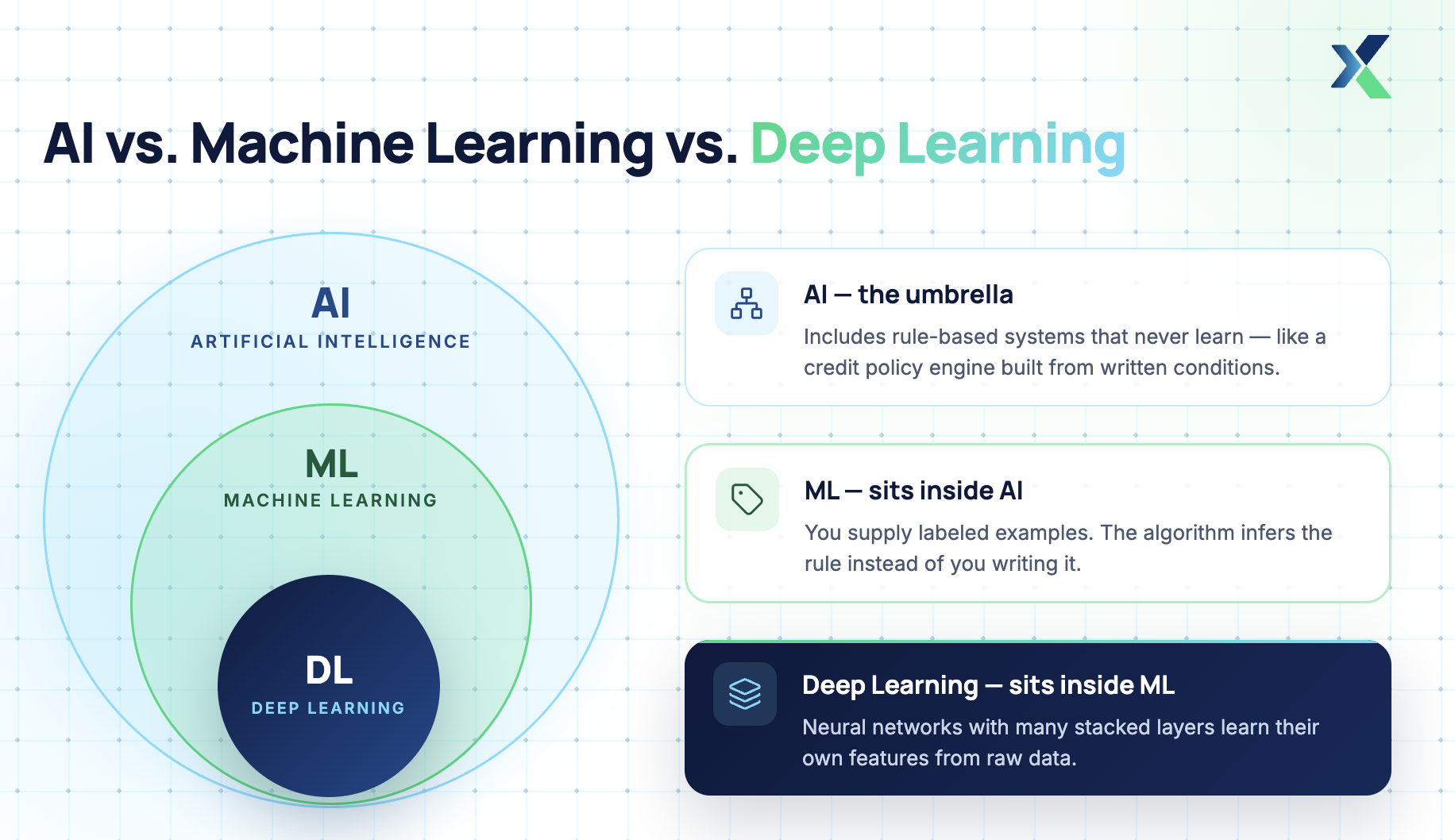
The distinction has practical value. A well-tuned logistic regression often beats a neural network on small tabular data. For a fuller breakdown of the pieces involved, read our guide to the components of artificial intelligence.
Three types of AI are commonly discussed: Narrow, General, and Super AI. Of these, only the first one has legit models. The other two don't exist yet in real time.
Narrow AI, General AI, and Super AI
Almost everything in production today is narrow AI. It handles one task family well and nothing outside it. Fraud scoring, product recommendations, speech transcription, and language models all sit here.
General AI means one system that transfers skill across unrelated domains the way you do. Nobody has built it yet, and researchers disagree sharply on how close anyone is.
Super AI describes capability beyond human performance across the board. It remains theoretical, so treat confident timelines with suspicion.
Want this structured rather than self-taught? Explore the AnalytixLabs AI programs and check your eligibility.
How AI Works: Step-by-Step Guide
Before the details, here is the shape of the whole thing. Every AI system follows the same six steps that holds whether the system sorts your email or writes your code.
What changes between systems is the model size and the amount of data. The sequence itself does not change. Learn it once, and you can follow almost any AI system you meet.
The six steps are:
Collect examples of the decision you want the system to make.
Turn those examples into numbers a model can work with.
Choose a model, a formula with adjustable settings.
Train the model, meaning adjust those settings until the predictions improve.
Test it on examples it has never seen.
Put it to work on live input.
The walkthrough below follows one example through all six steps: a spam filter. It is deliberately simple, and that is the point. Larger systems repeat the same steps with bigger models.
Step 1: Collect the examples
A model cannot learn a rule you never showed it, so the first job is gathering examples of the decision you want automated. Each example needs the correct answer attached.
In our spam example, that means collecting a large set of emails, each already marked spam or not spam. That marking is called a label, and data carrying labels is called labeled data.
Someone had to read those emails and decide by hand, and there is no way around that. Every model that predicts something was ultimately taught by decisions a person made first.
Because of that, this step sets a ceiling on everything after it. If your labels are inconsistent, the model will learn the inconsistency just as faithfully as it learns anything else. Teams often discover that what looked like an accuracy problem was really a labeling problem.
Step 2: Turn the examples into numbers
A model does arithmetic and nothing else, which means it cannot read an email the way you can. So before training begins, you convert each email into a list of numbers that stands in for its content.
The simplest approach is to count words. You pick a vocabulary, say the 5,000 most common words across your emails, and then represent each email as 5,000 numbers. Each of those numbers records how often one of those words appears in that email.
The resulting list is called a feature vector, and each individual number inside it is a feature. The word "free" appearing eleven times is a feature, and so is the sender being someone you have never received mail from.
Much of the craft in traditional machine learning sits in this step, because what you choose to count decides what the model is able to notice. Anything you leave out stays invisible to it, permanently.
Step 3: Choose a model
The word model sounds mysterious, but it is not. A model is simply a formula with adjustable numbers inside it, and those adjustable numbers are called weights.
For our spam filter, a simple and effective choice is logistic regression. It takes each feature from step two, multiplies it by its weight, and adds all the results together. It then converts that total into a probability between 0 and 1.
A result near 1 means the model thinks the email is spam, while a result near 0 means it thinks the email is legitimate. You then pick a cutoff, often 0.5, and act on whichever side of it an email falls.
At this stage, though, those weights are still arbitrary values, so the predictions are worthless. The model knows nothing yet, and everything it will eventually know comes out of step four.
Step 4: Train the model
Training corrects those arbitrary weights until the predictions start improving. It runs as a loop over your labeled data, repeated many times over.
A single pass of that loop works like this. The model predicts a probability for one email, and you compare that prediction against the real label to see how far off it was.
That error measurement is called the loss. A confident wrong answer produces a large loss, while a confident right answer produces a small one, which is how the system tells a near miss apart from a bad mistake.
An algorithm called an optimizer then uses the loss to slightly adjust every weight. It moves each one in whichever direction would have reduced the error, so words that show up constantly in spam gain weight while words common in ordinary mail lose it.
One complete pass through all the training data is called an epoch, and models usually train for many epochs in a row. Across those passes, the loss keeps falling, and the weights gradually settle into values that fit the patterns sitting in your data.
Notice that no understanding happens anywhere in this process. The model has no concept of what spam is or why anyone sends it. It has found numeric patterns that separate one labeled group from the other, which is narrower and far more brittle than understanding.
Step 5: Test it on examples it has never seen
A model that performs well on its own training data has proved nothing yet. It may simply have memorized those specific emails rather than learned anything that carries over to new ones.
To catch that, you hold back a portion of your labeled data before training ever begins. Twenty percent is common, and the model never sees it during training.
Once training finishes, you run the model on that held-out portion and measure how often it gets the answer right. This is the only number that matters, because training performance says nothing about generalization.
If the model scores well on training data but badly on the held-out set, it has overfitted. Overfitting means it learned noise specific to your examples, mistaking accidents in your data for the underlying pattern.
Step 6: Put it to work
Deployment means wrapping the trained model in something other software can call. Usually that is a web service.
For instance, in our spam example, it accepts an email and returns a probability. From that point, the model starts running on live mail it has never seen. When a trained model runs on new input, we call that inference. While training is an occasional process, inference happens constantly.
What the model will not do is keep learning on its own. It stays frozen at whatever it knew when training ended, so you have to decide and schedule retraining deliberately.
That matters because the world keeps moving. Spam tactics change every few months, which means a filter left untouched slowly gets worse at its job. Section four deals with that decay and what you can do about it.
Why a chatbot seems to learn when the model cannot
Step six usually raises a fair objection. If a trained model is frozen, then why does a chatbot appear to remember what you told it ten minutes ago?
The answer is that two different things are being confused. A model has weights, fixed when training ends, and it also has context, the text you give it fresh each time you ask something.
Put simply, weights are what the model knows, while context is what the model has been shown right now. Correcting a chatbot changes the second of those and leaves the first completely untouched.
Here is what actually happens when you send a message. The entire conversation so far gets sent along with it, and the model reads all of it as fresh input before answering.
So nothing was stored inside the model between your two messages. It simply reread the thread, much like you would reread an email before replying.
Some products add a memory layer on top of this, which makes the illusion stronger still. They save notes about you in an ordinary database, and those notes get pasted into the context before the model ever sees your question.
That is retrieval, which you will meet again shortly as RAG. The stored notes sit outside the model entirely, so the model underneath remains exactly as frozen as before.
A simple test settles the question. If a chatbot truly learned from your correction, every other user would see the corrected behavior tomorrow. They do not, because nothing inside the model changed.
Models do improve over time, but through a different route. A team runs a fresh training process on new data and releases a new frozen model, which is a new edition of a book rather than your copy rewriting itself.
Updating a model continuously from live input is possible, and it has a name: online learning, sometimes called continual learning. Production teams mostly avoid it, for practical reasons.
Models that update on live traffic drift away from the behavior they were tested on. They also forget earlier skills and can be steered by whatever the input stream carries.
Microsoft learned this publicly with its Tay chatbot in 2016. Tay updated from live conversation, users quickly fed it abuse, and it was withdrawn within a day. Freezing the model is the safer default, which is why almost everyone does it.
Where neural networks fit in
Everything described so far still applies to neural networks. They only change step three, the model choice, while the other five steps run exactly as before.
Think back to step two, where you decided which words to count. That decision quietly capped what the model could ever see, so if spammers hid their message inside an image, your word counts would miss it completely.
A neural network removes that cap. It stacks many layers of simple calculations on top of each other, and each layer builds a slightly more abstract description of the input than the layer below it.
In an image, for example, early layers might detect edges and corners. Middle layers then assemble those into shapes, and later layers recognize whole objects. Nobody specified any of this in advance because the network learned it during training.
That is the real advantage. Since the network builds its own features, you can feed it much rawer input and stop guessing in advance about what matters.
The training loop itself is unchanged in principle. The error is still measured, then pushed backward through every layer so each weight can be corrected, and that backward pass is called backpropagation. Our primer on the fundamentals of neural networks covers those mechanics in depth.
What you pay for all this is appetite. Neural networks need far more data and far more computing power than logistic regression, which is why they only became practical once large datasets and fast GPUs were both widely available.
Where large language models fit in
A large language model is a very large neural network, trained on a task that sounds almost trivial at first. It reads a stretch of text and predicts what comes next.
The unit it predicts is called a token, which is roughly a word or a fragment of one. The model works its way through text token by token, guessing each one in turn.
Now scale that up. Train a big enough network on enough text, and predicting the next token well stops being trivial because doing it reliably forces the network to absorb grammar, facts, and reasoning patterns along the way.
The practical consequence is a change in how you use AI at all. In our spam example, you trained one model for one specific job, whereas a language model arrives already trained for no particular job.
You point it at a task by writing instructions, rather than by retraining it. That is why steps one to five often disappear from view in modern AI work: someone else already ran them at a scale you couldn't match.
Your own work then shifts to the other end of the pipeline. Most of your time goes into clearly instructing the model and carefully checking what it gives back.
Why models need retrieval and grounding
A language model predicts likely text, and that is all it does. It has no mechanism for checking whether that text is true, because truth was never part of what it was trained to optimize.
When it states something false confidently, that is called a hallucination. You cannot remove it with a patch, since the same process that produces correct sentences also produces invented ones.
The usual fix is to stop asking the model to answer from memory at all. Instead, you first search a trusted set of documents, and then insert the relevant passages into the instructions you give the model.
Finally, you tell it to answer only from the material you supplied. If the answer is not in there, it should say so rather than fill the gap with something plausible.
This pattern is called retrieval-augmented generation, usually shortened to RAG. It now sits under most enterprise AI assistants, and its real value is that you can trace every answer back to a source document.
What turns a model into an agent
In everything described so far, the model answers once and then stops. An agent works differently because it has access to tools and can run in a loop.
A tool here is just something the model can call, such as a search function or a database query. On each pass of the loop, the model picks a tool, reads whatever comes back, and then decides what to do next.
It keeps going until it reaches an answer or hits a limit you set in advance. That loop is the entire difference between agentic AI and a chatbot.
It is also where most production failures begin, which is why section four returns to it in detail. For the build sequence itself, read our guide on how to build AI agents.
Artificial Intelligence Examples You Can Build Yourself
Most examples of artificial intelligence you read about are things other people built, usually at a scale you cannot reproduce. These three are different because you can build each one yourself.
Reading about models teaches you vocabulary, but building them teaches you judgment, and interviews actually test judgment.
Each project fits into a weekend. Work through them in order, because each one exposes a different kind of failure than the one before it.
Example 1: A Support Ticket Classifier
Start by taking a few thousand labeled support tickets. Public datasets exist for this if your company will not share real ones.
From there, clean the text and convert it into numeric vectors, exactly as in step two earlier. Then train a logistic regression to predict the category, and measure both overall accuracy and recall for each class separately.
Here is what you learn from doing it. Accuracy lies when classes are imbalanced, and support tickets almost always are.
Your model will score well overall while quietly missing the rare category that matters most, such as escalations. Fixing that single problem teaches you more about applied machine learning than any lecture will.
Example 2: A Question-Answering Assistant over your own Documents
For the second project, take a folder of policy documents or PDFs you actually care about. Split them into chunks, convert each chunk into an embedding, and store those embeddings in a vector index.
An embedding is a numeric representation of meaning. Similar text produces similar numbers, which is exactly how retrieval finds the passages relevant to a question.
So when a question arrives, you retrieve the closest chunks and pass them to a language model alongside the question itself. This is the RAG pattern from section two, built by hand.
Here is what you learn. Retrieval quality decides answer quality, and chunk size affects retrieval far more than your choice of model does.
Your assistant will sometimes answer confidently from the wrong chunk, and watching that happen is the real lesson. It is why citations belong in every AI product you ship.
Example 3: A Small Task Agent
For the third project, give a language model a single tool, such as a calculator or a search function. Then write a loop that lets it call the tool, read the output, and decide on the next step.
Before you run it, set a hard limit on iterations. You will need that limit sooner than you expect.
Here is what you learn. Agents fail by looping, not by being wrong.
Without a stopping condition, your agent will retry the same failing call until your budget runs out. Our list of checks to run before you deploy an AI agent covers the rest of that ground.
If you would rather see examples at industry scale than at desk scale, our roundup of real-world AI applications covers those instead.
Where AI Breaks Once It Leaves the Notebook
By this point, your model works in the notebook, which proves very little on its own.
The gap between a working demo and a reliable system is where most AI projects quietly die. Learn this section early, and you will already be unusual.
Evaluation is harder than training
Your test set came from the same collection as your training data, but real users do not.
Input distributions shift as products, seasons, and customers change, which means next year’s data will not look like what you trained on. A model that scored well in March can therefore degrade quietly by September, without anything appearing to break.
The defense is to build a small, hand-labeled evaluation set that reflects real usage rather than historical data. Then rerun it on every change you make, so degradation shows up as a number instead of a complaint.
Confident wrong answers
A model that admits uncertainty is far more useful than one that guesses well, but most models do not behave that way by default.
The fix has two parts. First, ground answers in retrieved sources and show those sources to the user so they can check the claim. Then route low-confidence cases to a human instead of shipping them straight through.
Cost and latency
Language model calls are priced per token, and agents multiply those calls by looping. As a result, a single user request can trigger dozens of them before it resolves.
So measure cost per completed task rather than cost per call, because the per-call figure hides the loop entirely. And set spending ceilings before launch, not after your first surprising invoice.
Monitoring and rollback
Log every input and output from the start, then sample them weekly and read them yourself. Nothing else gives you the same early warning.
Alongside that, version your prompts and models the way you version code. When quality drops, you then know exactly what changed and can roll it back within minutes rather than days.
Artificial Intelligence for Beginners: Where to Start
The most common failure in learning AI isn't laziness. It is course hoarding. You finish six video series, recognize every term you meet, and still cannot debug a pipeline. That happens because recognition is not skill, and only one of the two gets tested.
Use the sequence below instead, and ship one small project at each layer before moving to the next.
Python and data handling. Learn to load, clean, join, and inspect data, since everything later depends on it. Pandas plus SQL covers most of what you need.
Statistics and evaluation. Understand distributions, sampling and baselines, along with the metrics you will be judged on.
Classical machine learning. Regression, decision trees, and ensembles, which is where most business problems actually end.
Neural networks. Learn how they work from the inside before picking up a framework that hides the mechanics.
Language models and retrieval. Prompting, embeddings, retrieval, and the evaluation of generated text.
Deployment. APIs, containers, monitoring, and cost control, so your work survives contact with users.
Each layer earns the next one. Skipping straight to layer five is the most common mistake, and it shows immediately when an interviewer asks why a model is underperforming.
That is the shape of it. For the full study plan with timelines and resources, read our dedicated guide on how to learn artificial intelligence, and pick your practice work from these AI project ideas.
The Roles AI Is Creating in India
AI has not produced one new job title. It has produced a spread of them, and each one rewards a different mix of skills.
Role | What you actually do | Core skills |
|---|---|---|
Data Analyst | Turn business questions into queries, dashboards, and recommendations | SQL, visualization, domain fluency |
Machine Learning Engineer | Train, evaluate, and serve models in production systems | Python, ML, APIs, cloud |
AI or Generative AI Engineer | Build assistants and retrieval systems on top of language models | Prompting, embeddings, retrieval, evaluation |
Data Scientist | Frame problems, design experiments and model outcomes | Statistics, ML, communication |
AI Product Manager | Decide what to build and where humans stay in the loop | Product sense, evaluation literacy |
Forward Deployed Engineer | Sit with a client and make the AI system work in their environment | Engineering plus consulting |
Two notes are worth adding before you pick a direction.
The first concerns forward deployed engineering, which attracts a lot of attention right now and deserves it. It is a pivot role rather than an entry role, because most Indian listings ask for several years of delivery experience first. So treat it as a target for your third or fourth year, and our forward-deployed engineer roadmap sets out that path.
The second is about generative AI skills more broadly. They are now expected in existing roles, not just new ones, so analysts are asked to evaluate model outputs and engineers to control AI spend. The shifts reshaping AI hiring piece shows where that demand is concentrating.
Conclusion
AI stopped being a single subject several years ago. It is now a stack: data, models, language models, retrieval, agents and deployment, each one sitting on the layer below it.
This guide gave you the shape of that stack, along with three examples that make it concrete. None of it becomes knowledge until you build something and watch it fail.
So start with the ticket classifier this week. Everything else follows from that first honest failure.
Frequently Asked Questions
What is artificial intelligence in simple words?
Artificial intelligence is software that learns patterns from data, then acts on data it has not seen before. A spam filter learns what spam looks like from millions of examples, and then judges new mail against what it learned. Nobody wrote a rule for each case by hand. That shift, from written rules to learned patterns, is what makes a system count as AI.
What are some examples of artificial intelligence you use daily?
Your email spam filter, your card fraud alerts, map route predictions, product recommendations, face unlock, and voice assistants all run on AI. So does the autocomplete in your keyboard. None of these look dramatic, which is rather the point, because most working AI is invisible infrastructure rather than anything resembling a robot.
How does AI work, briefly?
An AI system collects data, converts it into numbers, and then trains a model to reduce the gap between its predictions and the correct answers. That gap is called loss. Training repeatedly adjusts the model’s internal values until the gap shrinks. Once that is done, the trained model runs on new input and produces an output you can act on.
Does an AI model keep learning after it is trained?
No. A model’s weights are fixed when training ends, and they stay fixed while it runs. A chatbot that seems to remember your corrections is simply reading the conversation back as input, not updating itself. Products that appear to remember you store notes in a database and feed them back in. Models improve only when a team trains and releases a new version.
Can you learn AI without a strong maths background?
Yes, up to a point. You can build and ship useful models with school-level algebra and a working grasp of probability. Depth starts to matter once you tune models or read research papers. So start applied, then add linear algebra and calculus when a specific problem demands it. Waiting until your maths feels complete is the slowest possible route.
What should you build first when learning AI?
Build a text classifier on a labeled dataset. It teaches data cleaning, feature representation, training, evaluation, and the trap of accuracy on imbalanced classes. You can finish it in a weekend with Python and scikit-learn. Once it works, break it deliberately and study what fails, because that second step is where the learning actually happens.